27
VGA (RGBHV)
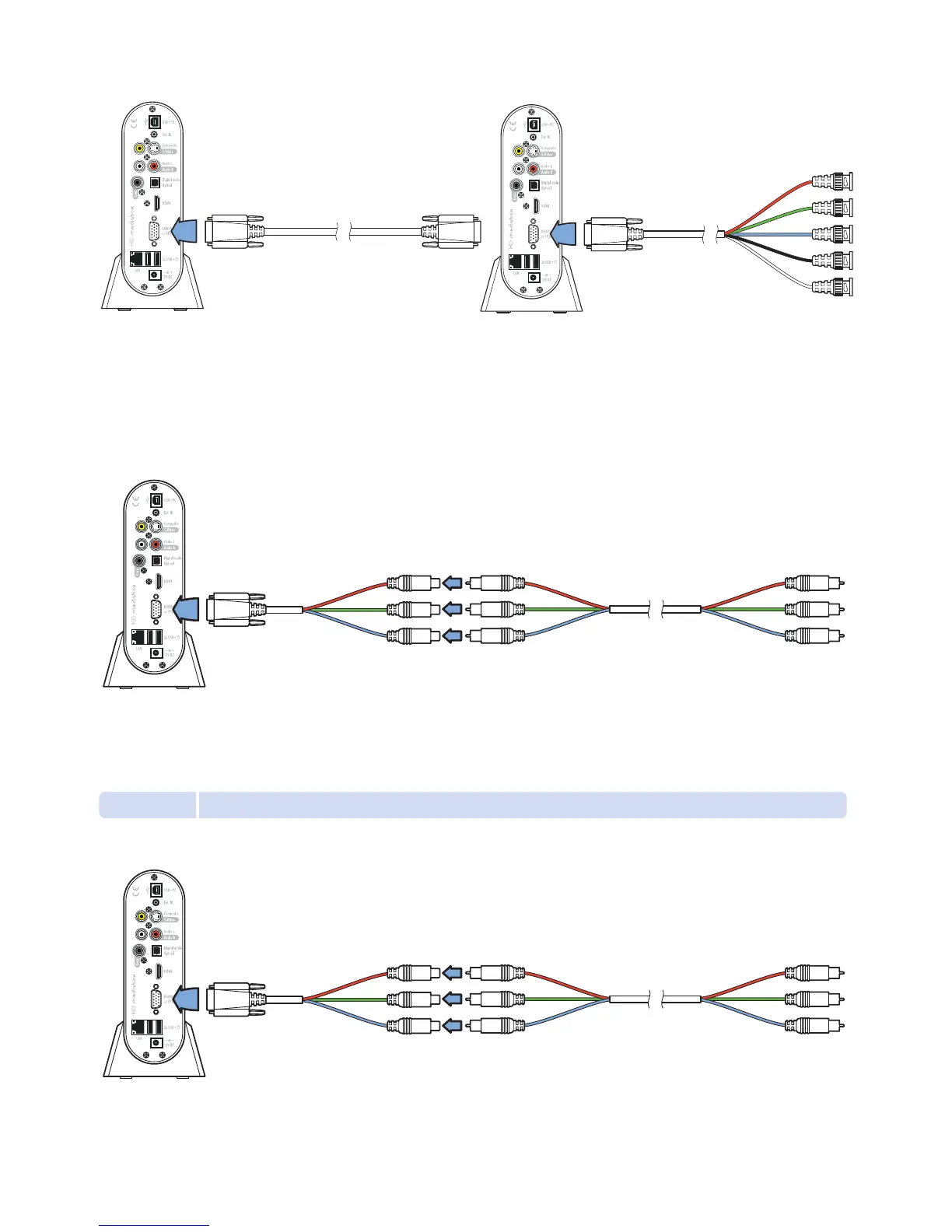
Many High Definition display devices support VGA. It is a high quality analog connection with every element
of the signal (Red, Green, Blue, Horizontal Sync and Vertical Sync) transmitted through its own cable to
prevent interference. You can connect a VGA cable to HD MediaBox using the VGA connector.
If your display features separate R, G, B, H and V connectors you can use a VGA to RGBHV cable.
Check to see if your display or processor requires BNC or RCA connectors, as both are common.
High Definition Component (YPbPr)
This connection is made using the VGA connector and the supplied breakout cable. Simply connect the
included breakout cable to the HD MediaBox VGA connector and then use a standard Component cable
to link the breakout cable to your display or AV receiver.
4.1.2 Standard Definition Connections
Component (YPbPr)
This connection is made using the VGA connector and the supplied breakout cable. Simply connect the included
breakout cable to the HD MediaBox VGA connector and then use a standard Component cable to link the breakout
cable to your display or AV receiver.
VGA VGA
(cable not included)
VGA RGBHV
(cable not included)
VGA breakout cable (included) Standard Component cable (not included)
VGA breakout cable (included) Standard Component cable (not included)


 To Next Page