52
6. COMMANDS
Description and operation of the mechanical control panel
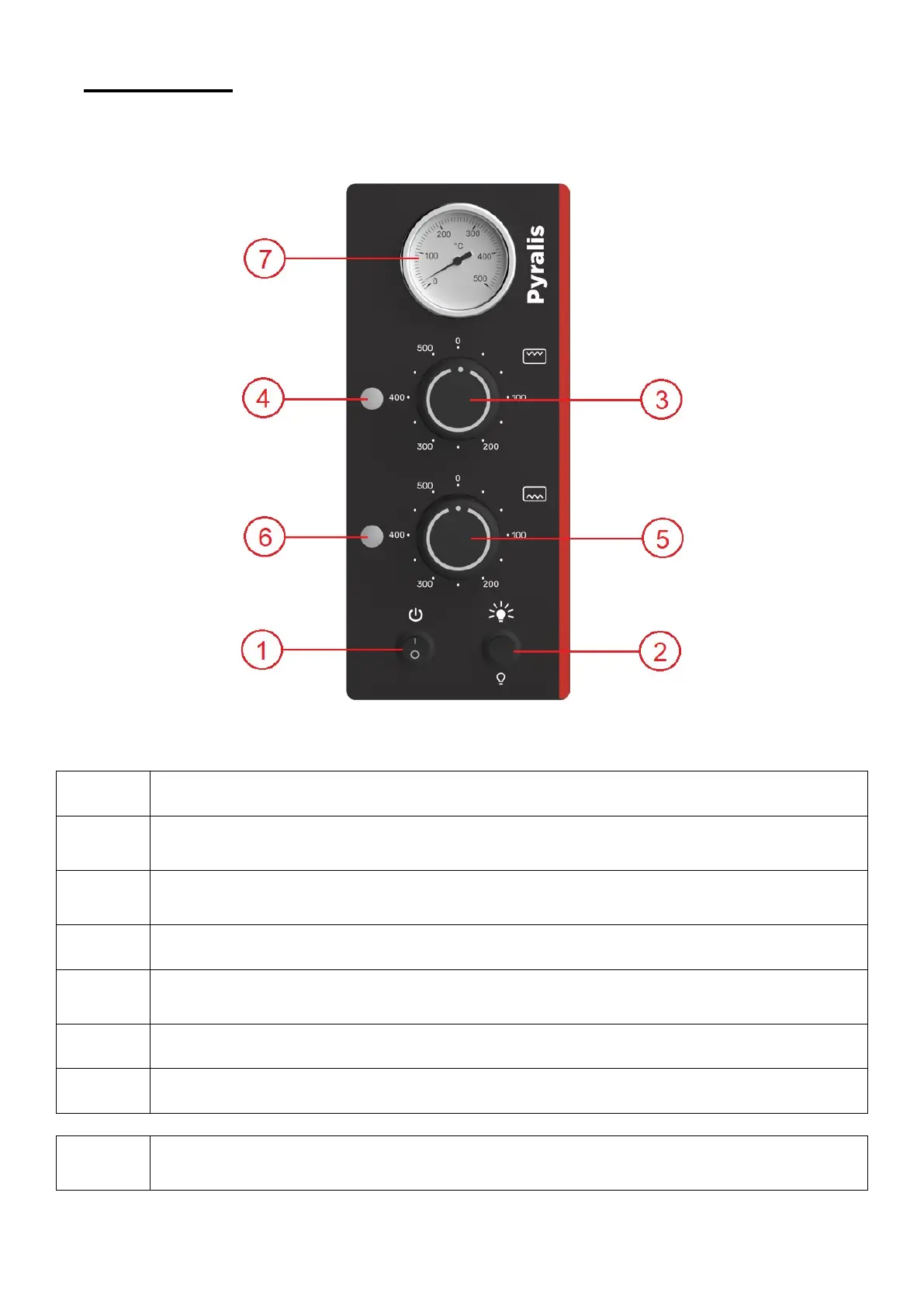
Main switch
This command activates and deactivates the temperature and chamber light adjustment functions
Chamber light switch
Turns the light inside the cooking chamber on and off.
To turn on the light, the main switch must also be in position 1.
Top temperature knob
The top’s cooking temperature can be adjusted via this knob.
Turn the knob clockwise to the desired value.
Top temperature indicator light
Lights up when the top is heating up and turns off when the temperature is reached.
Bottom temperature knob
The bottom’s cooking temperature can be adjusted via this knob.
Turn the knob clockwise to the desired value.
Bottom temperature indicator light
Lights up when the bottom is heating up and turns off when the temperature is reached.
Analogue thermometer
Measures and displays the temperature inside the chamber.
If, at the end of the shift, you want to keep the temperatures set during this work cycle, you can leave the
thermostats as they are (on the last programmed setting) and turn the oven off by moving the main switch
to position 0.


 To Next Page