The EMF100 will only accept Tippmann98™ style stock buer tubes
using the adaptors supplied.
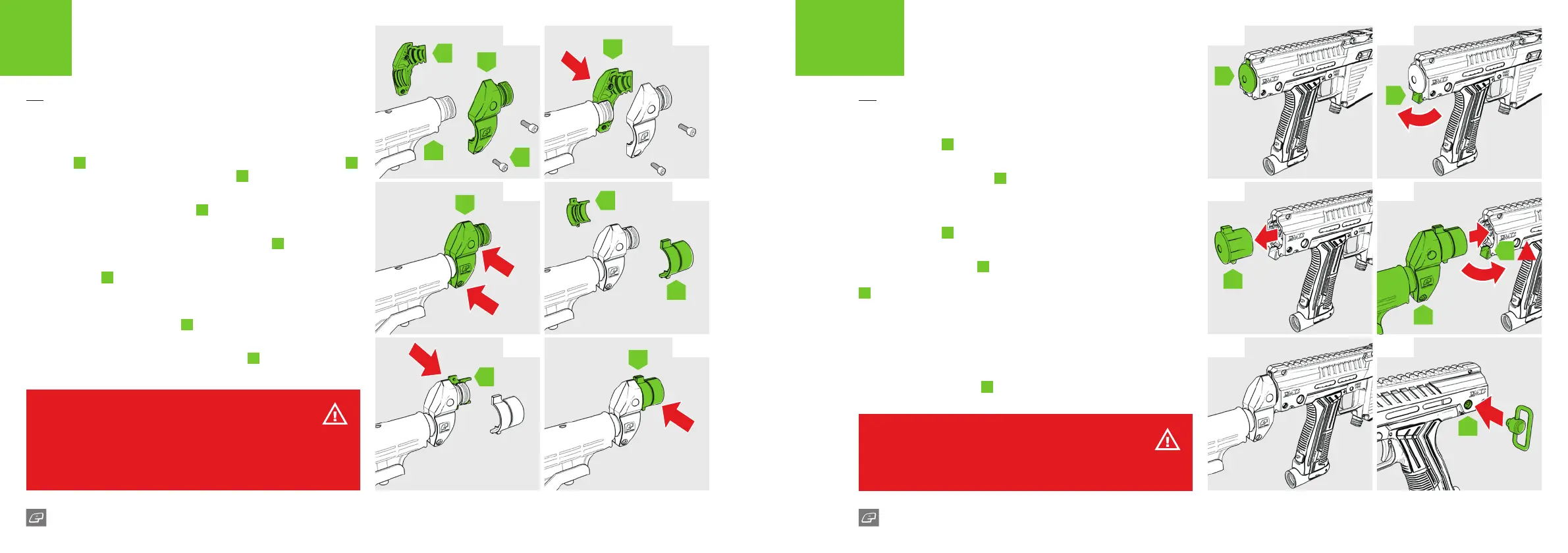
FIG-1
The stock
B
can be tted to the marker using the drop stock adaptor
A
and is secured using the two screws provided
C
.
FIG-2
Attach half of the drop stock adaptor
A
to the stock and hold in place.
FIG-3
Screw both halves of the drop stock adaptor together
A
.
FIG-4
The stock insert
D
is used to connect the stock and drop stock adaptor
into the back of the marker.
FIG-5
Attach one half of the stock insert
D
to the drop stock adaptor.
FIG-6
Connect both halves of the stock insert together
D
.
FIG-7
The blanking plug
E
needs to be removed from the marker.
FIG-8
Swing the blanking plug latch
F
towards the back of the marker to
release the blanking plug.
FIG-9
The blanking plug
E
will slide out from the marker body with ease.
FIG-10
Insert the stock assembly
G
into the back of the marker using the top
and bottom tabs to guide it. Once inserted swing the blanking plug latch
F
towards the marker to secure the stock assembly in place.
FIG-11
The installed stock assembly should be secure and solid. If it feels loose
then remove and try to ret correctly.
FIG-12
Short (6mm stub) third party QD sling mounts may be installed in the
mounting rings highlighted
H
.
FIG-1 FIG-7
FIG-3 FIG-9
FIG-5 FIG-11
FIG-2 FIG-8
FIG-4 FIG-10
FIG-6 FIG-12
A
A
A
D
B
D
WARNING!
The drop shoulder attachment will not connect securely to the marker without
the addition of the stock adaptor.
The stock can be used without the drop shoulder attachment by tting the stock
adaptor directly to the stock.
A
D
C
D
F
E
H
E
G
F
!
WARNING!
Always ensure the blanking plug latch is in the forwards position to guarantee
the secure installation of the stock assembly.
22 23
EMF100 EMF100
QUICK START
ATTACHING A STOCK
QUICK START
ATTACHING A STOCK















 To Next Page