FIG-1
FIG-2
FIG-1
1
- +
1/8
A
B
B C
D
B
5/64
A
C
24 25
EMF100 EMF100
QUICK START
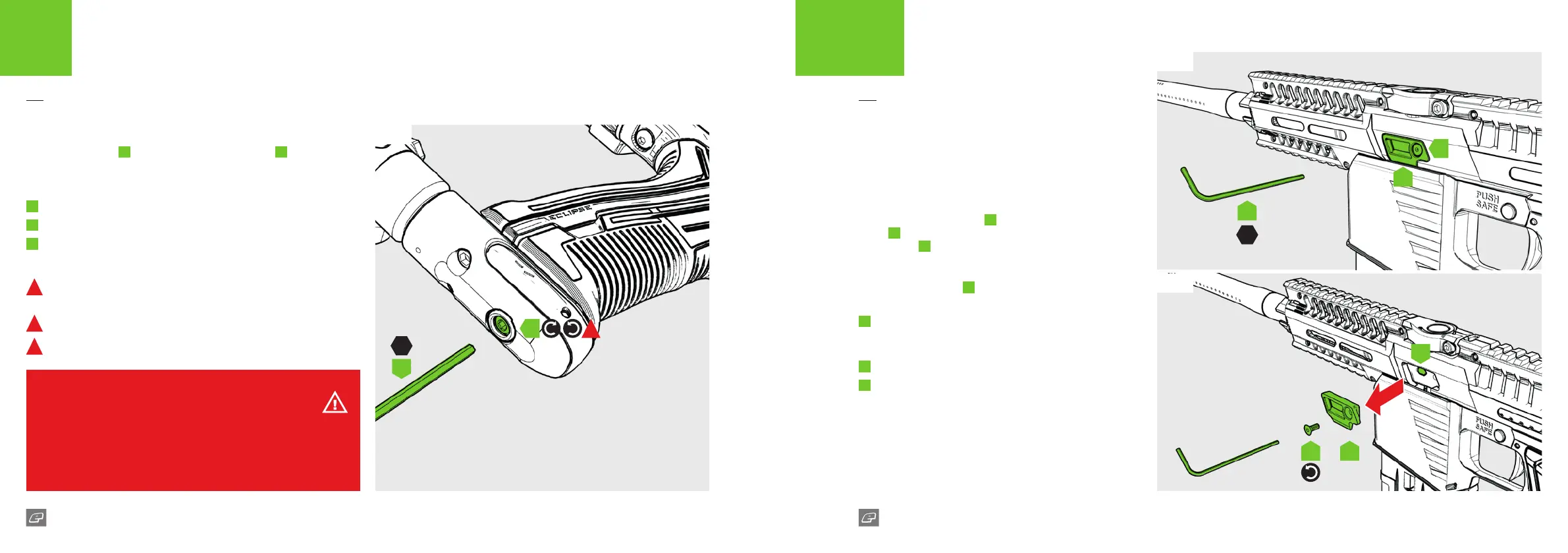
VELOCITY ADJUSTMENT
FIG-1
Insert a 1/8 hex key
A
into the velocity adjuster screw
B
to alter the
velocity of the marker.
Adjusting the velocity:
1
Turn the hex key clockwise to reduce velocity.
2
Turn the hex key counter-clockwise to increase velocity.
3
Fire two clearing shots after each velocity adjustment for an
accurate velocity reading.
1
DO NOT turn the adjuster screw in too far. This will prevent the
EMF100 from ring.
2
DO NOT exceed 300 FPS when using .68 calibre paintballs.
3
DO NOT exceed 300 FPS when using shaped rounds.
WARNING!
ALWAYS conform with the velocity limits of the venue and/or local laws.
ALWAYS wear correct protective equipment when ring your marker.
NEVER point your marker in the direction of other people when not on the eld.
ALWAYS be aware of where the barrel is facing when adjusting the velocity.
QUICK START
DETENTS
The rubber detents (see Fig-2) hold each paintball in place
until ready to re. This prevents paintballs from rolling down
the barrel and maintains feed consistency.
These can be removed for cleaning or replacement.
FIG-1
Use a 5/64” (2mm) hex key
A
to remove the detent cover
screw
B
by rotating counter-clockwise. This will release the
detent cover
C
(see Fig-2).
FIG-2
To remove the detents
D
simply use a small hex key, or
your nger tips, to gently lift the rubber detent from its seat.
B
Detent cover screw
6-32UNC x 5/16
countersunk socket screws
C
Detent cover
D
Rubber detent
The elements within this diagram apply to both sides of the
marker.















 To Next Page