EasyManua.ls Logo

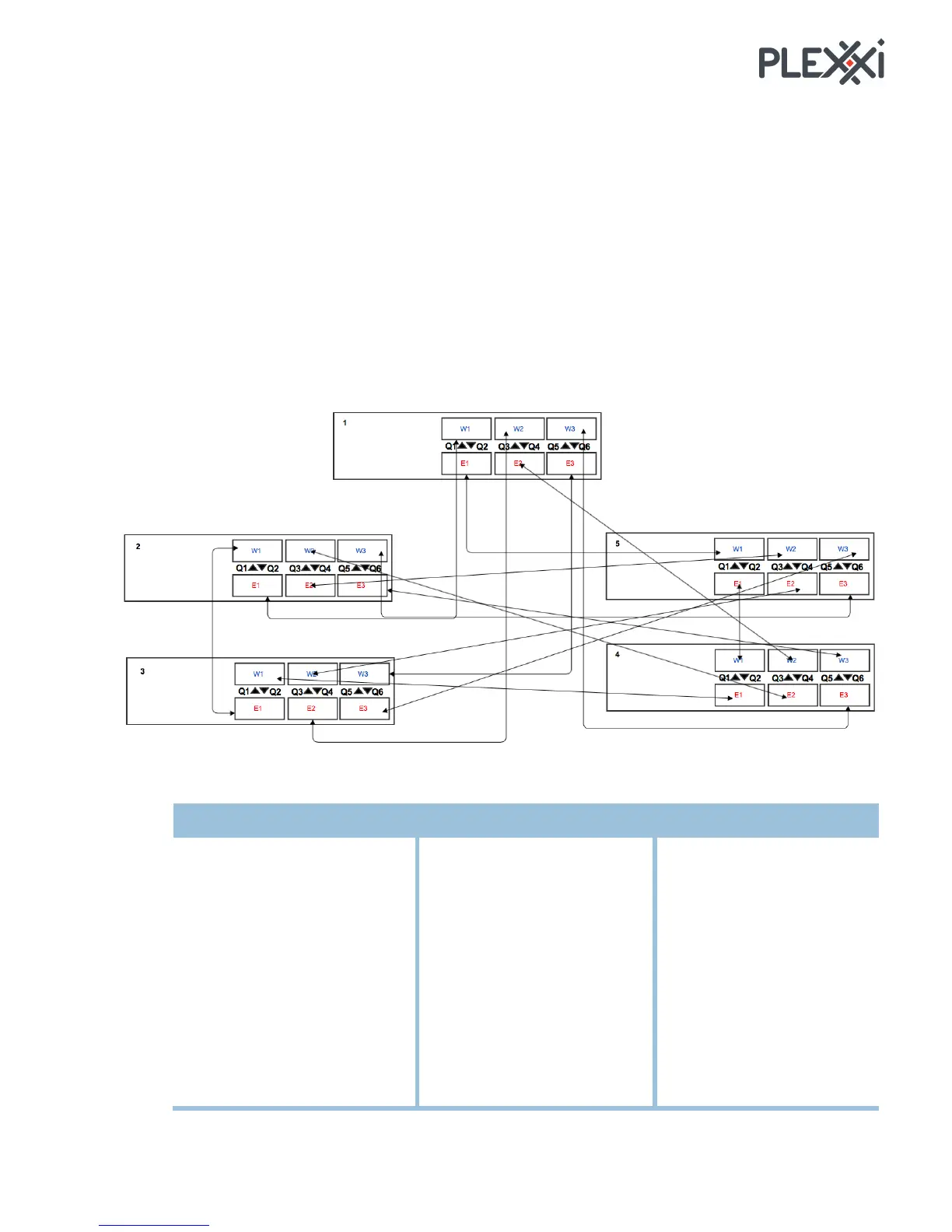
Plexxi Switch 2e - Add Switch To Existing Network; Five-Switch Network Example; Connection Table

Default Icon
25 pages
Print Icon
To Next Page IconTo Next Page
To Previous Page IconTo Previous Page
Loading...
!
+M! Plexxi Switch 2e Hardware and Installation Guide! !
\RR!?O73/A!3.!JQ76372T!@)3O.5W!
Follow the guidelines described here to add a Switch 2e to an existing network, which requires recabling
the switches.
Identify the numbers or order of the current Plexxi 2e switches in the existing ring fabric, which one
is 1, which one is 2, and so on.
Make the Switch 2e you want to add to the ring fabric the last number/last in order.
[7*)%?O73/A!@)3O.5W!JQ<1PE)!
You have an existing ring fabric with five Plexxi 2e switches. You want to add another switch 2e to make
it a ring fabric of six. To add the switch, you need to shift six existing connections and add three more
cables.
X.22)/37.2!D<8E)!

From
To
From
To
From
To
Switch 1
Switch 2
Switch 3
W1 (Q1)
Switch 2 E1 (Q2)
W1 (Q1)
Switch 3 E1 (Q2)
W1 (Q1)
Switch 4 E1 (Q2)
W2 (Q3)
Switch 3 E2 (Q4)
W2 (Q3)
Switch 4 E2 (Q4)
W2 (Q3)
Switch 5 E2 (Q4)
W3 (Q5)
Switch 4 E3 (Q6)
W3 (Q5)
Switch 5 E3 (Q6)
W3 (Q5)
Switch 1 E3 (Q6)
Switch 4
Switch 5
W1 (Q1)
Switch 5 E1 (Q2)
W1 (Q1)
Switch 1 E1 (Q2)
W2 (Q3)
Switch 1 E2 (Q4)
W2 (Q3)
Switch 2 E2 (Q4)
W3 (Q5)
Switch 2 E3 (Q6)
W3 (Q5)
Switch 3 E3 (Q6)
!

Related product manuals