E – 20
Estructura del menú
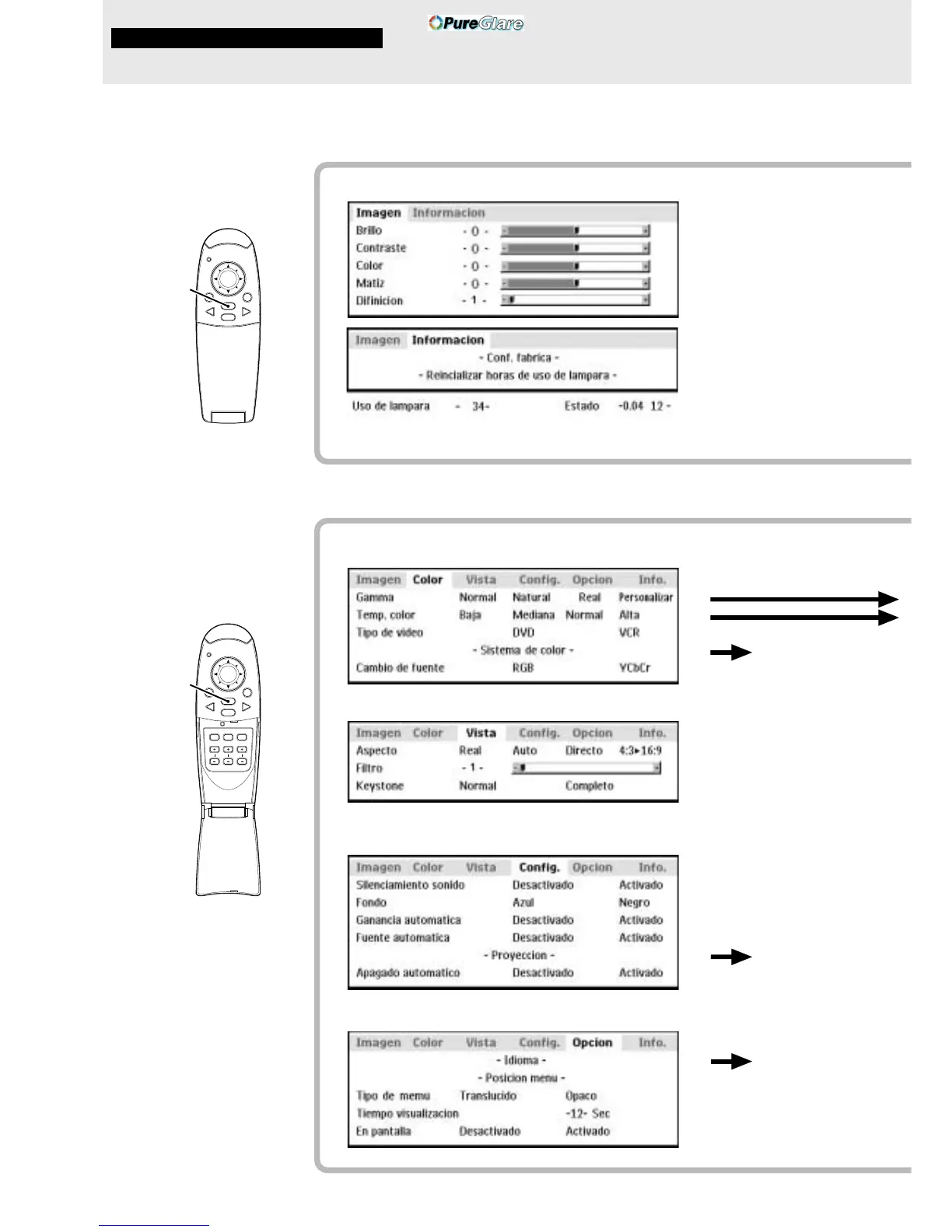
El menú normal se visualiza
cuando se presiona el
botón MENU con la TAPA
BASCULANTE del
controlador remoto
cerrada.
Los números entre paréntesis ( ) son los números de las páginas de referencia.
Menú normal
Para entrada de VIDEO, S-VIDEO y componente de vídeo (YCbCr)
El menú avanzado se
visualiza cuando se
presiona el botón MENU con
la TAPA BASCULANTE del
controlador remoto abierta.
Menú avanzado
Para entrada de VIDEO, S-VIDEO y componente de vídeo (YCbCr)
Menú común
Menú común
Operació n del menú
MOUSE POWER
VIDEO
MENU
CANCEL
RGB
PLUS
MOUSE POWER
VIDEO
MENU
CANCEL
RGB
AUTO FREEZE MUTE
ZOOM VOLUMEKEYSTONE
(22)
(22)
(22)
(22)
(22)
(25)
(25)
(26)
(26)
(26)
(26)
(27)
(27)
(27)
(28)
(28)
(28)
(28)
(29)
(29)
(29)
(30)
(30)
(30)
(30)
(30)
Å
Ç
ı
Botón MENU
Botón MENU



 To Next Page