E – 11
AUDIO MOUSE RGB
/
YCbCr
VIDEOS-VIDEO
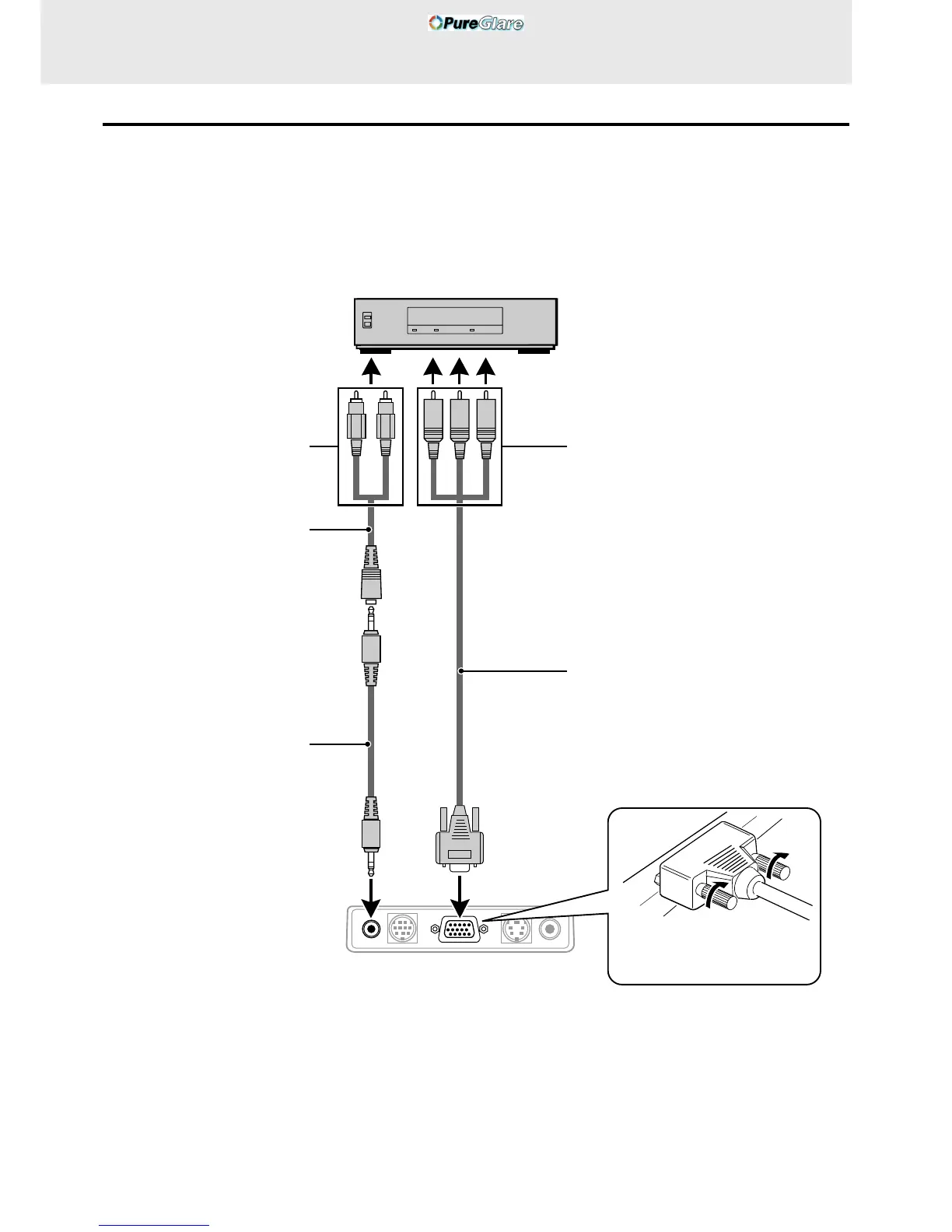
Connecting Video Equipment With Component Video Signal (YCbCr) Output
• Video equipment with component video signal (YCbCr) output can be connected to this projector by setting the RGB/YCbCr connector to
YCbCr (see page 27) from the menu.
Connection to the RGB/YCbCr connector
To audio out jack
Audio adaptor (accessory)
Audio cable (accessory)
DVD player
To component video (YCbCr) OUT jack
Component cable* (YCbCr cable: option)
* Model name: UP-106
Jacks: RCA × 3 mini D-Sub 15-pin
Rear panel jacks of this device
Plug in the connection cable
and tighten the screws.
White
(L)
Red
(R)
Green Blue Red
(Y)
(Cb)
(Cr)



 To Next Page