E – 20
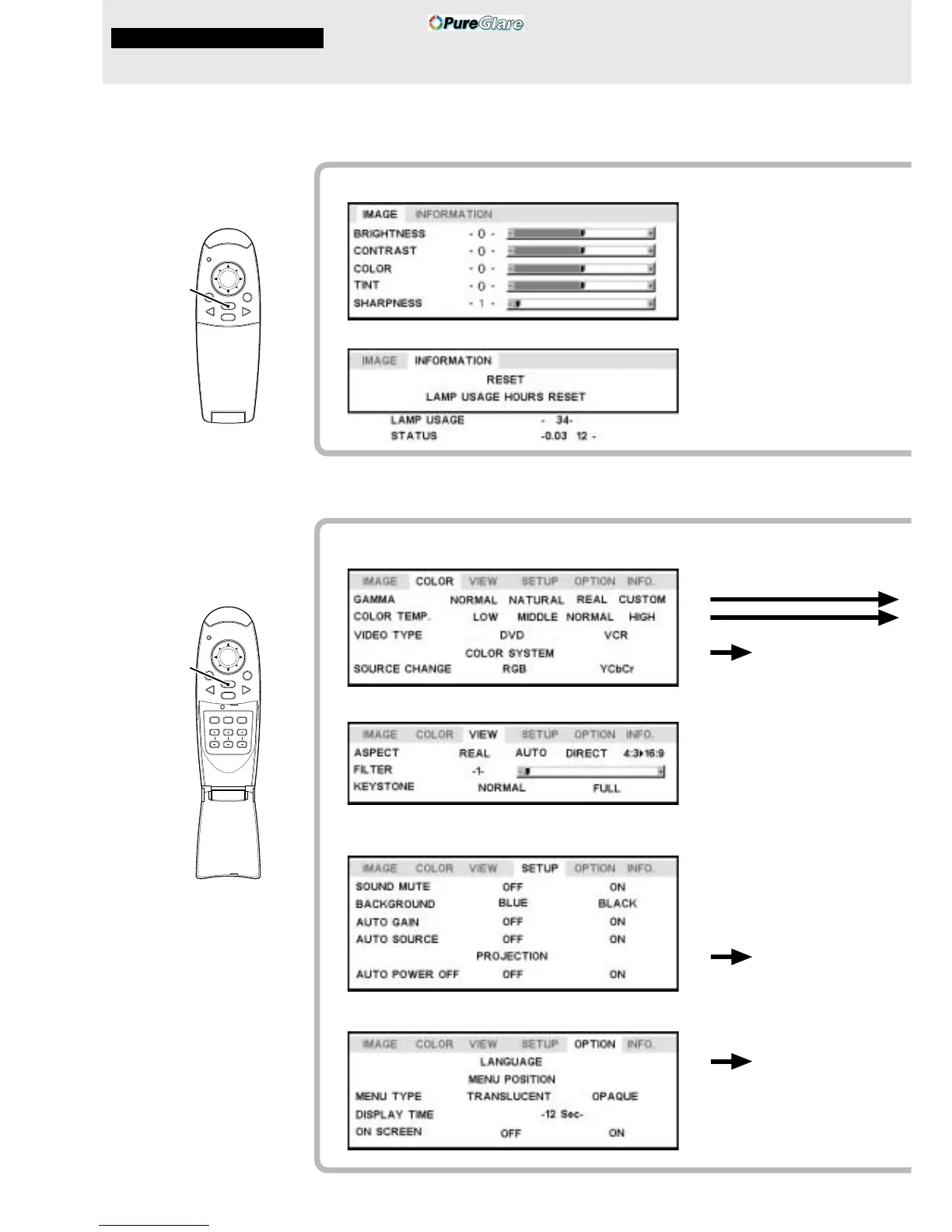
Menu Structure
The normal menu will be
displayed when the MENU
button is pressed with the
remote control FLIP COVER
closed.
The numerals in parentheses ( ) are reference page numbers.
Normal menu
For VIDEO, S-VIDEO and component video (YCbCr) input
The advanced menu will be
displayed when the MENU
button is pressed with the
remote control FLIP COVER
open.
Advanced menu
MENU button
For VIDEO, S-VIDEO and component video (YCbCr) input
Common menu
Common menu
Menu operation
MOUSE POWER
VIDEO
MENU
CANCEL
RGB
PLUS
MOUSE POWER
VIDEO
MENU
CANCEL
RGB
AUTO FREEZE MUTE
ZOOM VOLUMEKEYSTONE
(22)
(22)
(22)
(22)
(22)
(25)
(25)
(26)
(26)
(26)
(26)
(27)
(27)
(27)
(28)
(28)
(28)
(28)
(29)
(29)
(29)
(30)
(30)
(30)
(30)
(30)
Å
Ç
ı
MENU button



 To Next Page