Home
Point Mobile
Handhelds
PM67
Page 38 (Contact Details)
Point Mobile PM67 - Contact Details
84 pages
Manual
Save Page as PDF
To Next Page
To Next Page
To Previous Page
To Previous Page
Loading...
PM67 Android 11 User Manual
Learning the Basics
37
©
2021 Point Mobile Co., Ltd. All rights reserved
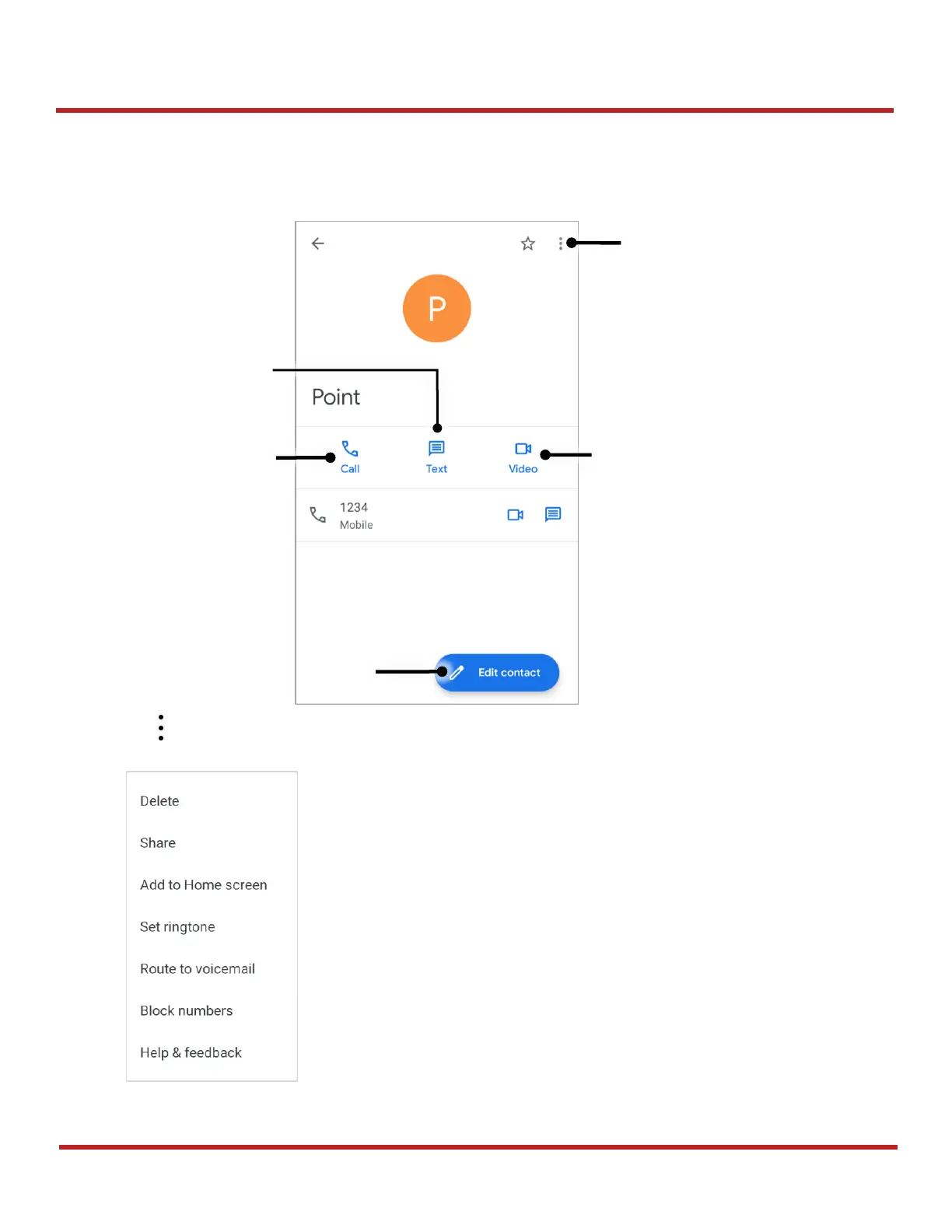
Contact detai
l
Select a contac
t from the list to
find more detail i
nformation.
Tap
to
open advanced op
tions such as delete, s
hare, block, etc.
Figure
39
Contact advanced options
Advanced
options
Tap to edit this
contact
Make a video
call
Make a
voice call
Send a mess
age
Figure
38
Contact detail
37
39
Table of Contents
Main Page
Instruction
2
Revision History
2
PM67 Skus
2
Table of Contents
3
Getting Started
7
Device Parts
7
Product Standard Accessories
9
Install SIM & SD Card
10
About SIM Card
10
About SD Card
11
Install & Remove Battery
13
Install the Battery
13
Remove the Battery
15
Charge the Device
16
Battery Specification
16
Charge with Power Adapter
16
Charging Cradle
17
LED Indicator
20
Turn on & off PM67
21
Use a Touch Screen
22
Learning the Basics
24
Setup Wizard
24
Home Screen
25
Status Bar
26
Notification Panel
27
Quick Setting Panel
28
Apps & Widget
29
Recently Used Apps
33
Call
34
Making a Call
34
Answering a Call
36
Contacts
37
Add a Contact
37
Contact Detail
38
Message
39
MTP Connection with PC
40
Manage the Files
41
Lock the Screen
43
Settings
44
Adjust Display Brightness
44
Adjust Sound
44
Adjust Font Size
45
Using the Keypad
46
Keypad
46
Use the Buttons
48
Screen Capture
48
Program Buttons
48
Camera
50
Scanner
51
Turn on / off the Scanner
51
Scansettings
52
Basic
52
Options
53
Notification
54
Wedge
55
Extended Wedge
56
Symbologies
60
About
60
Scan a Barcode
61
N3601 Scanner SKU (SKU1, SKU2)
61
N6603 Scanner SKU (SKU3)
62
Scandemo
62
Wireless
63
Mobile Network (LTE SKU Only)
63
Wi-Fi
64
Bluetooth
65
Turn on / off
65
Pair and Connect
65
Unpair and Disconnect
66
Change the Bluetooth Device Details
67
NFC (NFC SKU Only)
68
System Maintenance
69
System Information
69
On Settings
69
On Emkit
69
Check Device Health
70
OS Update
71
OS Update Via Storage
71
OS Update Via OTG Port
72
OS Update Via FOTA
72
Factory Data Reset
74
Factory Data Reset Via Settings App
74
Factory Data Reset Via Recovery Mode
75
Accessories
76
Hand Strap
76
Mount Hand Strap
77
Remove Hand Strap
78
Gun Handle
79
Attach Gun Handle
80
Mount Hand Strap
81
Single Slot Cradle (SSC / SEC)
82
4SC (4 Slot Cradle)
82
4SBC (4 Slot Battery Cradle)
82
Safety Information
83
Battery Safety Information
83
Other manuals for Point Mobile PM67
Quick Start Guide
8 pages
Related product manuals
Point Mobile PM60
79 pages
Point Mobile PM450
72 pages
Point Mobile PM260
65 pages



 To Next Page