~POI/IIEIIAIIOl«S&
SkyHuntct40~
MANL:INS:SH:X:XX
6.4.2 SkyKey Programmer- KEYY:XXP:SH:A:XX
August 8 ,2013
Rev 25
CAUTION - BE SURE YOUR SKYKEY HAS BEEN PROGRAMMED WITH YOUR AIRCRAFT
INFORMATION AT AN APPROVED SKYHUNTER406 MAINTENANCE SHOP BEFORE
INSTALLATION
Using the remote switch kit instructions replace the yellow remote connector with the blue
SkyKey connector.
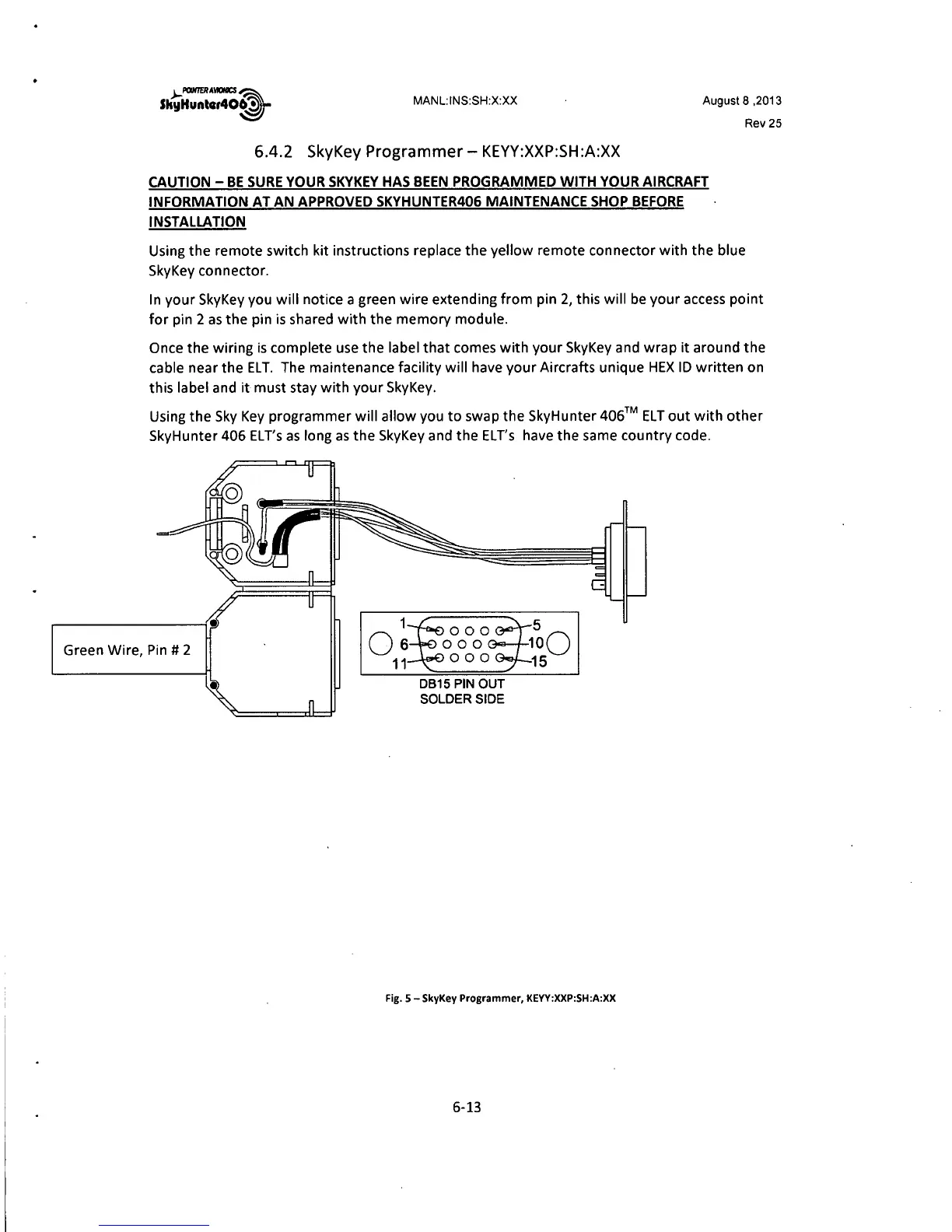
In your SkyKey you will notice a green wire extending from pin 2, this will be your access point
for pin 2 as the pin is shared with the memory module.
Once the wiring is complete use the label that comes with your SkyKey and wrap it around the
cable near the ELT. The maintenance facility will have your Aircrafts unique HEX ID written on
this label and it must stay with your SkyKey.
Using the Sky Key programmer will allow you to swap the SkyHunter
406™ ELT out with other
SkyHunter 406 EL T's as long as the SkyKey and the ELT's have the same country code.
Green Wire, Pin
# 2
1
Os
11
0815 PIN OUT
SOLDER SIDE
5
100
15
Fig. 5 -SkyKey Programmer, KEYY:XXP:SH:A:XX
6-13



 To Next Page