32 33
EN – Installation and operation guide SIMPLE MOVE 102
EN – Installation and operation guide SIMPLE MOVE 102
EN
EN
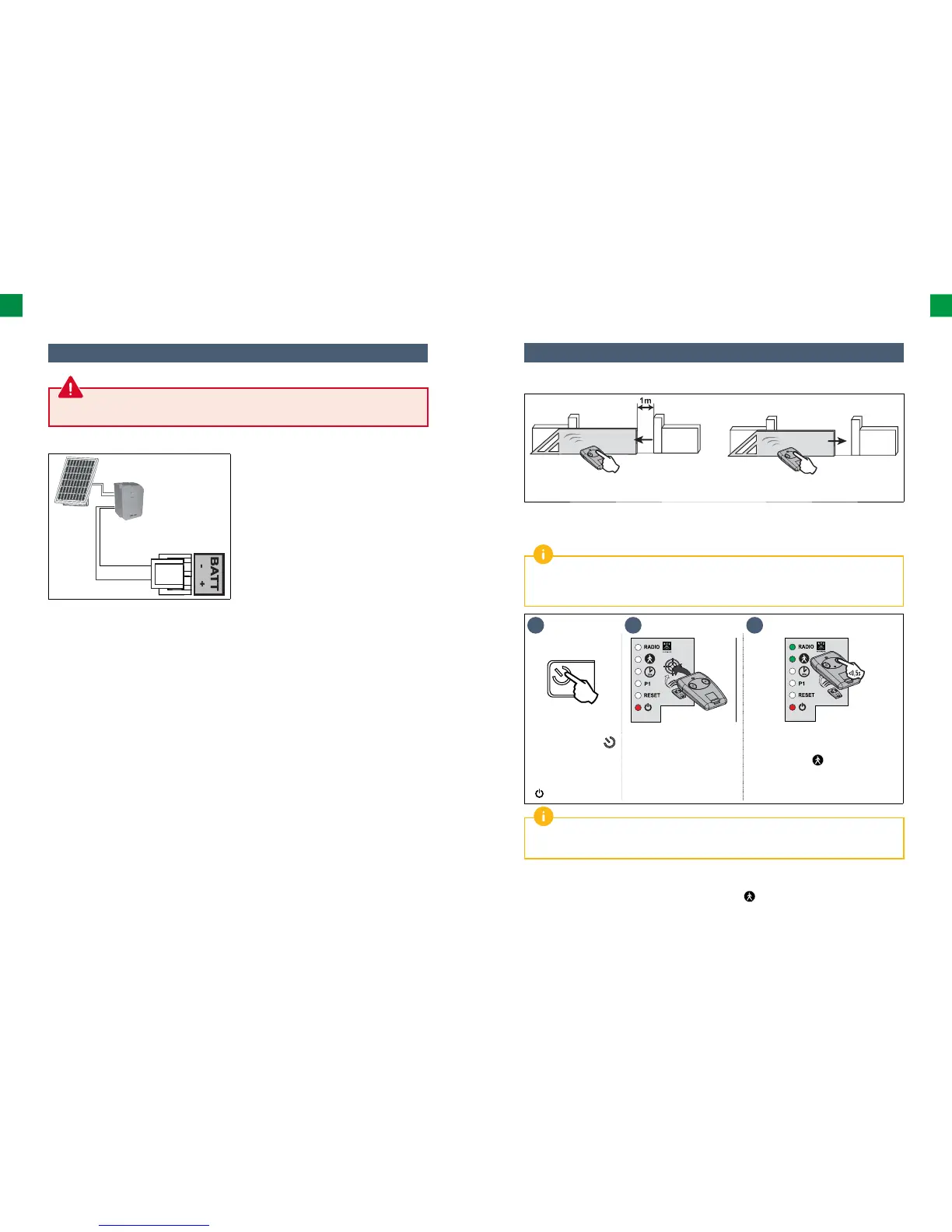
3.8 Solar energy supply (optional)
Never connect the drive unit to a power supply of 230 V when it is already connected to a solar energy
source because this can lead to damage to the electronic module of the drive.
When the drive unit operates using a solar
energy power supply:
• the gate can be controlled by means of remote
controls and radio transmitters only (wire
control is inactive),
• protecting wired accessories (photocells, the
orange light) are still active.
4 ADVANCED PARAMETER SETTINGS
4.1 Opening for pedestrian entry
Pressing the remote control button programmed to open for pedestrian entry causes opening of the
gate to a width of about 1 metre. Pressing it again causes the gate to close.
Button number 1 on 2- or 4-button remote controls cannot be programmed to control opening for
pedestrian entry.
See "Programming the remote controls”, pages 38-40, for more information.
1 2 3
>2s
• Press and hold the
button of the electronic
control system for 2
seconds.
The indicator light
comes on.
• Place the remote control on
the electronic control system
target.
• Press button 2 on the remote control
(less than 0.5 second)
The RADIO and
indicator lights
come on then go out. The opening for
pedestrian entry is activated on this
button.
▶ Activation of opening for pedestrian entry
▶ Operation of opening to enable pedestrian entry
Repeat the “Activation of opening for pedestrian entry” procedure using the button, for which the opening
of pedestrian entry must be deactivated. The indicator light comes on then goes out. Opening for
pedestrian entry is deactivated on this button.
▶ Deactivation of opening for pedestrian entry
Move away from the electronic control system to test the opening for pedestrian entry.



 To Next Page