36 37
EN – Installation and operation guide SIMPLE MOVE 102
EN – Installation and operation guide SIMPLE MOVE 102
EN
EN
▶ Scope of the application
Set the gate speed in accordance with the table below:
Gate weight Standard speed Slow speed
0 do <100 kg
100 do <200 kg
200 do <300 kg
+ strip sensor*
300 do <400 kg
+ strip sensor*
*Installation of a passive strip sensor on the gate is mandatory.
A speed not suitable for the weight of the
gate could cause serious injury to the users,
for example by being crushed. To meet the
requirements of the standard EN 12453, it
is essential to comply with the scope of the
application’s limitations.
4.3 Gate speed
By default, the gate operates at standard
speed.
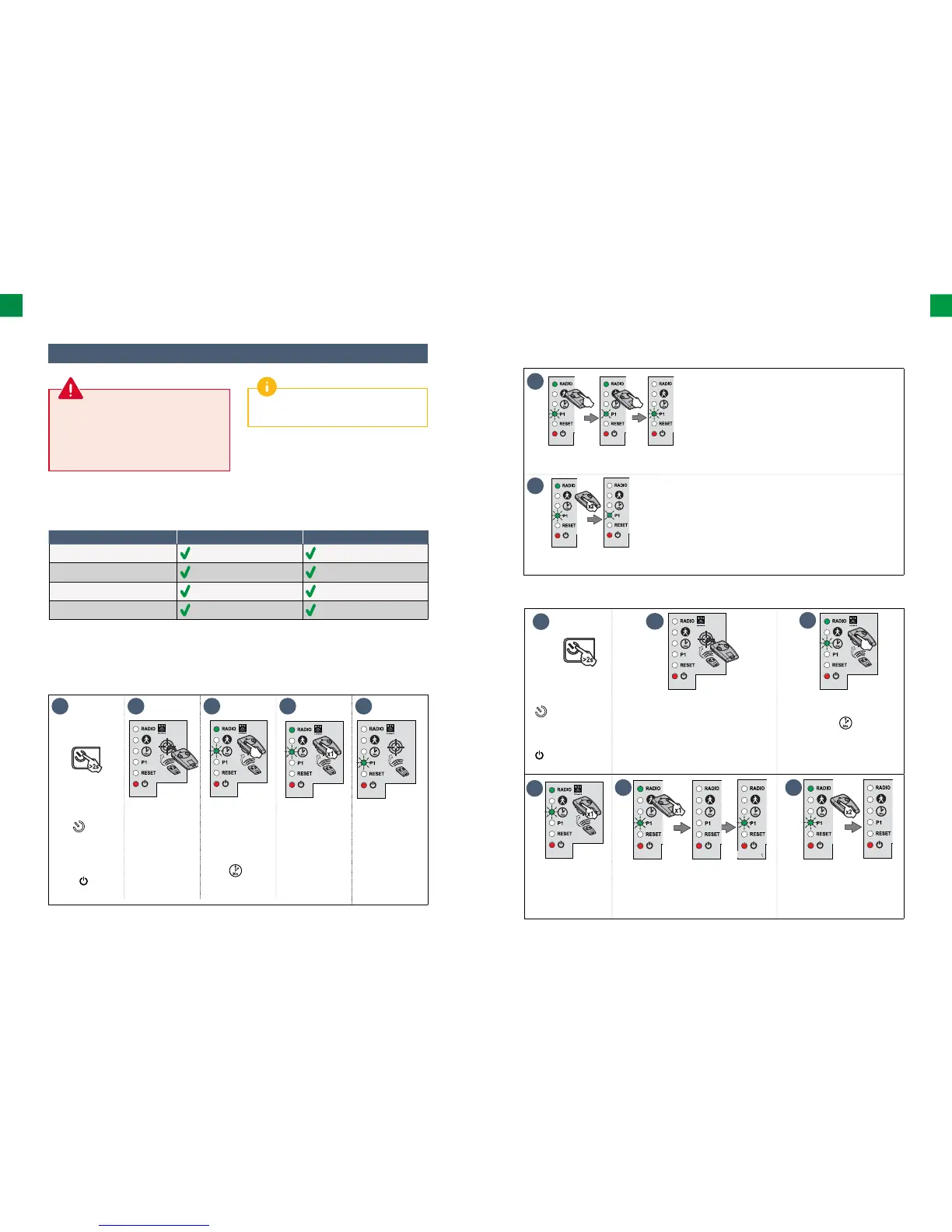
1 2 3 4 5
• Press and hold
the
button
of the electronic
control system
for 2 seconds.
The indicator
light comes
on.
• Place the remote
control on
the electronic
control system
target.
• Keep
button 1 of the
remote control
pressed until
the indicator
light
starts
fl ashing.
• Press button 1
on the remote
control once.
The indicator
light P1 fl ashes.
▶ Setting slow speed
▶ Setting slow speed (continued)
6
• Keep button 2 of the remote control pressed until the indicator light P1 starts slowly fl ashing.
Slow speed is selected.
7
• Press button 1 on the remote control 2 times. The indicator light P1 fl ashes slowly.
Slow speed is selected.
▶ Returning to standard speed
1
2
3
• Press and hold the
button of the
electronic control
system for 2 seconds.
The indicator light
comes on.
• Place the remote control on the electronic
control system target.
• Keep button 1 of the remote
control pressed until the
indicator light starts
fl ashing.
4
5 6
• Press button 1 on
the remote control
once.
The indicator
light P1 fl ashes.
• Press button 2 on the remote control
once.
The indicator light P1 goes out for 5
seconds, and then fl ashes.
• Press button 1 on the remote
control 2 times. The indicator
light P1 is off . Standard speed
is selected.



 To Next Page