42 43
EN – Installation and operation guide SIMPLE MOVE 102
EN – Installation and operation guide SIMPLE MOVE 102
EN
EN
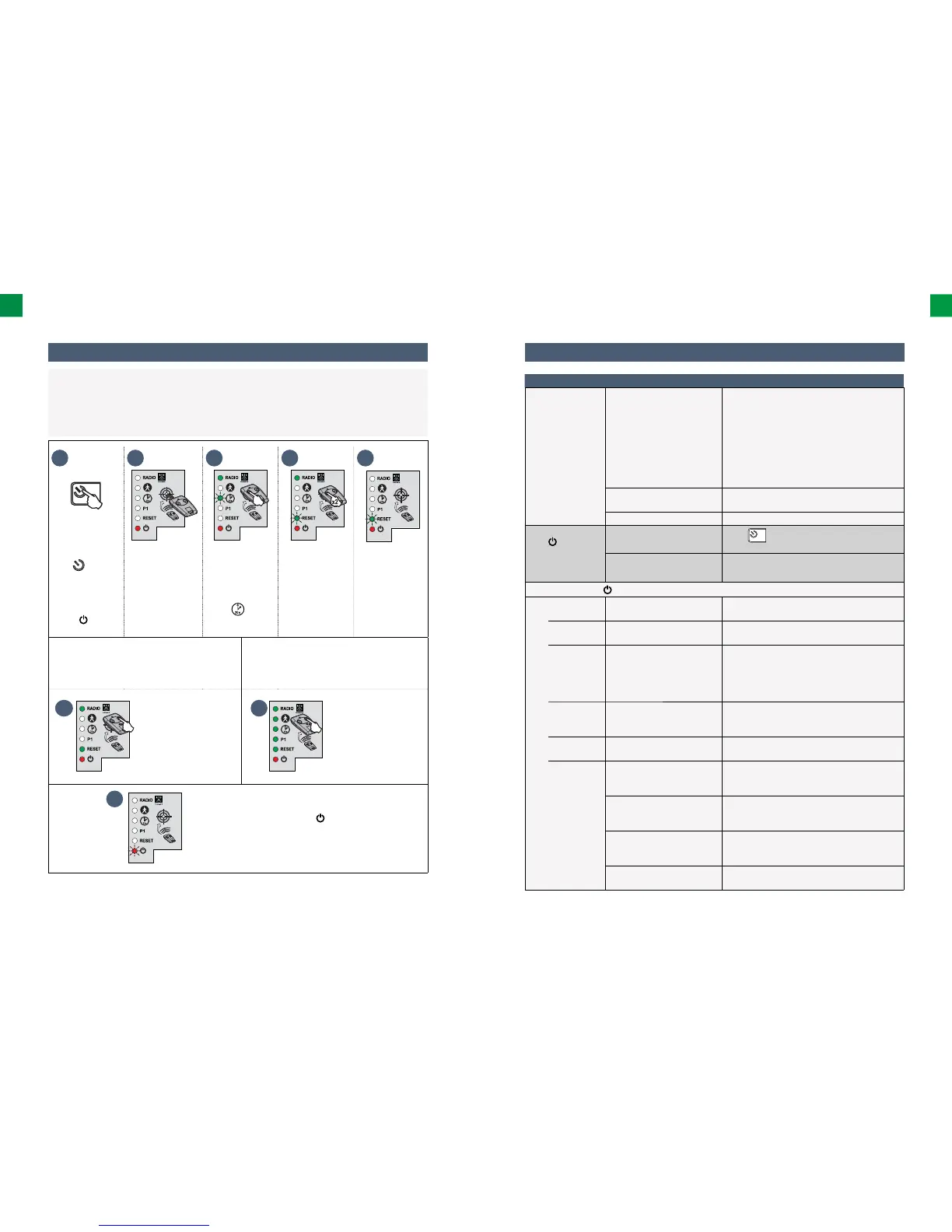
1 2 3 4 5
>2s
• Press and hold
the
button
of the electronic
control system
for 2 seconds.
The indicator
light
comes
on.
• Place the
programmed
remote control on
the target.
• Keep button
1 of the
remote control
pressed until
the indicator
light starts
fl ashing.
• Press button 1
on the remote
control twice.
The indicator
light “RESET”
fl ashes.
In order to delete settings*
In order to delete settings*
and the remote controls/control points
saved in the memory
6
• Keep button 2 of the
remote control pressed
until the indicator
light RESET comes
on.
6
• Keep button 2
of the remote
control pressed
untill all the indicator
lights come on.
7
The indicator light fl ashes twice (see page
26 to run a self-learning procedure).
*Gate track, deactivation of the settings.
6.3 Deletion of settings
When are settings to be deleted?
•Aſt er self-learning, if you change the position of an opening stop, in the case of modifi cation of the
drive wiring, or if you add a strip sensor to the gate.
• If the gate opens at random due to normal wear and tear.
Diagnostics Troubleshooting
The drive does
not respond to
commands from
the remote
control
Limited operating range of
the remote control.
• Check the battery of the remote control
• (See “Replacing the remote control’s battery”
– page 41)
• Check the electronic module antenna (cable,
position – see page 25).
• Check whether any external element is
causing radio wave interferences (overhead
line pole, reinforced brickwork, etc.). If this is
the case, fi t an external antenna.
Unsaved remote control in
the memory
Save the remote control in the memory
(see page 40).
Unlocked drive Lock the drive.
The indicator
light of the
electronic module
does not emit
any light
The electronic control system
is on standby
Press
, for 2 seconds to reactivate the
electronic control system.
No power supply for the
electronic control system.
• Check the mains supply.
• Check the supply conductor.
The indicator light
of the electronic module is fl ashing:
1 fl ash Operation mode with the
emergency battery supply.
Check the mains supply.
2 fl ashes The drive unit is awaiting the
gate track self-learning.
Restart the gate track self-learning
(see page 26).
3 fl ashes Photocells failure • Check, whether there are any obstacles
between the photocells.
• Check the photocells’ settings.
• Check the photocell conductors
(see page 29).
4 fl ashes Short circuit at the output
“START” (terminals 5-6) of the
electronic module.
Check accessories connected to the output
“START” of the electronic module.
5 fl ashes Thermal protection of the
drive is on.
Allow the drive to cool down for several
dozen minutes.
6 fl ashes Short circuit at the output
“BUS” (terminals 3-4) of the
electronic module.
Check accessories connected to the output
“BUS” of the electronic module.
Short circuit at the output
“24 V” (terminals 7-9) of the
electronic module.)
Check accessories connected to the output
“24 V” of the electronic module.
Short circuit within the
orange light (terminals 8-9)
of the electronic module.
Check the cable of the orange light
(see page 29).
Short circuit within
the drive unit
Check the cables of the drive unit
(see page 29).
6.4 Diagnostics



 To Next Page