40 41
EN – Installation and operation guide SIMPLE MOVE 102
EN – Installation and operation guide SIMPLE MOVE 102
EN
EN
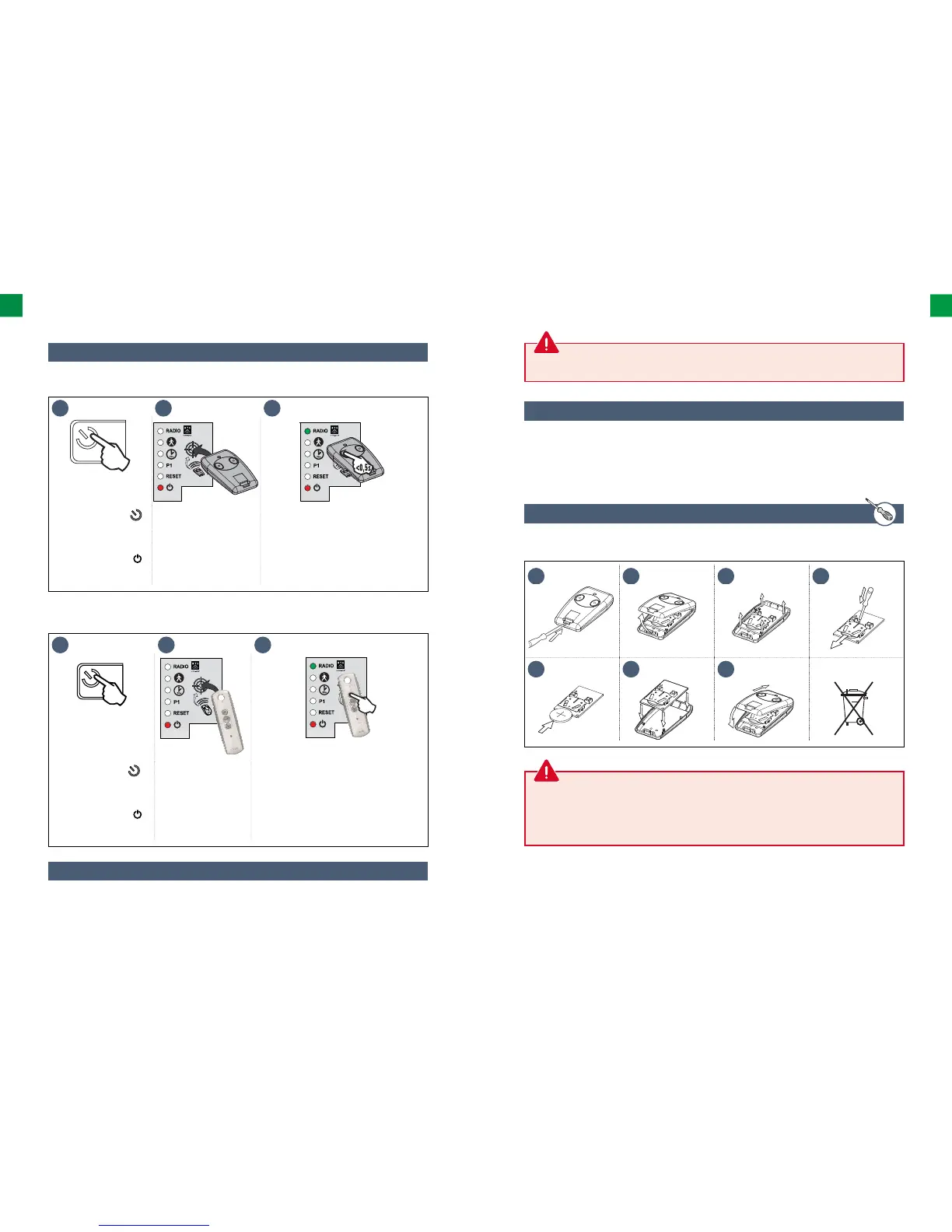
5.2 Adding a remote control
See “Deleting of settings” page 42.
1 2 3
>2s
<0,5s
• Press and hold the
button of the electronic
control system for 2
seconds.
The indicator light
comes on.
• Place the remote
control on the
electronic control
system target.
• Briefl y press the button to be programmed
on the remote control.
The “RADIO” indicator light will come on and
then go out when you release the button on
the remote control.
The remote control has been saved in the
memory.
▶ 3-button remote control
▶ 2 or 4-button remote control
▶ The battery life is usually 2 years.
5.3 Deleting a remote control
1 2 3
>2s
• Press and hold the
button of the electronic
control system for 2
seconds.
The indicator light
comes on.
• Place the new remote
control to be programmed
on the electronic control
system target.
• WBriefl y press the button to be
programmed on the remote control. The
“RADIO” indicator light will come on and
then go out when you release the button
on the remote control.
Complete opening has been
programmed on this button.
6 TROUBLESHOOTING
The drive unit must be disconnected from any power supply during cleaning and maintenance and
when parts are replaced.
WARNING: Observe the polarity (+/-) of the batteries; they must not be recharged or thrown into fi re or
water. They must not be exposed to high temperatures. Used batteries must not be opened or mixed
with batteries of another type or used batteries (this can result in an explosion, electrolyte leakages
and damage of diff erent types). Keep out of the reach of children.
1 2 3 4
5 6 7
Li
6.2 Replacing the remote control’s battery
6.1 Assistance
Despite the huge care taken in the design of our products and the creation of our guides, you may
encounter diffi culties during the assembly of your automatic mechanism or have some doubts.
In this case, please do not hesitate to contact us; our specialists will answer all your questions.



 To Next Page