38 39
EN – Installation and operation guide SIMPLE MOVE 102
EN – Installation and operation guide SIMPLE MOVE 102
EN
EN
5 PROGRAMMING THE REMOTE CONTROLS
Depending on the choice of settings, the Somfy
RTS remote controls can control:
• full opening of the gate
• opening of the gate for pedestrian entry
• other Somfy RTS devices (example: garage door
drive, roller shutter, etc.)
5.1 Programming the remote controls
1
2
34
1
2
2-button remote
control
4-button remote
control
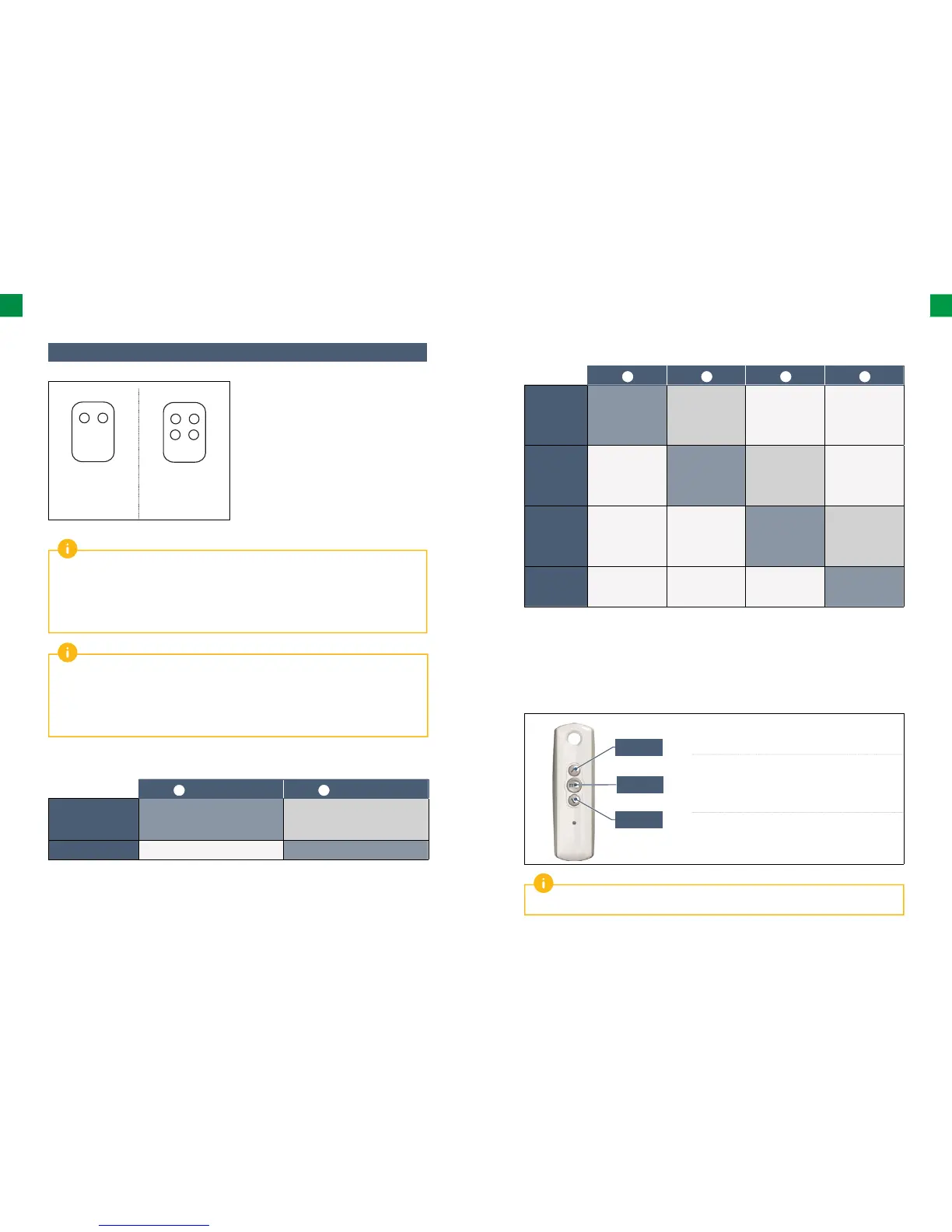
Up to 16 control points for one drive (remote controls, other radio control points) can be saved
in the memory.
A remote control that controls the opening for pedestrian entry and the full opening
of the gate count as 2 control points.
If a 17th control point is saved in the memory, the fi rst saved point will be deleted automatically.
Button
1
Button
2
Possibility 1
Complete opening Opening for pedestrian entry
or other Somfy RTS automatic
mechanism
Possibility 2 Other Somfy RTS device Complete opening
▶ Possibilities for programming a 2-button remote control
If you wish to programme the opening for pedestrian entry, it must be programmed on the button
following the one used to open the gate fully (e.g.: complete opening controlled by button 2, opening
for pedestrian entry controlled by button 3).
It is not possible to programme the opening for pedestrian entry on button 1 of the remote
controls.
Button
1
Button
2
Button
3
Button
4
Possibility 1
Complete
opening
Opening for
pedestrian entry
or other Somfy
RTS automatic
mechanism
Other Somfy
RTS automatic
mechanism
Other Somfy
RTS automatic
mechanism
Possibility 2 Other Somfy
RTS automatic
mechanism
Complete
opening
Opening for
pedestrian entry
or other Somfy
RTS automatic
mechanism
Other Somfy
RTS automatic
mechanism
Possibility 3 Other Somfy
RTS automatic
mechanism
Other Somfy
RTS automatic
mechanism
Complete
opening
Opening for
pedestrian entry
or other Somfy
RTS automatic
mechanism
Possibility 4 Other Somfy
RTS automatic
mechanism
Other Somfy
RTS automatic
mechanism
Other Somfy
RTS automatic
mechanism
Complete
opening
▶ Possibilities for programming a 4-button remote control
Opening
Stop
Closing
• To open the gate completely, press the “Up” button on
the remote control.
• To stop the gate while it is moving, press the central
button on the remote control.
• To close the gate, press the “Down” button on the
remote control.
The 3-button remote control cannot be used to change the drive settings.
▶ Use of the 3-button remote control



 To Next Page