24
5.2 I User alerts
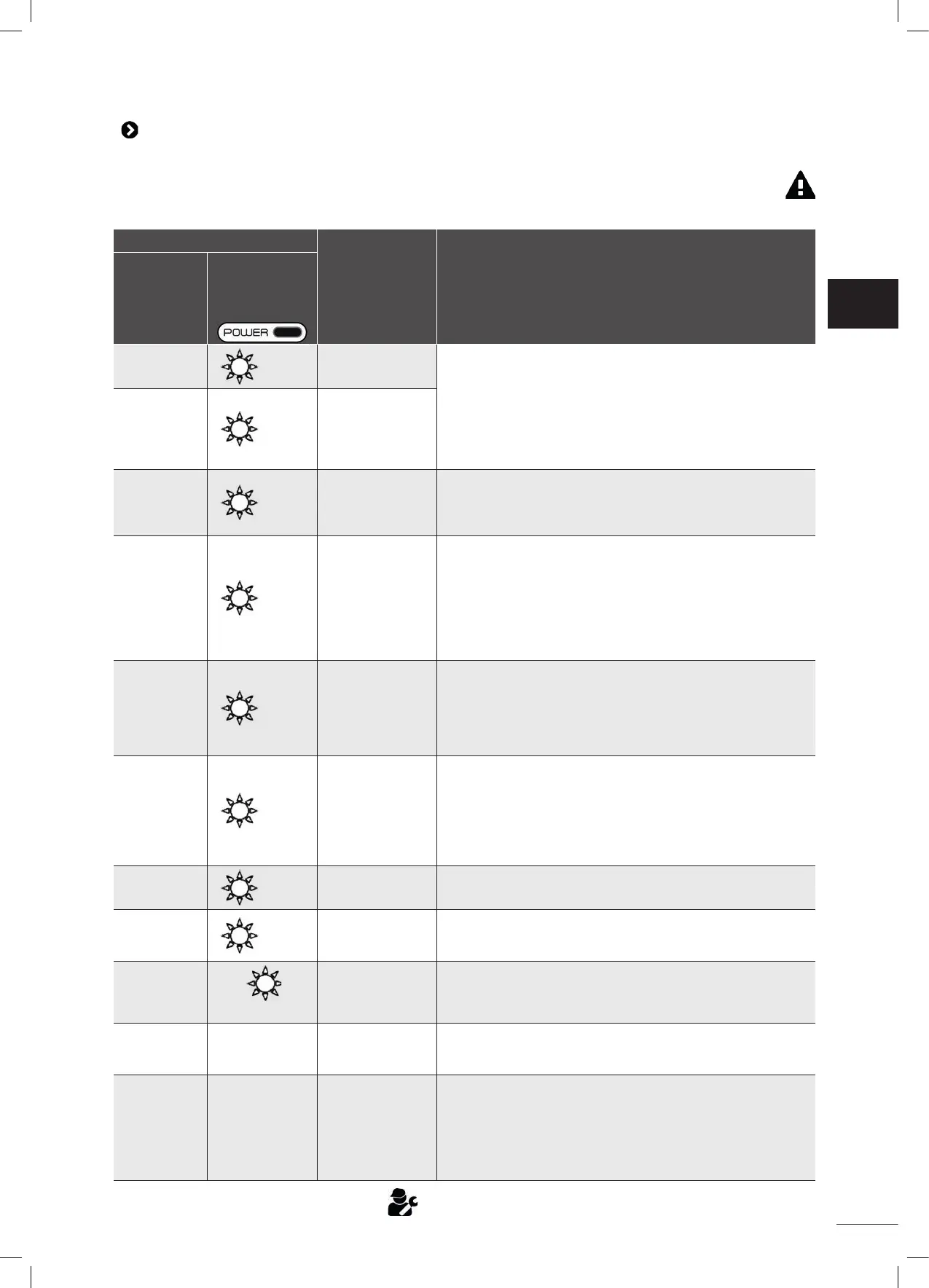
• Alerts are displayed both on the control box and in the iAquaLink™ app.
• Follow the troubleshoo ng solu ons suggested below; they can also be accessed in the iAquaLink™ app: press
when an error code appears.
Display on control box
Display in the
iAquaLink™ app
Solu ons
Error code
(depending on
the model)
Flashing LED
(depending on the
model)
Er: 01
x 3
Pump motor
• Check that debris or the cable is not preven ng the brushes
from rota ng freely.
• Check that nothing is interfering with the cable connec on
area.
• Rotate each wheel by a quarter of a turn in the same
direc on un l it rotates smoothly
• If this fails to solve the problem, contact the retailer for a
full diagnosis.
Er: 02
Er: 03
x 2
Right trac on
motor
Le trac on
motor
Er: 04
x 3
Pump motor
consump on
• Check that no debris or hair is blocking the impeller.
• Clean the lter thoroughly.
• If this fails to solve the problem, contact the retailer for a
full diagnosis.
Er: 05
Er: 06
x 2
Right trac on
motor
consump on
Le trac on
motor
consump on
• Check that debris or the cable is not preven ng the brushes
from rota ng freely.
• Check that nothing is interfering with the cable connec on
area.
• Rotate each wheel by a quarter of a turn in the same
direc on un l it rotates smoothly
• If this fails to solve the problem, contact the retailer for a
full diagnosis.
Er: 07
Er: 08
x 3
Cleaner out of
the water
• Turn the cleaner o .
• Clean the lter thoroughly.
• Put it back in the water, shaking to release the air bubbles.
• Restart the cycle.
• If this fails to solve the problem, contact the retailer for a
full diagnosis.
Er: 10
x 1
Communica on
• Disconnect and reconnect the cleaner.
• Check that the cable is properly connected to the control
box.
• Check that nothing is interfering with the cable connec on
area.
• If this fails to solve the problem, contact the retailer for a
full diagnosis.
Er: 11
x 4
Sensor unit • Contact the dealer to check the condi on of the sensor unit.
Er: 12
x 5
Update failed or
incomplete
• Disconnect and reconnect the control box to restart the
update.
• If the error con nues, contact the retailer.
PROG
con nuously
Update in
progress
• Wait for the update to complete.
• Do not disconnect the power cable from the cleaner during
an update.
N/A N/A Connec on error
• Check the status of the Bluetooth/Wi-Fi LEDs on the control
box and follow the steps described in the table "5.3 I
Troubleshoo ng the connec on to the iAquaLink™ app".
N/A N/A
A red dot appears
in the "My
appliances" list
• Appliance not plugged in or not connected to the home Wi-
Fi network. If the dot is red when the control box is plugged
in and if the Bluetooth/Wi-Fi icons are lit up, refresh the
screen (by swiping downwards).
• If the dot turns green: the appliance is ready for use.
If the problem con nues contact the retailer:
EN


 To Next Page
 Loading...