Page 16
USER MANUAL
Touchpad Layout
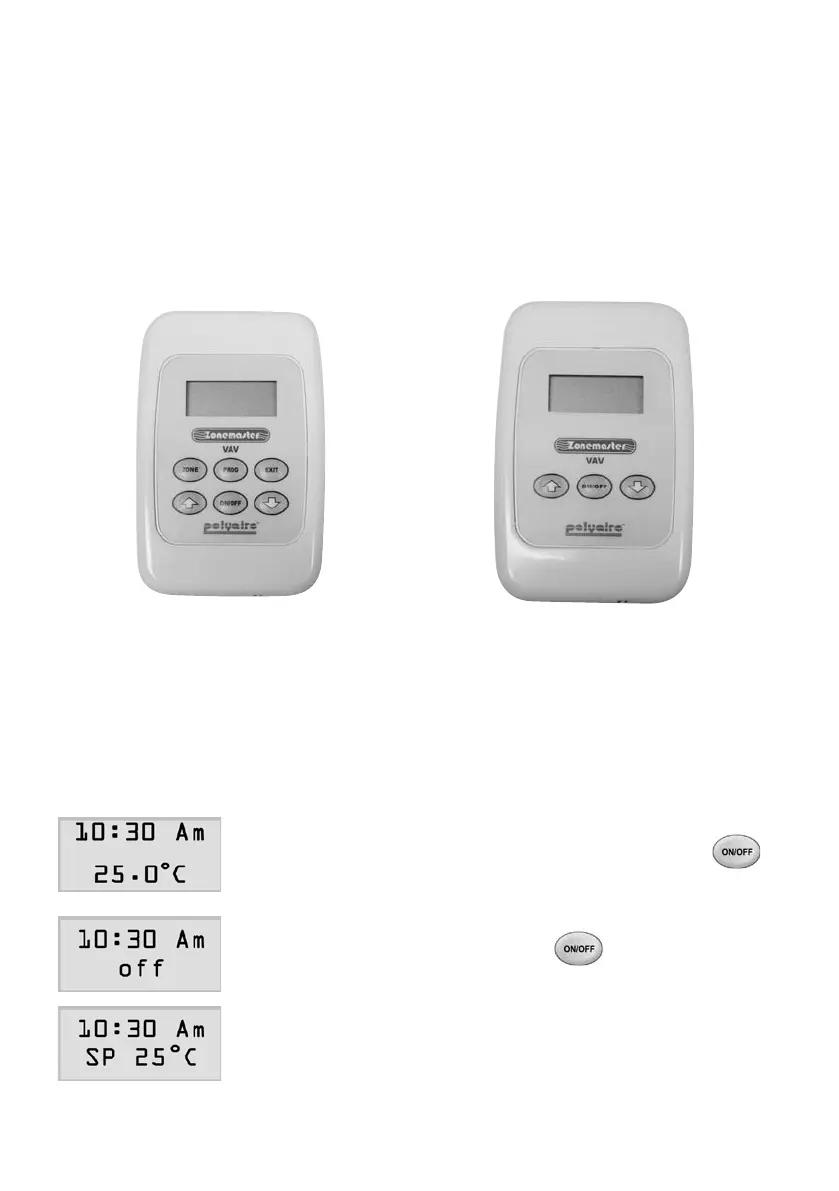
TheMastertouchpadhasaLCDwithsixbuttons,whereastheZone
touchpadhasaLCDscreenwithonlythreebuttons,asshowninFigure5.
Innormaldisplaymode,theLCDscreenswilldisplayclocktimeandtheir
local zone temperatures.
Figure5.LayoutofMasterandZoneTouchpads
Master Touchpad Zone Touchpad
Zone Touchpad
ZoneOn/OffControl
1) In‘on’status,theLCDofthetouchpaddisplays
zonetemperatureorsetpoint.Pressing
button once will turn off the zone and the
secondlineofthescreenwilldisplay‘off’.
2) In‘off’status,pressingbuttononcewill
turn on the zone and the second line of the
LCDscreenwilldisplaythesetpointofthe
zonefor20seconds,andthenwillreturntothe
normaldisplayofthezonetemperature.



 To Next Page