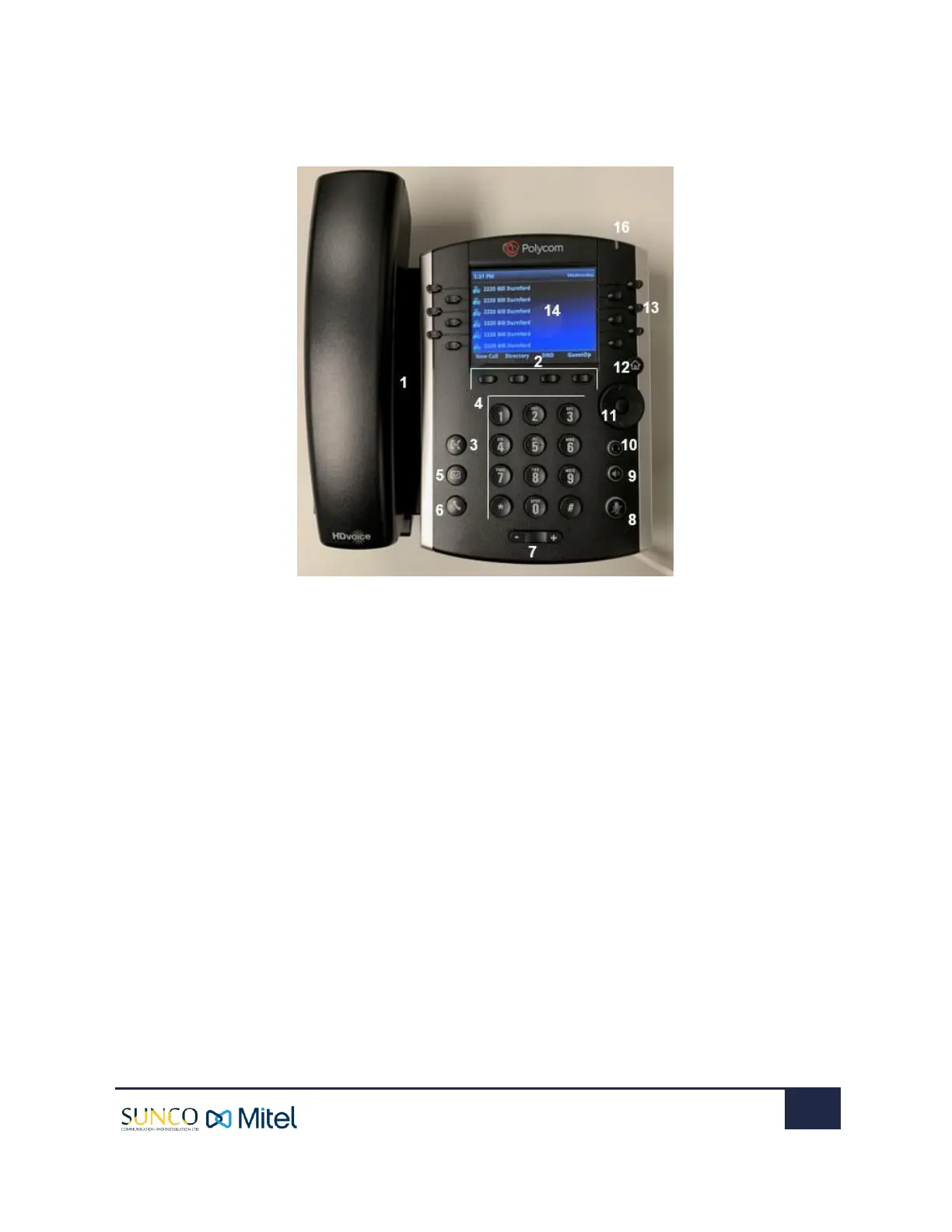
1. SPEAKER: Provides ringer and speakerphone audio output.
2. SOFT KEYS: Buttons that invoke several functions depending on
the action being it is being used for.
3. TRANSFER KEY: Transfers an active call to a contact.
4. DIAL PAD KEYS: Enable you to enter numbers, letters, and special
characters. You can also use the dial pad keys to select menu
items that have index numbers.
5. MESSAGES KEY: Enables you to access and manage instant and
voice messages.
6. HOLD KEY: Holds an active call or resumes a held call.
7. VOLUME KEY: Adjust the volume of the handset, headset,
speaker, and ringer.
8. MUTE KEY: Mutes local audio during calls and conferences. The
key glows red when activated.
9. SPEAKERPHONE KEY: Enables you to place and receive calls
using the speakerphone. The key glows green when
activated.
10. HEADSET KEY: Enables you to place and receive calls
through a headset. The key glows green when an analog
headset is activated, and blue when a USB or Bluetooth
headset is activated.
11. NAVIGATION/SELECT KEY: Used to scroll through
information or options displayed on the phone’s screen.
12. HOME KEY: Displays the Home screen and the Lines and
Calls screens from the Home screen.
13. LINE KEYS: Enable you to select a phone line, view calls on a
line, or quickly call a favorite contact.
14. SCREEN: A 3.5” diagonal screen with a backlight that
displays menu and data.
15. MESSAGE WAITING INDICATOR: Flashes red to indicate
when you have new messages.


 To Next Page