22
WARNING: When the cooling mode switches to heating mode or vice-versa, the heat pump will restart
after 10 minutes.
Step 1: Long press 3s to switch on your pump.
Step 2: Long press 3s to switch from one mode to another until ECO Heating Mode is displayed.
Step 3: Select the desired temperature by using the buttons and (15-40°C).
4. Use
4.5 ECO silence Mode
WARNING: Before starting, ensure that the ltration pump is operating correctly.
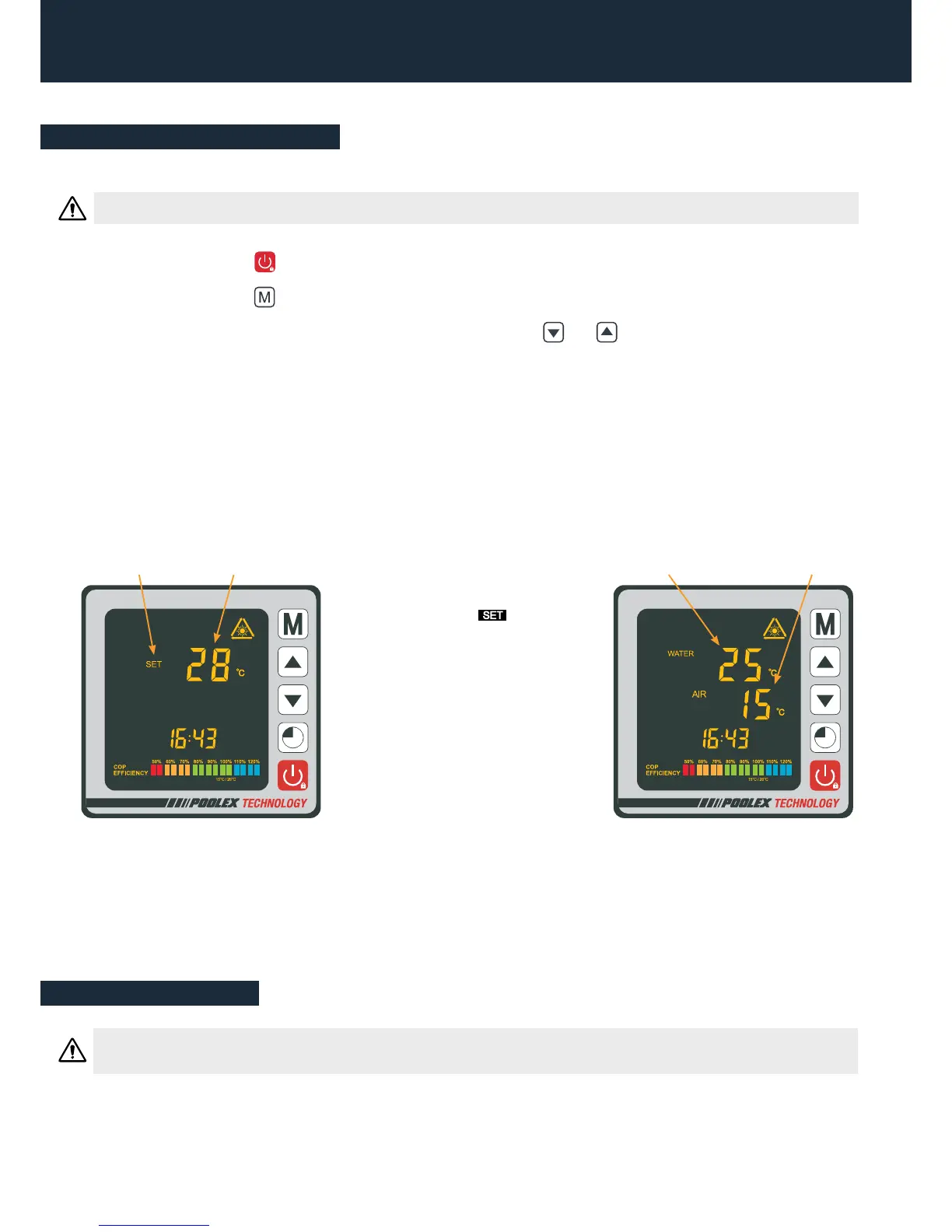
EXAMPLE:
If you have selected 28°C, your screen will display:
Once the symbol stops
blinking, the required temperature
is validated and is replaced by the
water’s current temperature (25°
in our example).
Required
temperature“Blinking”
Current water
temperature
Current temperature
of the ambient air
Useful information
When the incoming water temperature is less than or equal to the required temperature (setpoint tempera-
ture - 1°C), the heat pump will switch to heating mode. The compressor will stop when the temperature of
the incoming water is greater than or equal to the required temperature (setpoint temperature + 1°C).


 To Next Page