28
4. Use
4.12 System parameter query
WARNING : This operation is used to assist servicing and future repairs.
The default settings should only be modied by an experienced professional person.
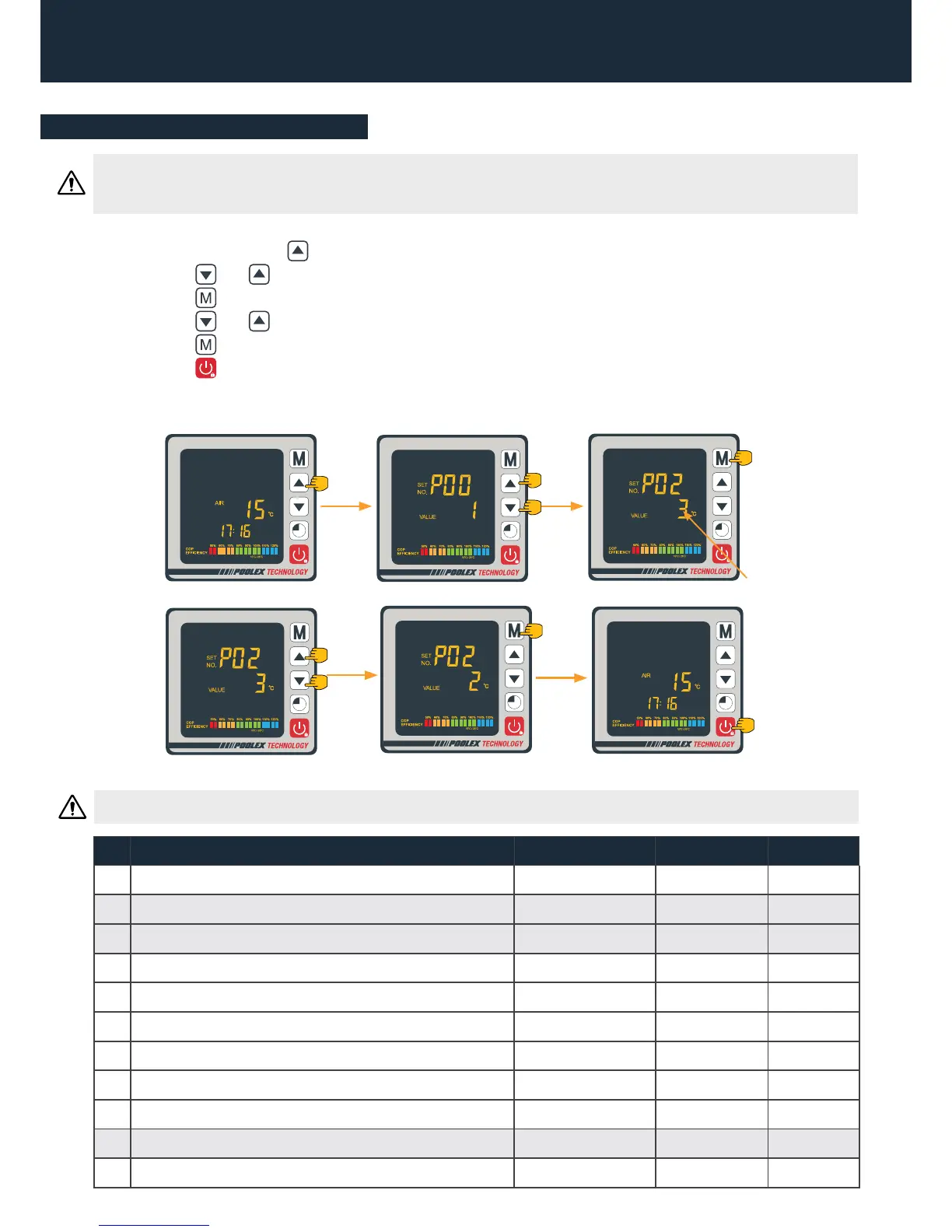
The system’s settings can be checked and adjusted via the remote control by following these steps
Parameters table
Step 1 : Keep pressing 3s on until you enter the settings verication mode.
Step 2 : Press and for see the congured parameters.
Step 3 : Press to select the setting to be modied, the value is blinking.
Step 4 : Press and to adjust the setting value.
Step 5 : Press to set the new value.
Step 6 : Press to return to the main screen.
If not opération for 60s, it will be exited automatically.
Step 3
Step 4
Step 2Step 1
3s
«Blink»
Step 6Step 5
N° Description Adjustment range Factory setting Remarks
01* Adjustment of temperature difference befor restart 2~18°C 1°C Adjustable
02 Reserved - Do not adjust Reserved
03 Reserved - Do not adjust Reserved
04 Adjusting the cooling temperature 8~28°C 27°C Adjustable
05 Setting the heating temperature 15~40°C 27°C Adjustable
06 Ambient air protection temperature 80~125°C 120°C Adjustable
07 Compressor output protection temperature 50~100°C 95°C Adjustable
08 Compressor current protection 2~50A 20°C Adjustable
09
Setting the compensation coefcient of the temperature water inlet
-5~15°C 0°C Adjustable
10 Reserved - Do not adjust Reserved
11 Auto-activation time before de-icing commences 20~90 min 45 min Adjustable
WARNING : Any change to the reserved settings will automatically void the warranty.


 To Next Page