EN | 21
4. USE
Scan or search for «Smart Life» in the play to download the app:
Seng up the applicaon « Smart Life »
You’ll need to create a «Smart Life» account to control your heat pump remotely. If you
already have a Smart Life account, please log in and go directly to step 3.
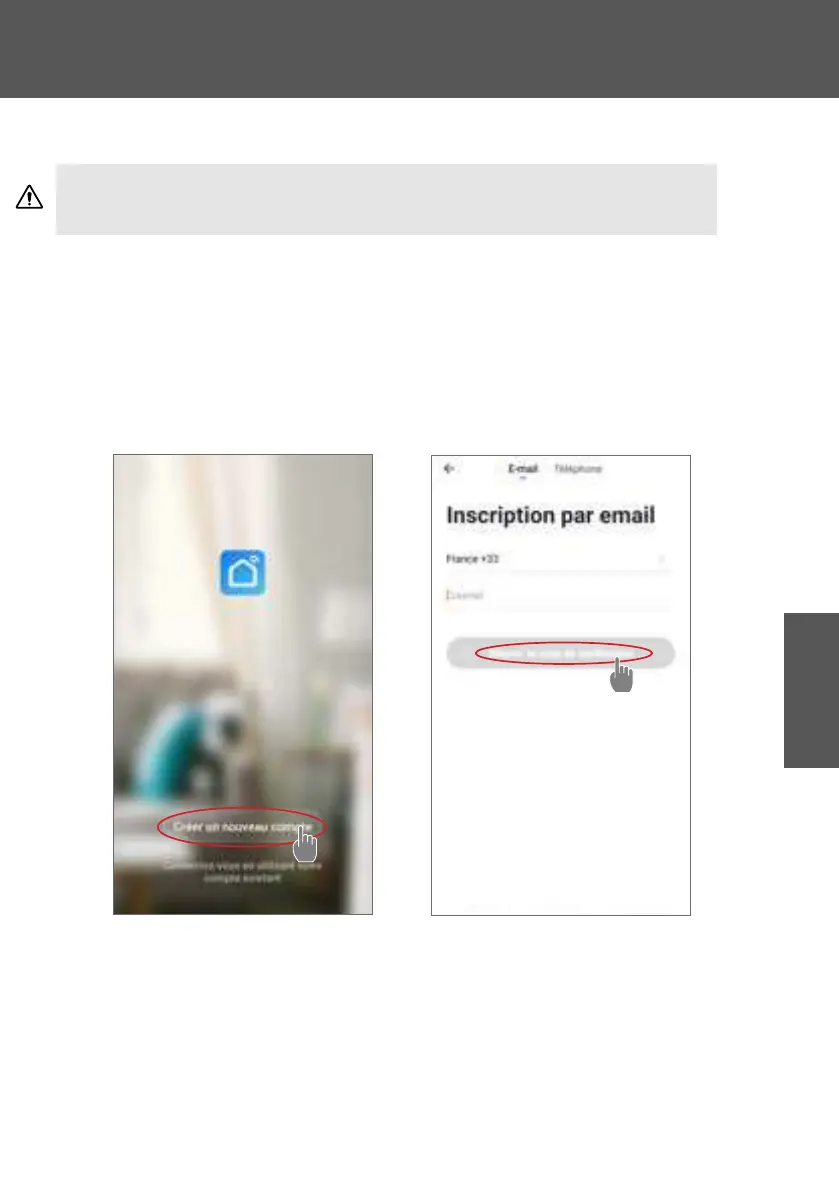
Step 1: Click on «Create new account» and choose to register by «Email» or «Phone,» where
a vericaon code will be sent to you.
Enter your email address or phone number and click «Send vericaon code».
Step 2: Enter the vericaon code received by email or phone to validate your account.
Congratulations, you now belong to the “Smart Life” community.
WARNING: Before you begin, make sure you have downloaded the «Smart Life» app,
connected to your local WiFi network, and that your heat pump is electrically powered and
running.



 To Next Page