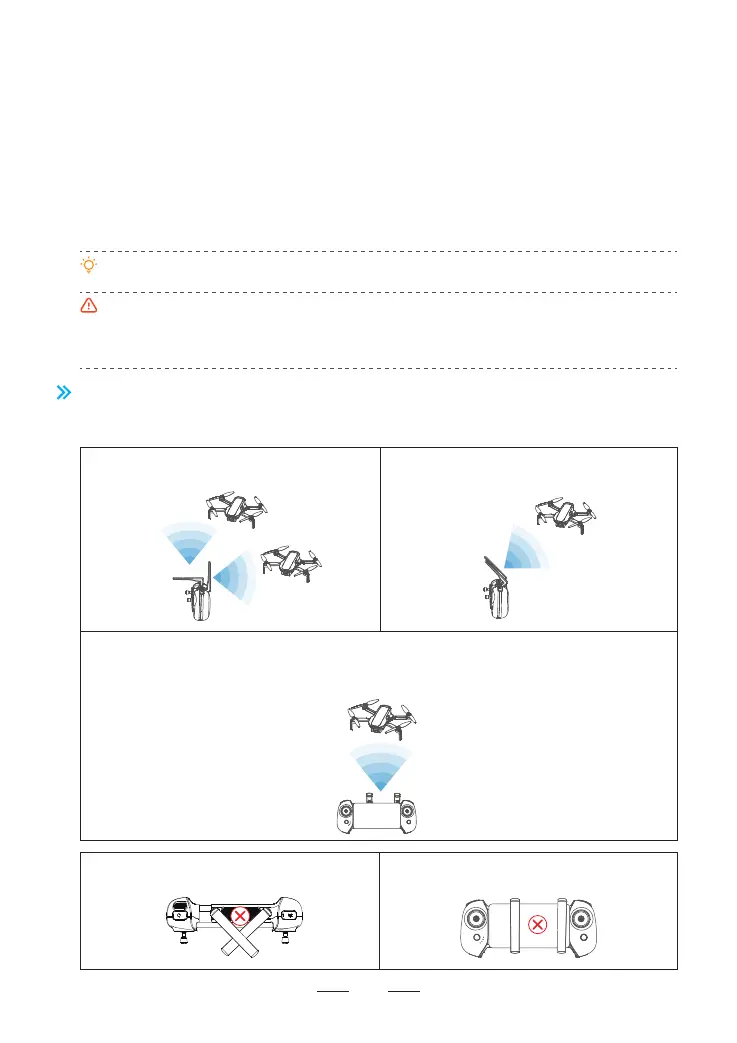
5.4 Antenna Angle
Adjust the antenna angle along with the changes of drone height and distance, to ensure the
best communication status of the remote controller.
1. Power on the remote controller and connect it with the mobile phone, launch PotensicPro App, tap Settings
and select “Re-pair the drone” to enter the frequency pairing interface.
2. After powering on the drone, long press the“Power”button until the drone indicator flashes quickly in green;
now the drone is ready for frequency pairing.
3. Wait for about 7s, the remote controller beeps once to indicate frequency pairing is successful and the flight
interface of the App will show realtime video transmission.
5.3.3 Remote Controller Function
The Atom SE drone and the remote controller can be used immediately after startup since they
have passed frequency pairing before delivery. If a new remote controller or drone is used for
the first time, user must conduct frequency pairing for them as follows prior to use:
Make sure the remote controller is within 1m of the drone during frequency pairing, and there is no
2.4G frequency interference.
If frequency pairing fails, check if there are interferences nearby, or other drones are also in
frequency pairing mode, or the remote controller is too far away or blocked. Eliminate the problems
above and try again.
Do not relocate or operate the remote controller and the drone during frequency pairing.
19
Wider communication angle is ensured at a
close distance in this mode.
Keep both antennas pointing directly towards
the drone to acquire a longer transmission
distance.
When the drone is right above the remote controller, the transmission signal is weakened
drastically due to poor antenna angle. Please lower the flight altitude or fly the drone horizontally
for some distance with the antenna pointing at the drone as much as possible as shown in the
picture.
Do not cross the antenna in any case. Do not press the antenna on your mobile
device in any case.



 To Next Page