7.9 Return(RTH)
The return consists of three steps, as follows:
During the waypoint flight, you can adjust the flight altitude by moving the throttle stick.
During the waypoint flight, once reaches the virtual fence, the drone will exit the waypoint flight and
hover in place.
1. Ascent: The drone ascends to the set return altitude (this step is skipped if the drone's altitude is already higher
than the return altitude).
2. Level flight: The drone maintains a straight flight at the set altitude towards the home point.
3. Landing: Once it reaches the home point, the drone will automatically land and stop its propellers.
Return to Home (RTH) The drone must be in GPS mode
>20m
Return ascent
If Drone altitude ≥ return
altitude, start from step 2
Return altitude = Your settings
Return flight
Landing
H
1
2
3
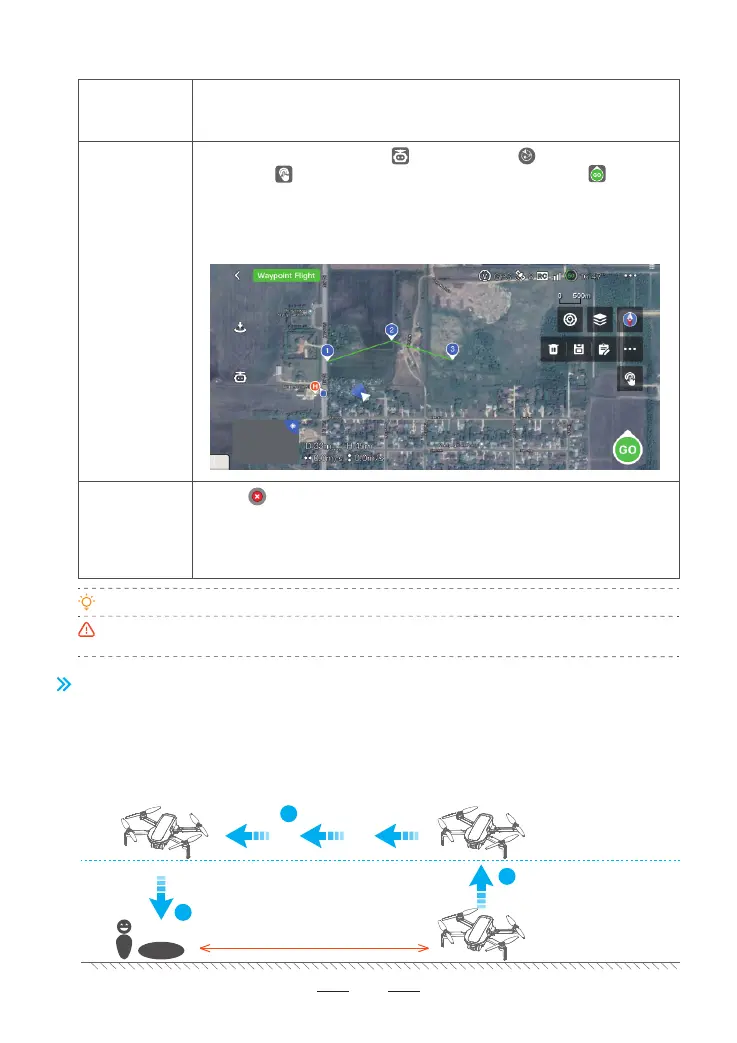
1. Tap on the left to exit Waypoint Flight.
2. Move a control stick(Except the throttle stick) to stop Waypoint Flight. The
drone will hover in place.
3. Short press the RTH/Pause button on the remote controller to stop Waypoint
Flight. The drone will hover in place.
Description
How to exit
How to start
7.8.3 Waypoint Flight
When waypoint flight function is enabled, User can freely set 1 or multiple
waypoint coordinates in App map, and the drone will fly over the corresponding
coordinates according to the sequence of set waypoint coordinates.
30
When GPS signal is strong, tap in App and select to enter Waypoint
Flight. Tap in the map to pin multiple waypoints, after that tap to start
Waypoint Flight.
User can set 2-30 waypoints; The figure in waypoint icon indicates the flight
sequence. Meanwhile, User can delete certain waypoints, save current Waypoint
Flight route data, or choose from the saved waypoint flights route data.



 To Next Page