Test conditions of the max. flight time: Fly at an even speed of 5m/s at 25°C and in breezeless
condition.
Test conditions of the max. transmission distance: Measured at an open and no-interference
environment, with a flight height of 120m, and without considering the return of the drone.
Power consumption will increase considerably when the drone is returning against the wind. If you
receive a prompt of encountering strong wind from the App, please make sure to lower the flight
altitude and return in time to ensure safety of the drone.
Pre-Flight Checklist:
1. Pay attention to the local weather forecast and make sure it is suitable for flying the drone.
2. Make sure the battery is fully charged.
3. Make sure the firmware is updated to the latest version.
4. Make sure the flight environment is open and free of interference.
5. Before takeoff, make sure the battery is secured and the buckle pops out correctly, and no deformed propellers
and loose screws.
6. Power on the drone on open and level ground, wait for the drone to enter GPS Mode before takeoff, and pay
attention to the HOME point.
05
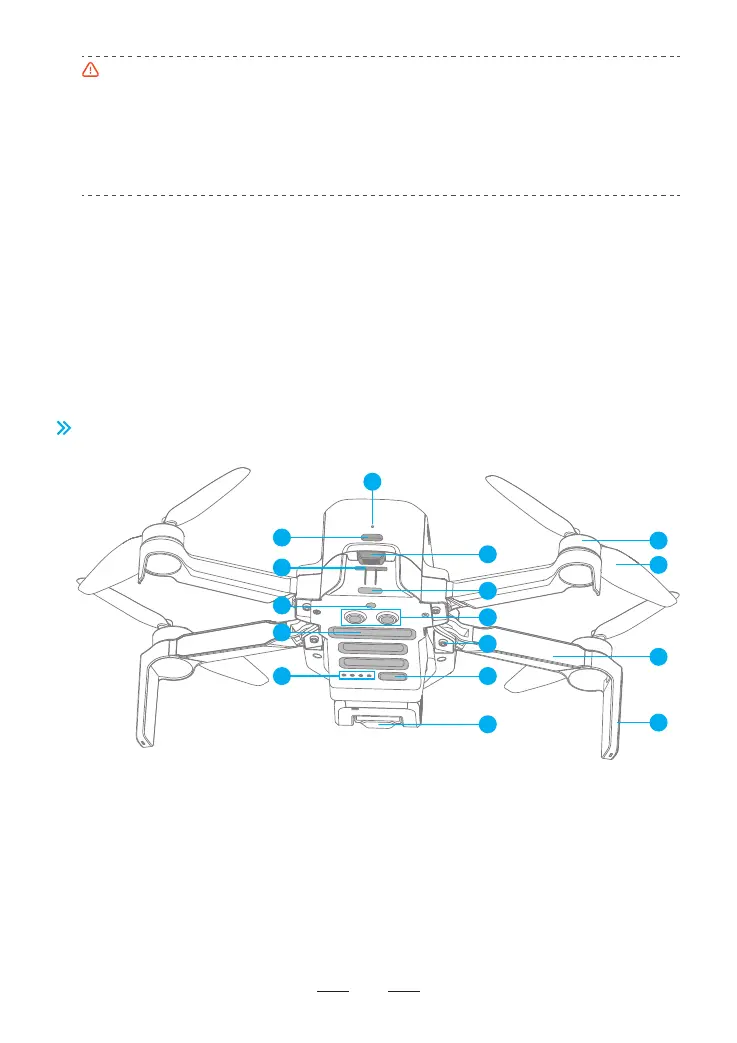
3.2 Drone Diagram
1. Charging indicator
2. TYPE-C charging port
3. Battery buckle
4. SD card slot
5. Tail indicator
6. Monocular visual module
7. TOF module
8. Bottom cooling hole
9. Power indicator
10. Power/frequency pairing button
11. Integrated single-axis gimbal camera
12. Brushless motor
13. Propeller
14. Arm
15. Antenna tripod
16. Arm shaft
4
9
1
5
7
12
13
14
15
16
8
10
11
2
3
6



 To Next Page