One-key landing
Tap one-key landing button in App, then
swipe left in the pop-up window to land the
drone, or swipe right to start returning.
7.7 Takeoff/Landing/Hovering
7.7.1 Manual Takeoff/Landing
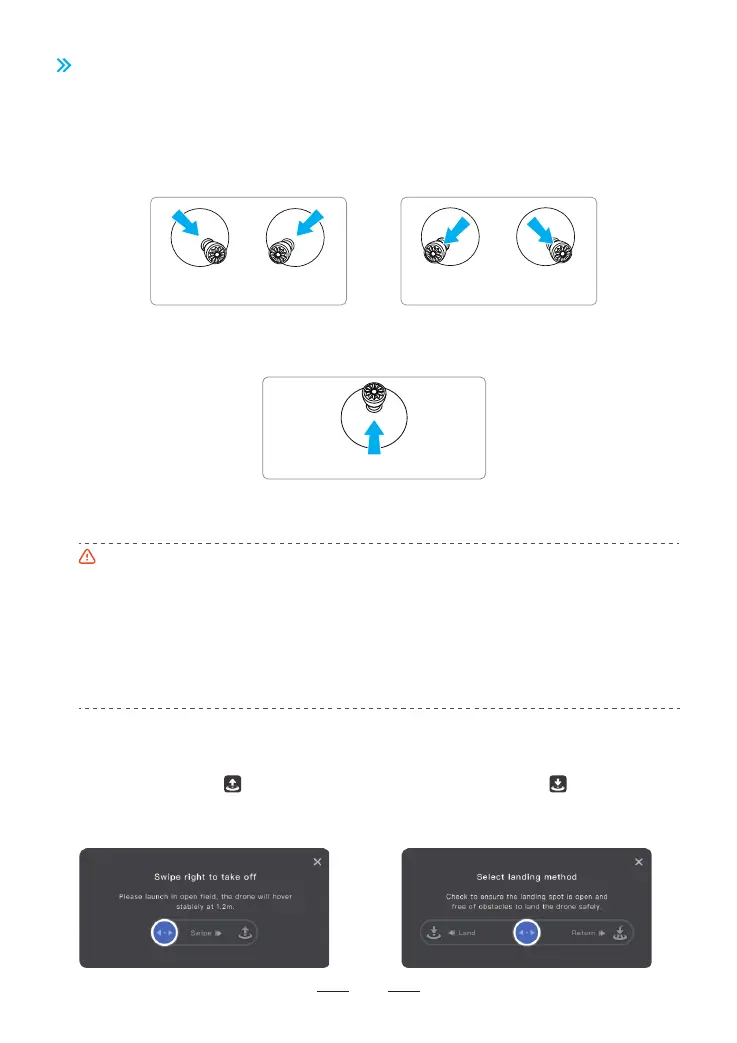
Step 1: Start the motors
Use a combination stick command to start the motors. Push both sticks to the bottom inner or outer corner
depending on your control stick mode to start the motors. Release both sticks simultaneously once the motors
are spinning.
Take off from stable and level surface, do not take off from or land on the palm or by hand.
It is not suggested to take off at low battery, for it may affect the battery service life. Please handle it
with caution and undertake the corresponding consequences if forced takeoff is required.
When the drone is not in a level and stationary condition, stay at least 5 m away from the drone, and
push both sticks to the bottom inner corner for 2 seconds to forcibly unlock the motors.
Keep the distance over 0.5m between the drone and ground, for it may fail to enter good hovering
status due to air flow when it is close to the ground.
If the drone fails to be locked after landing due to anomaly, pull down the throttle control stick to the
limit position for 3s and the drone will be locked by force.
Landing
Pull the throttle control stick until the drone lands on ground. Release the throttle control stick when the motors
are no longer spinning.
7.7.2 One-key Takeoff / Landing
One-key takeoff
Tap one-key takeoff button in App, then swipe
right in the pop-up window to start the drone
automatically then ascend to the height of 1.2m
and maintain hovering.
Throttle control stick
Left
control stick
Right
control stick
Left
control stick
Right
control stick
or
Takeoff
Step 2: Push throttle control stick to take off
Push the throttle control stick upwards gently as shown in the picture, release the control stick when the drone
leaves ground and it will keep hovering.
28



 To Next Page