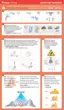
Method 1: Tap on the left of App to exit RTH.
Method 2: Briefly press the return button on the remote controller to exit RTH.
One key RTH: Press and hold the RTH button on the remote controller for 1s or tap in App
to pop up the menu, then swipe right to start the return (see 7.7.2).
Auto RTH: When either the drone battery level is low, the signal between the drone and the
remote controller is lost or the drone is experiencing other abnormalities, Auto RTH will be
triggered.
To ensure the safety of return flight, please set the appropriate return altitude in the app according
to the flight environment.
During the return course, users can still adjust the flight altitude by adjusting the throttle.
The drone will return when it is within 20m of the HOME point, and the return height will be 5m.
Please pay attention to safety.
Tall buildings or obstacles can block the transmission signal and cause signal loss. Do not fly
behind buildings beyond the return height, otherwise the drone will collide with obstacles and crash
during the return. If the drone enters ATTI mode due to GPS failure or GPS signal interference, it will
not be able to return. During the return process, strong headwinds may be encountered. Lowering
the flight altitude appropriately can help reduce power consumption. If the power is insufficient, the
drone will perform a forced landing in place. Please pay attention to the prompts in PotensicPro
App. Do not initiate the return when there are obstacles overhead, such as tall trees, otherwise the
drone may crash during the climb.
Please pay attention to return safety, because the drone does not support obstacle avoidance and
may crash when colliding with obstacles during the return course.
For any GPS signal anomaly in communication loss return, the drone will maintain hovering at ATTI
mode, until GPS signal is strong enough and the return will resume.
7.10 Emergency Stop
See 5.3.1 Emergency stop for the detailed operation method.
Emerency stop function is designed for preventing injuring pedestrians or damaging the valuables
by propeller blades in case of drone failure. Please use it with caution, because stopping the motors
mid-flight will cause the drone to crash.
31
How to RTH
How to exit the RTH
RTH Requirements
The drone must take off in GPS mode and successfully record the HOME point.
If the drone takes off in OPTI mode and switches to GPS mode mid-flight, it will not be able to
return to the takeoff point.
Please pay attention to the location of the HOME point on the map and the prompts in
PotensicPro App.



 To Next Page