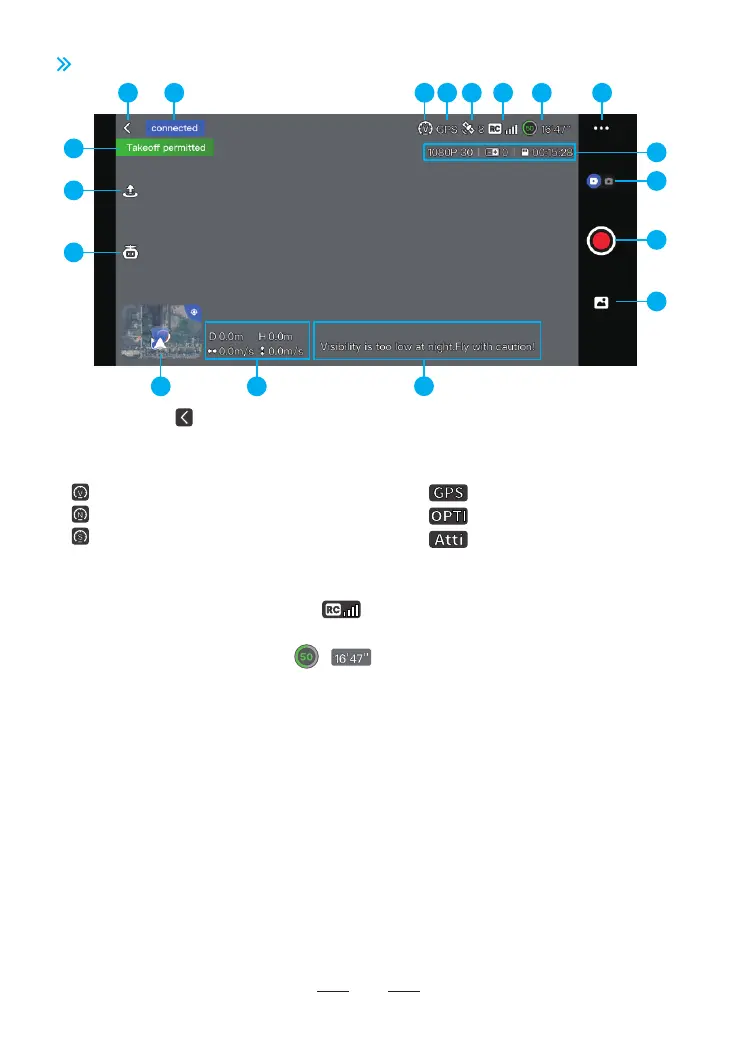
3. Flight mode:
8. Settings
Tap to view information about Safety, Calibration, Control, Camera and About.
Safety
Switch on or off Beginner Mode: If switched on, the drone will be confined to fly in a cylindrical space with a radius
of 30 m and a height of 30 m and restricted to fly only in Video Mode.
Set measurement system (Metric or Imperial) and speed (Video/Normal/Sport)
Set minimum return altitude and virtual fence.
Battery information: check the temperature, current, voltage and others of the smart battery. Calibration
This sector includes compass calibration, remote controller calibration and drone re-pairing.
Control
Remote Controller Settings: Tap to switch control stick mode (Mode 1: Left Hand Throttle; Mode 2: Right Hand
Throttle)
Camera
General Settings: Tap to set white balance, gridlines, segmental recording, etc. Tap to check Micro-SD card
capacity and format.
Other Settings: Tap to set watermarks in photos.
About
View device information, firmware information, App version, etc.
1. Return button: 2. Navigation prompt bar:
Tap to return to the homepage Display drone status and flight mode
22
6.2 Flight Interface
4. Positioning mode:
5. GPS status:
7. Power level of the smart battery:
Normal
Sport
Video
Attitude mode, no positioning
Vision positioning
GPS positioning
Display the strength of video transmission connection signal between the drone and the remote controller
6. Signal quality of video transmission:
Display GPS signal status and quantity of satellites searched
Estimated Remaining Flight Time
3
5
7
9
15 14
13
16
17
18
1 2
10
12
11
6 8
4



 To Next Page