24
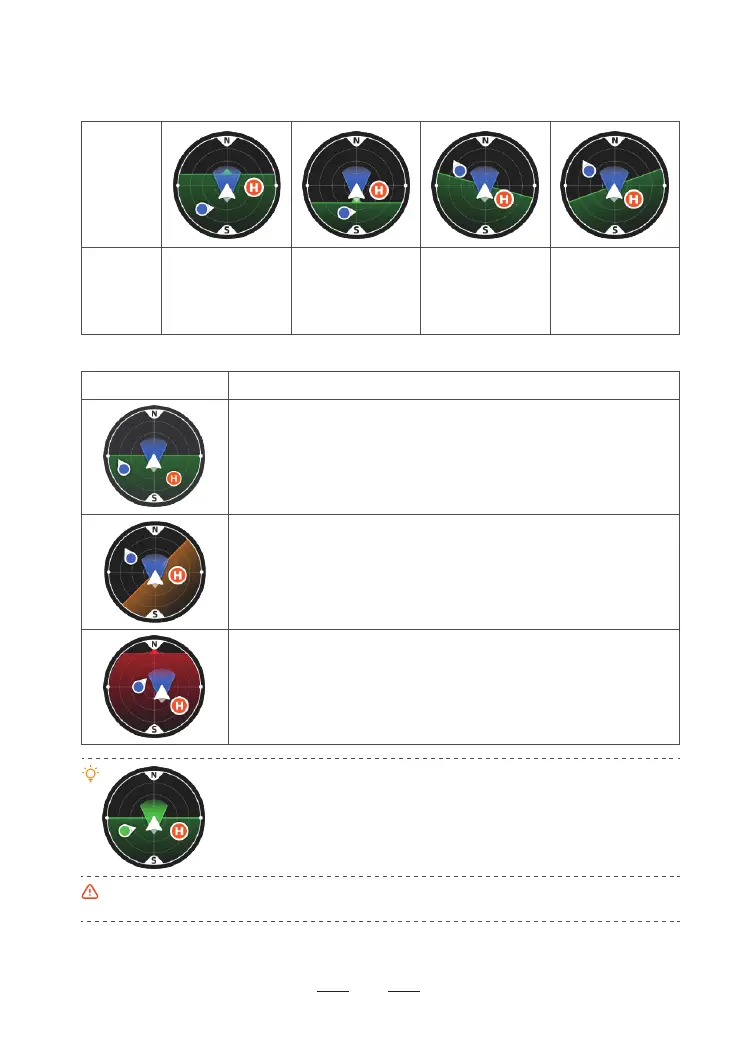
Different colors of the attitude indicator:
Legend Description
Green indicates that the drone is flying at a relatively small tilt angle,
and optimal video quality can be achieved.
Yellow indicates that the drone is flying at a relatively large tilt angle,
and the video quality may be reduced.
Red indicates that the drone is flying at a very large tilt angle. If the
attitude indicator frequently turns red during flight, the drone may be
encountering strong winds and the video quality can be compromised.
Please fly the drone back and land it as soon as possible.
When the icons of the drone and the remote controller both turn green, it
indicates that the remote controller is facing the drone which guarantees
the optimal communication signal.
After the drone is powered on and enters GPS mode, the current GPS
coordinates will be updated as the HOME point. Pay attention to the update
prompt of the HOME point.
When the drone takes off in OPTI mode and then enters GPS mode, the HOME point is no longer the
take-off point. Pay attention to the return safety.
Legend
Tilting
direction of
the drone
Tilt forward:
the horizon line tilts
towards the upper
half of the attitude
indicator
Tilt backward:
the horizon line tilts
towards the lower
half of the attitude
indicator
Tilt to the right:
the horizon line tilts
towards the right
side
Tilt to the left:
the horizon line tilts
towards the left
side
The attitude indicator displays information of drone direction, tilt angle, remote controller direction,
HOME point and more.
The attitude indicator can show the angle and direction of the drone in real time as follows:



 To Next Page