To navigate between hyperlink topics using a keyboard, select ALT+◄ or ALT+►.
22
Table of Contents
DC Application
▲ Before using the generator, read and comply with all Safety Alerts and Icons.
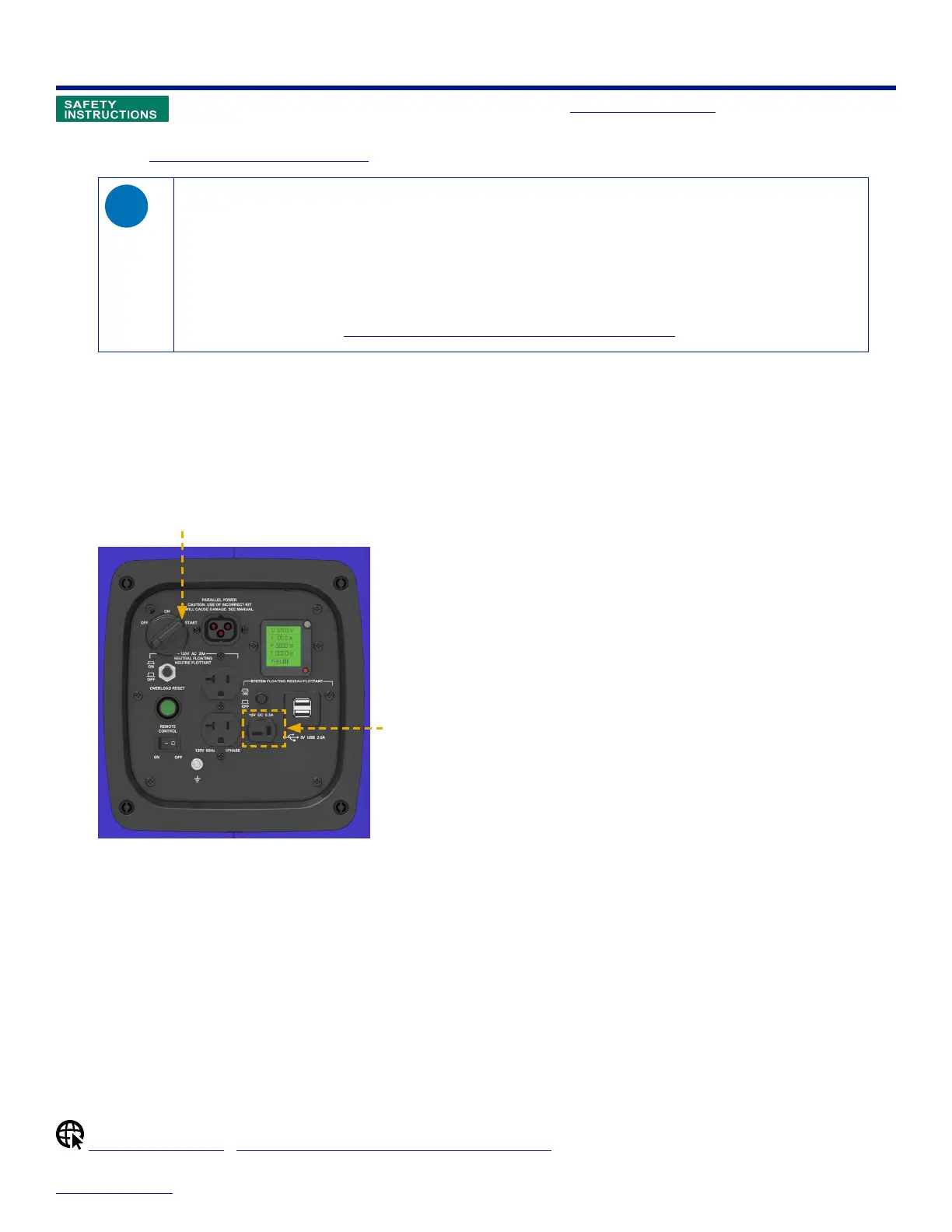
This generator provides a 12V, 8.3A supply through the DC receptacle on the control panel. The DC receptacle is
designed for Charging an External 12V Battery, but it can also be used to power a maximum 7A DC device.
◊ The DC receptacle may be used while generator is running.
◊ You can use DC power while AC power is in use.
◊ The DC output comes directly from the battery, so powering a DC device places a load on the battery. If the
generator is not running when you power a DC device, the 12V battery will become depleted. Once the 12V battery
is depleted you need to fully recharge it in order to restart the generator.
◊ In the event of an overloaded DC circuit, reset the DC circuit breaker to resume operation. Make sure that the
connected device is in good working condition and draws no more than 12V, 8.3A.
◊ For additional help, see Troubleshooting: No Output at the DC Receptacle.
Powering a DC Device
When the generator is running, the DC receptacle can be used to power a maximum 7A DC device.
To power a DC device:
1. Start the generator and let it run for a few minutes to reach its normal operating temperature.
The LCD shows output voltage when the generator is ready for use.
START
DC receptacle
2. On the control panel, plug the T-style end of the device cable into the DC receptacle.
Using Smart USB Ports
This generator has two Smart USB ports which monitor the charge of the device you plug in. Smart USB ports trim
back the power as the device reaches a full charge, which prevents over-charging of the device.
When the generator is running, you can use Smart USB ports for powering small electronic devices. Both ports can be
used at the same time to draw 1.0A each, or you can use only one port to draw a maximum of 2.0A.
Startup & Shutdown | Troubleshooting: No Output at the DC Receptacle


 To Next Page