To navigate between hyperlink topics using a keyboard, select ALT+◄ or ALT+►.
36
Table of Contents
Cleaning the Air Filter Element
A dirty air filter will restrict airflow to the fuel system. To prevent fuel system malfunction, clean the air filter element
as recommended in the Maintenance Schedule. Clean more frequently when operating the generator in extremely dirty
areas with high dust or sand. Use a soapy solution or non-flammable solvent to clean the air filter element.
▲ Never run the generator without the air filter element; rapid engine wear may result.
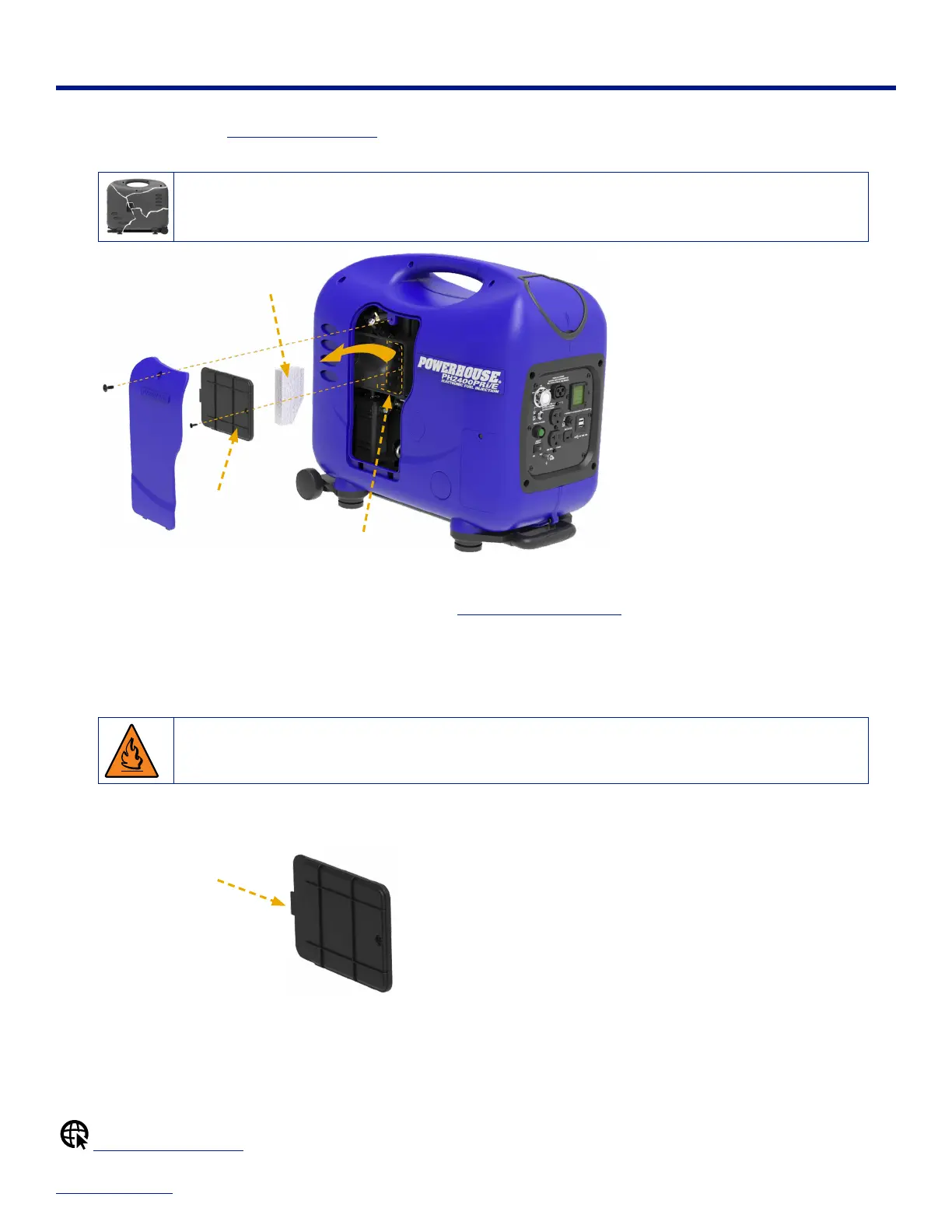
Air Filter
Cover
Air Filter Element
Air Filter Case
To clean the air filter element:
1. On the left side of the generator, remove the screw and the Maintenance Access Door.
2. Remove the screw from the air lter cover.
3. Remove the air lter element from the air lter case inside the generator.
4. Inspect the air lter element. If the element is dirty, wash it in a soapy solution and let it dry thoroughly.
▲ Do not use gasoline or low flash point solvents for cleaning because they are flammable and explosive under
certain conditions.
5. Place the air lter element back into the air lter case inside the generator.
6. Reinstall the air lter cover and screw. Keep the tab positioned on the left when inserting the air lter cover onto the air lter case.
Re-install cover
with tab on the left
7. Reinstall the maintenance door and screw back onto the generator.
Maintenance Schedule


 To Next Page