27
Table of Contents To navigate between hyperlink topics using a keyboard, select ALT+◄ or ALT+►.
Clearing a Fault Condition (blinking red light)
If the generator detects a problem with its engine performance or components:
• The red display indicator light illuminates and blinks intermittently.
• The generator may continue to run.
View the fault code and correct the cause of the fault condition to resume normal operation.
For a complete list of conditions, see the Fault Codes table.
To view and clear a fault condition:
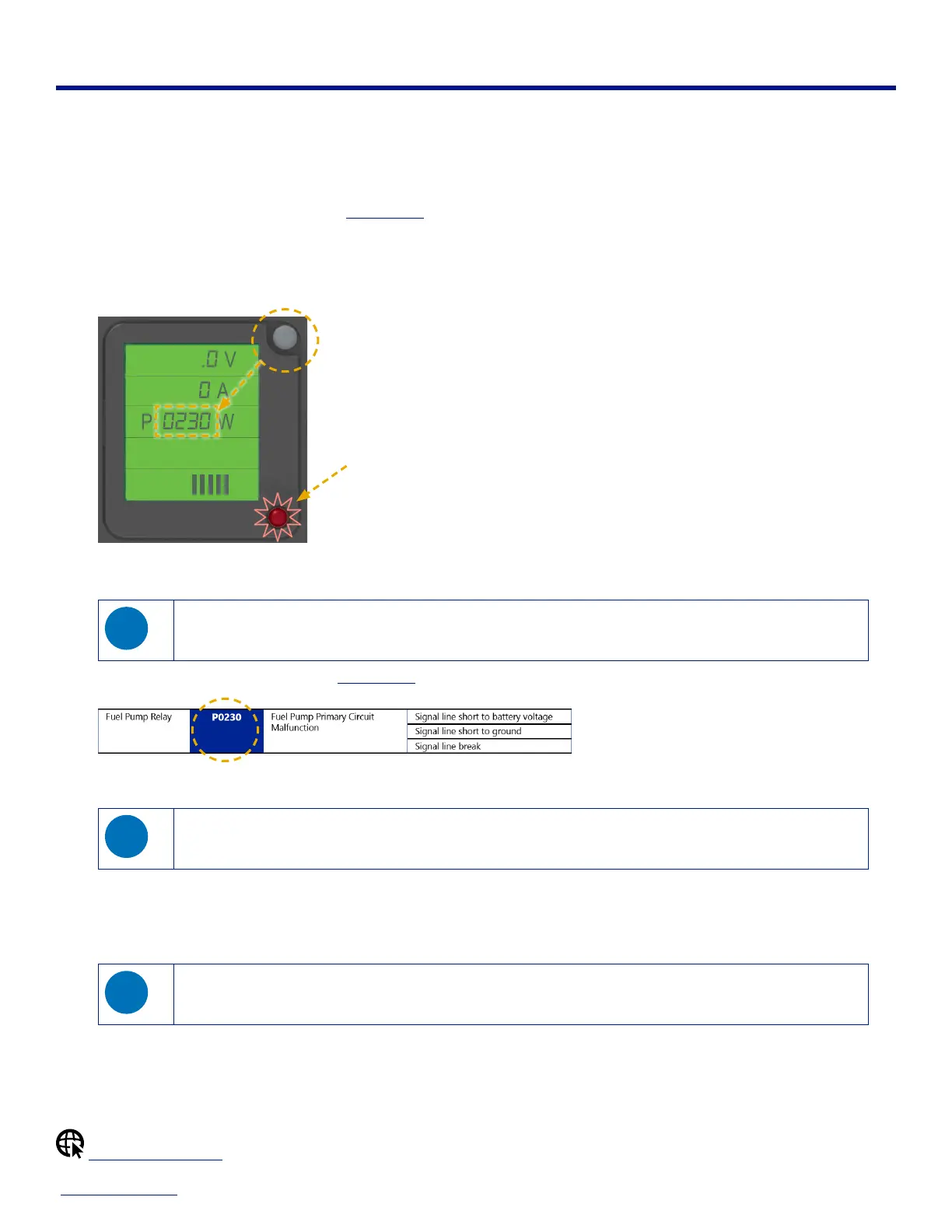
1. When the indicator light is blinking, press the Display Reset Button to view the fault code(s) on the P (power/watts) output line on
the LCD.
FUEL
T:
000.0 H
P:
0230 W
I:
00.0 A
U:
000.0 V
Blinking red light
indicates fault
condition(s)
Press to display fault code(s)
• If there are multiple fault codes, they are displayed in succession.
• Once all fault codes have been displayed, a zero value appears on the P (power/watts) output line on the LCD.
If the generator is not running, but the ignition switch is ON, the LCD dims after 30 seconds to conserve battery
power. To view the fault codes again, simply toggle the ignition key (or remote switch) OFF-ON, then press the
Display Reset Button again.
2. Compare the code(s) on the LCD to the Fault Codes table to identify the source(s) of the fault condition.
3. Shut down the generator, then correct the condition(s) causing the fault code(s).
Some fault codes can only be corrected by a service technician. If you are unable to correct the fault condition,
take the generator to an authorized POWERHOUSE
®
service center.
4. Restart the generator.
5. Press and hold the Display Reset Button for several seconds to reset the LCD and indicator light.
The LCD shows output voltage when the generator is ready for use.
If the fault code(s) or blinking indicator light is still present after you press the Display Reset Button, repeat the
steps above to clear the remaining fault condition(s).
Find a Service Center


 To Next Page