39
Table of Contents To navigate between hyperlink topics using a keyboard, select ALT+◄ or ALT+►.
Replacing the 12V Battery
Clean and replace the 12V battery as recommended in the Maintenance Schedule.
To remove the battery for maintenance or replacement:
1. On the left side of the generator, remove the screw and the Battery Access Door.
2. Unplug the quick connect cable from the wiring harness.
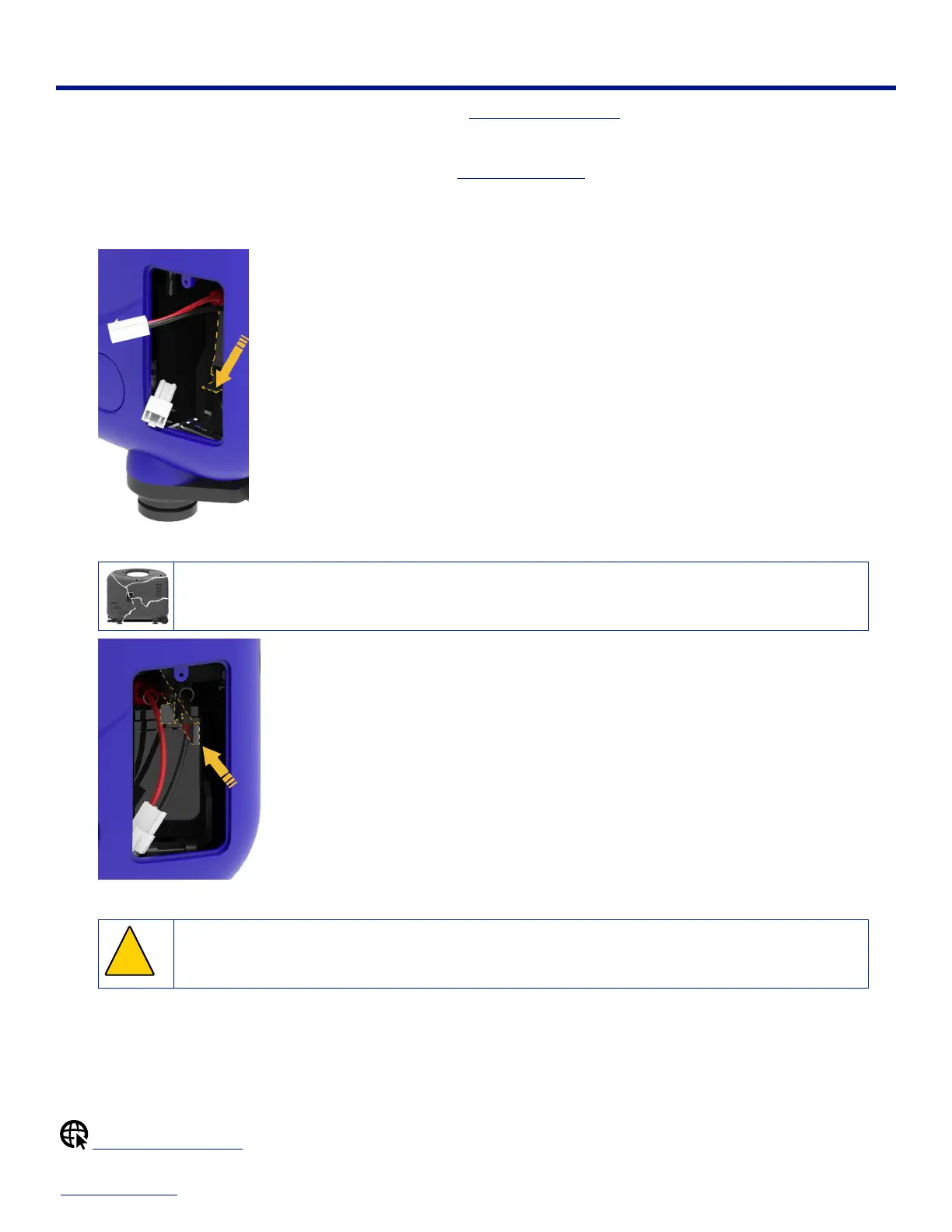
3. Press down on the battery hold down strap and detach it from the battery box.
4. Turn the strap sideways and feed it onto the top of the 12V battery, between the red and black battery cables.
▲ Ensure that you don’t accidentally short the battery by touching the strap to the battery terminal or
dropping tools across the battery leads.
5. Slide the battery out.
!
▲ Ensure that you don’t accidentally short the battery when removing it by touching the positive terminal to
the chassis.
6. To replace the 12V battery, lift up the battery hold down strap while you slide the new battery into place.
7. Reattach the battery hold down strap to the battery box.
8. Plug the quick connect cable back into the wiring harness.
9. Reinstall the battery access door and screw back onto the generator.
Maintenance Schedule


 To Next Page