16
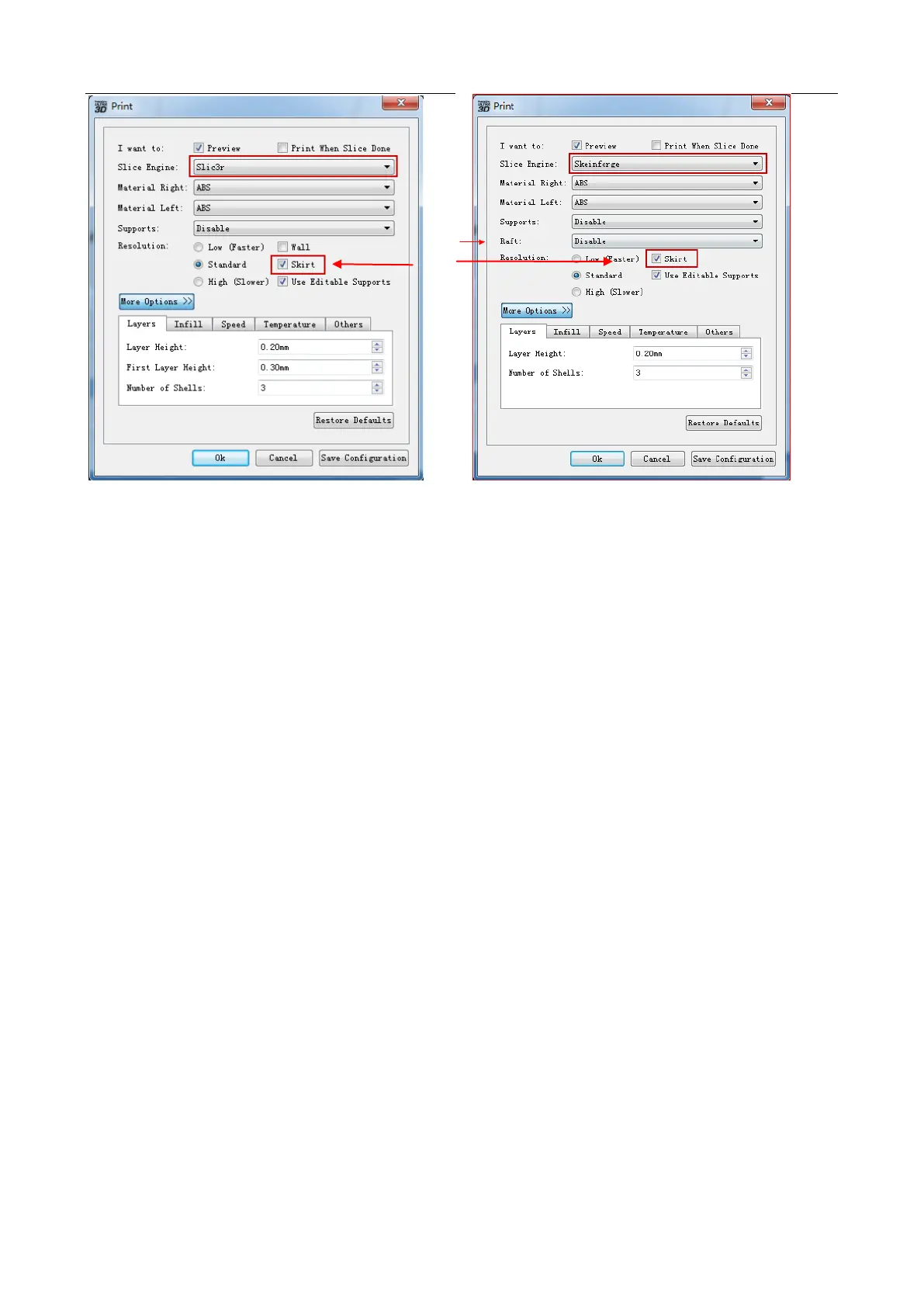
A. Preview: Select this option to preview the Gcode file when slicing is finished.
B. Print When Slice Done: Select this option to directly print the model.
C. Slice Engine: Three slice engines are provided: Slic3r, Skeinforge and ffslicer. Different slice
engines have different configurations. It is recommend to select Slic3r, as it has better
performance.
D. Material Right: Choose filament type you want to use with right extruder.
E. Material Left: Choose filament type you want to use with left extruder.
F. Supports: Choose Left or Right Extruder to print supports when overhang is existing, or
disable when not needed.
G. Raft: Choose Left or Right Extruder to print rafts which can helps the model to adhere better to the
build plate, or Disable when not needed. (Note: Slic3r has no this function, while Skeinforge has
this function with the default extruder used to print the raft. You can choose left or right extruder to
print the raft when using ffslicer.)
H. Skirt: Select this option to help extruder extrude filament more smoothly. (Note: ffslicer does not have
this function.)
I. Wall: Select this option to scrape extruded filament from a non-printing extruder during dual
extrusion print. (Note: Skeinforge does not have this function. This function can’t be used with Skirt
at the same time.)
J. Use Editable Supports: Select this option to disable the built-in supports function in the slice
engine and use the support structures generated by Powerprint software. ffslicer has no
built-in support functions, so this function is always enabled.
K. Resolution: When printing using the right extruder with ABS, or dissolvable filament, you can select
High option with better print but lower speed, or Standard option, or Low option with normal
print but high speed. Each option has its own configured parameter. While printing with the right
extruder with PLA filament, you have the fourth option, which is Hyper with hyperfine print.
Click More Option button to set the parameters as you want. Different resolutions have different
default parameters. Click Restore Defaults to restore it.
H
G


 To Next Page