20
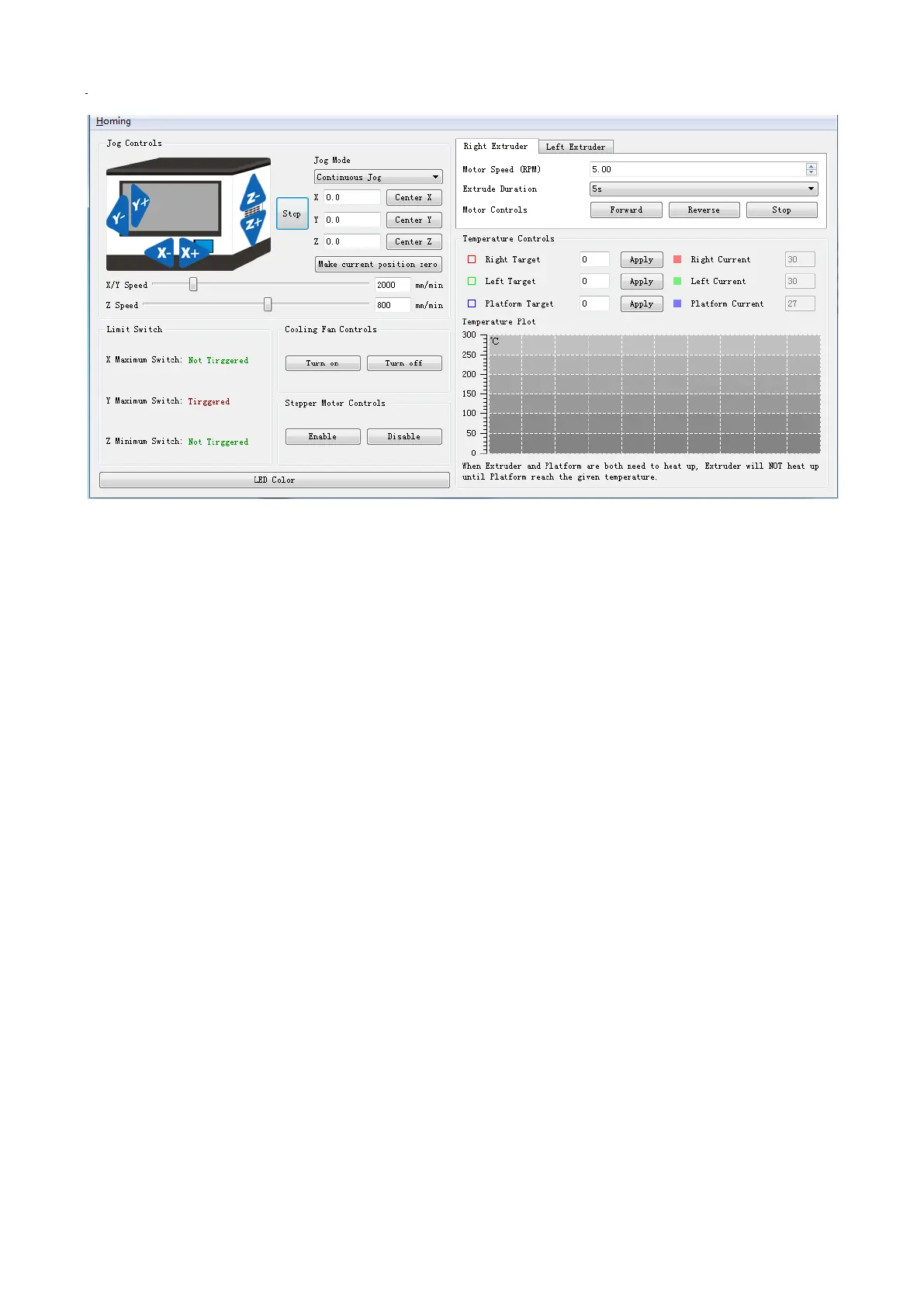
A. Jog Controls
a. Jog Mode:
You can set the distance the extruder or the platform moves by a single jog click time.
b. Direction Buttons:
These six blue-arrow buttons are set to control the movements in the X/Y/Z directions. Click the direction
buttons of the x-axes and y-axes to control the horizontal movements of the extruder. Click the direction
buttons of the z-axes to control the vertical movements of the platform. Click the X- button to make the
extruder move to the left; click the X+ button to make the extruder move to the right. Click the Y- button
to make the extruder move forward; click the Y+ button to make the extruder move backward. Click the
Z- button to make the platform move upward; click the Z+ button to make the platform move downward.
The distance of movement will be shown in the X/Y/Z value bar.
c. Stop Button:
Click this button to terminate the current movement.
d. Coordinate frame:
Displays the coordinated positions of the extruder and platform.
e. Make the current position zero, button:
Click this button to set the current position of the extruder and platform as the origin of coordinates.
f. Center X/Y/Z buttons:
Click these buttons to return the extruder or platform to the origin of coordinates automatically.
g. X/Y/Z Speed sliding bar:
Set the moving speed of the extruder and platform by sliding the speed sliding bar.
B. Limit Switch
In order to protect the 3D printer, there are three limit switches on the X/Y/Z axes used to control the
movement limit positions. The following are the two statuses:
a. Open Status:
If the extruder or platform has not reached the limit position of the X/Y/Z direction, the switch will not be
triggered and its status is Open.
b. Triggered Status:
If the position of the extruder or platform has reached the maximum point of the X/Y/Z direction, the
limit switch will be triggered and its status will be displayed as Triggered.
C. Fan Controls
Click the Open button to turn on the cooling the fan and the Close button to turn it off.


 To Next Page