37
4 Advanced Ableton Live Integration
4.2 Screen Controls
ATOM SQ
Owner’s Manual
5. Rate. When selected, the Screen Encoder will adjust how fast or
slow the arpeggiator steps through each note in the sequence.
6. Octaves. When selected, the Screen Encoder will change how many
octaves the sequence will step through before restarting.
4.2.2 Song Mode
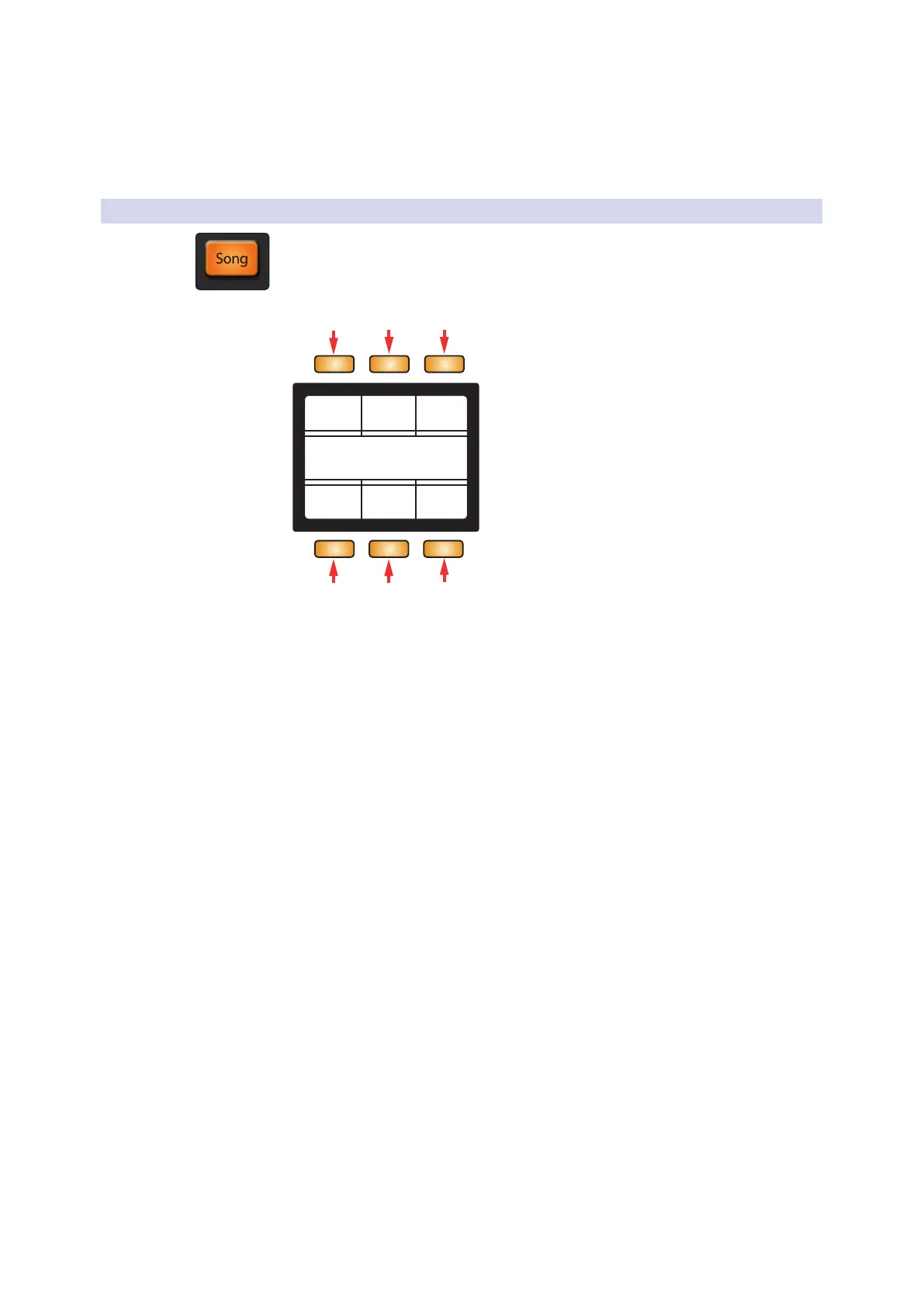
Song mode will display commonly used functions and commands for your Session.
Device Name
Track Name
Solo Mute Arm
Clip StopScene
1 2 3
4 5
6
1. Solo. Solos the currently selected track.
2. Mute. Mutes the currently selected track.
3. Arm. Record arms the currently selected track.
4. Clip. Launches the currently selected clip.
5. Scene. Launches the currently selected scene (independent of the box).
6. Stop. Stops the currently playing clip.



 To Next Page