4 Connecting Your RM-series Mixer to Your Audio System
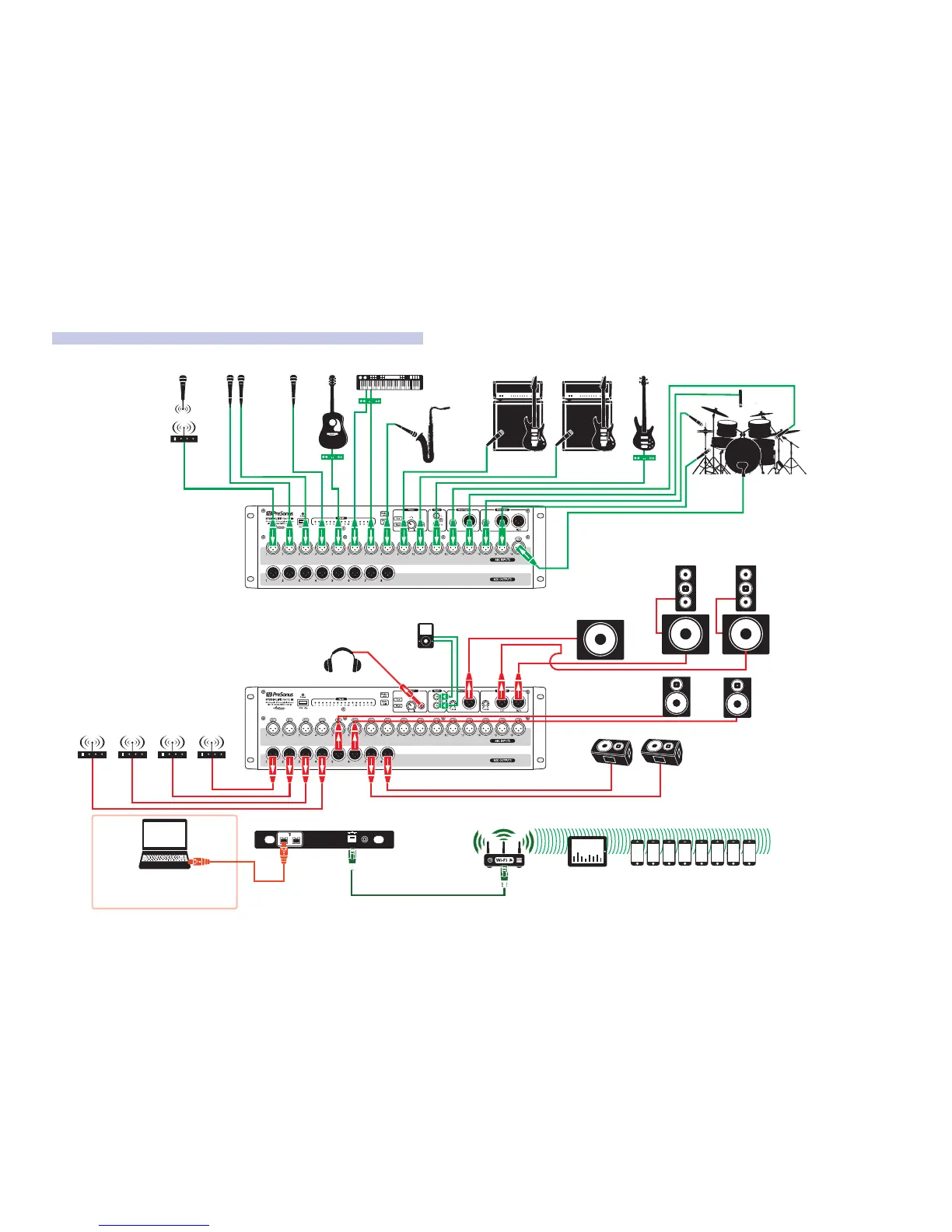
4.9 Diagrams of Typical Setups
StudioLive™ RM-Series Mixers
Owner’s Manual
48
FireWire-equipped laptop
running Capture 2.0
This connection has up to 32 channels
and 20 mixes running to the recording computer!
S800S800
S800S800
S800S800
S/PDIF
Control Output
S800S800
S800S800
S800S800
iPad running
UC Surface
iPhones running QMix-AI
floor wedges
mo’ bass
drum
monitor
side
fill
wireless in-ear
(lead guitar)
wireless in-ear
(bass)
wireless in-ear
(keys)
wireless in-ear
(lead vocals)
main
speakers
and
subwoofers
AI Mixer Option Card
headphones
music source
keyboard/DI
lead vocal
DI
Box
DI
Box
backup vocal micswireless mic
acoustic
guitar/DI
DI Box
drum kit
bass/DI
electric guitar
amp (rhythm)
electric guitar
amp (lead)
sax
4.9.2 RM16AI Typical Band Setup











 To Next Page