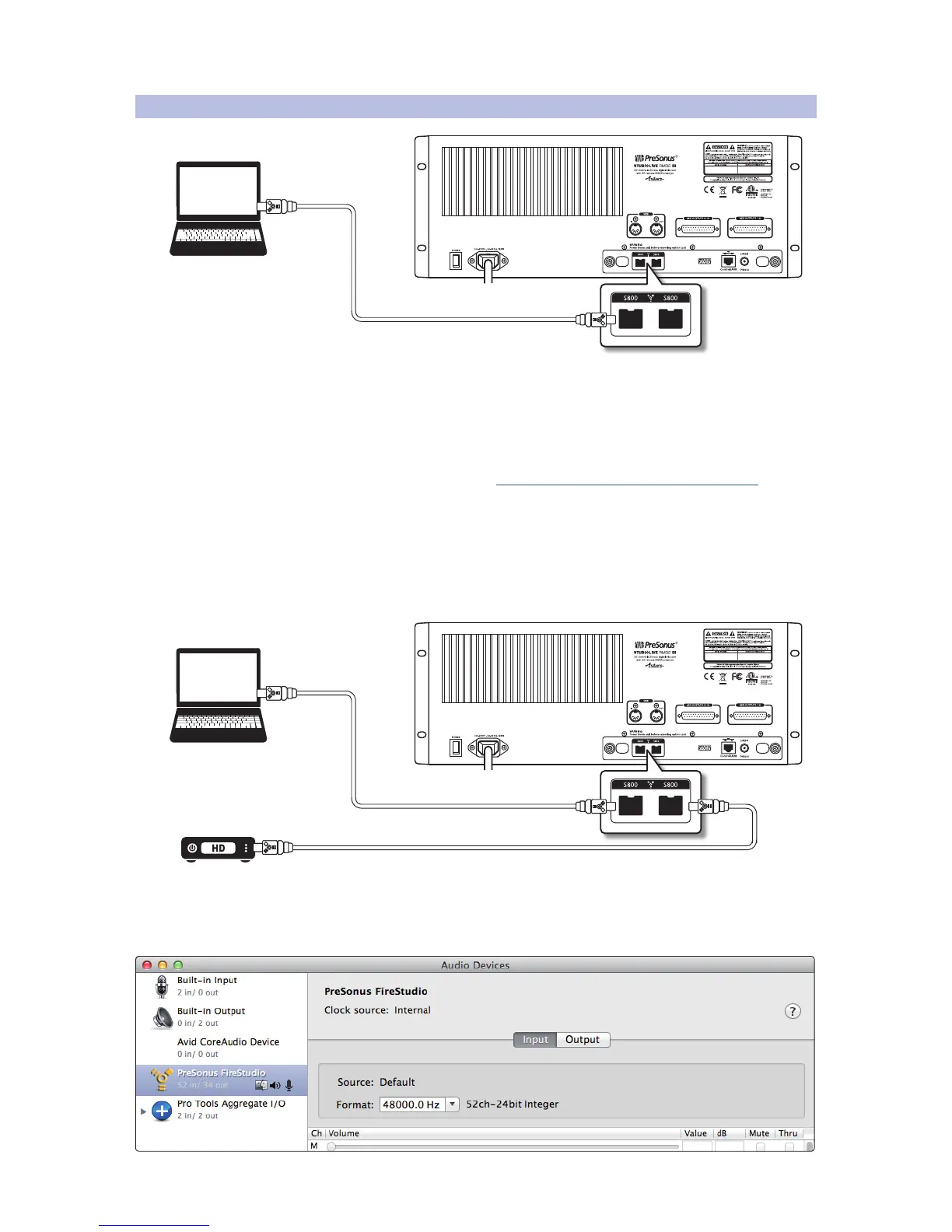
3.10 FireWire Audio Setup
The FireWire s800 connection carries audio betwen the RM-series mixer your
computer, enabling your RM-series mixer to act as a 52 x 34 FireWire recording
and playback interface for Capture, Studio One, and other audio programs.
Your computer must be equipped with a FireWire s800 (IEEE 1394b) port. If
your computer has a Thunderbolt port but not a FireWire s800 port, you can
use the Thunderbolt port with the Apple Thunderbolt to FireWire adapter.
To set up the FireWire connection:
1. Use the included FireWire cable to connect either of the FireWire ports on
the rear panel of the RM-series mixer to a FireWire port on your computer.
2. The second FireWire port on the RM-series mixer can be used to
connect another FireWire device, such as a hard drive.
3. With Mac OS X, the RM-series mixer uses the PreSonus FireStudio driver and
shows up in the Audio MIDI Setup application as a PreSonus FireStudio interface.











 To Next Page