Controls and Instruments
38
AFSS PROTECTION PANEL & MANUAL ACTIVATION
SWITCH
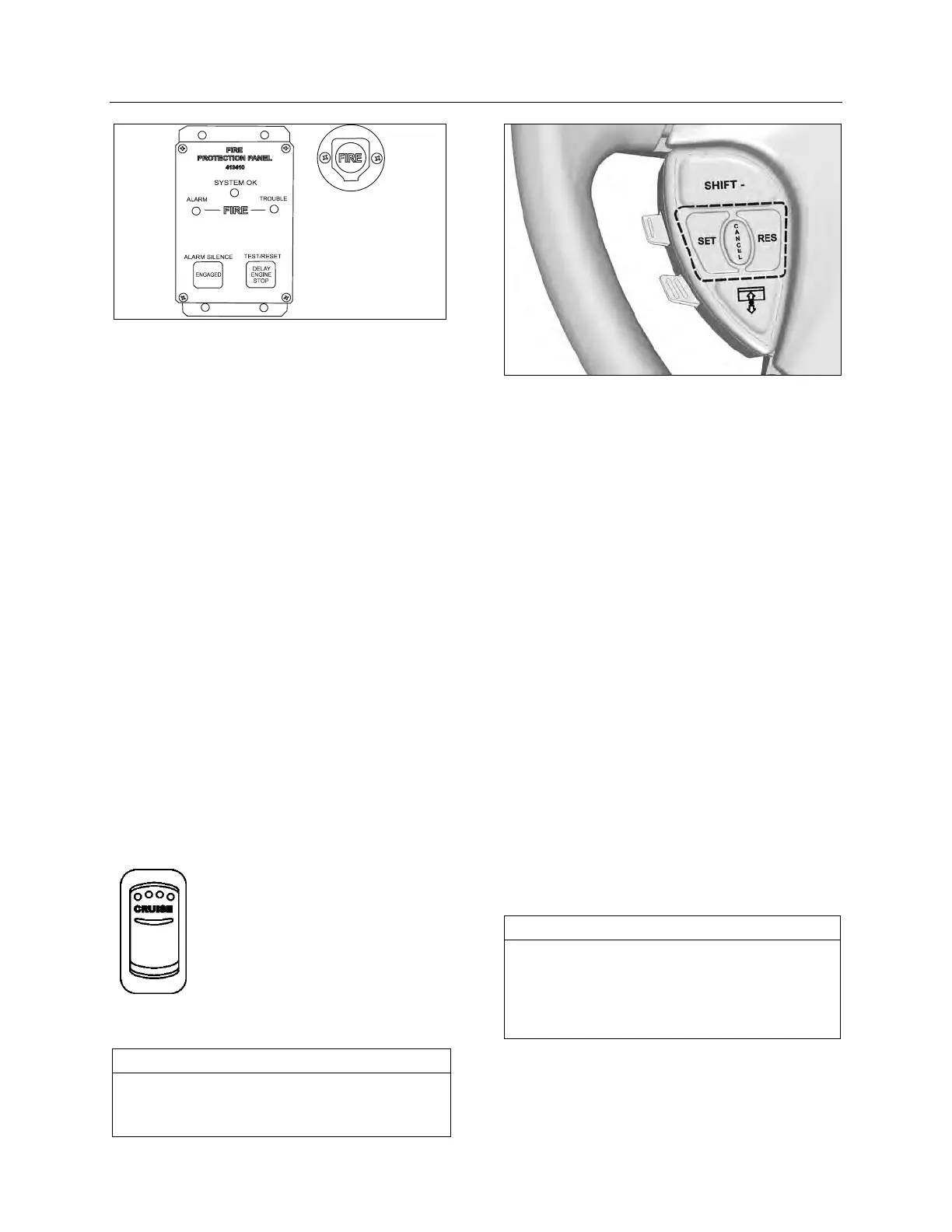
Manual Activation Switch
The manual activation switch allows immediate
system activation (extinguisher discharge and
engine shutdown) by the operator at any time.
Activation of the switch is accomplished by
twisting and pulling the tamper seal to remove,
lifting the cover and pressing the red “FIRE”
button for more than half a second. After the
manual activation switch has been activated, the
protection panel will blink the fire “ALARM”
indicator until power has been cycled to the
system.
Refer to chapter “
SAFETY FEATURES AND
EQUIPMENT
” for more information on Kidde Dual
Spectrum Automatic Fire detection and
Suppression System (AFSS).
CRUISE CONTROL
REGULAR CRUISE CONTROL
The cruise control allows you to cruise the
vehicle at a desired speed over 18 mph (30
km/h) without having to use the accelerator
pedal.
Turning the system on
06701
To operate the cruise control,
press the cruise rocker switch
located on the lateral control panel
to the on position. This turns the
system on. The dashboard telltale
turns on; you can now set the
vehicle at a desired cruising
speed. To turn off the system,
press the rocker switch to the off
position.
NOTE
The CRUISE switch and RESUME button do
not operate at speeds below 30 mph (50
km/h).
CRUISE CONTROL BUTTONS
Setting at a desired speed
Accelerate the vehicle to the desired cruising
speed using the accelerator pedal. Press and
release the SET button then remove foot from
the accelerator pedal. This will set the vehicle
cruise speed and store it in memory. The set
speed will appear in the driver information
display.
Increasing set speed
The vehicle cruise speed setting can be in-
creased by one of the following methods.
1. Accelerate using the accelerator pedal until
the desired cruising speed is reached. Press
and release the SET button.
or
2. Press and hold the RES (RESUME) button
until the desired cruising speed is reached.
When the RES button is released, the new
cruising speed will be stored in the cruise
control memory.
or
3. When driving with cruise control, each time
the RES button is momentarily depressed,
the cruising set speed is raised by 1 mph (2
km/h).
NOTE
When driving with cruise control, the vehicle
can still be accelerated by depressing the
accelerator pedal in the usual manner. Once
the accelerator pedal is released, the vehicle
will return to the previously set cruising speed.







 To Next Page