Controls and Instruments
58
Press CAM button again to turn off the panoramic
view camera.
6. NAV
Press
NAV button to display the optional GPS
navigation system guidance screen (Not
applicable).
7. BAS, BAL, TRE, LOUD
Press one of these buttons to select BASS,
BALANCE, TREBLE and LOUDNESS mode.
8. +, -
Press these buttons to increase or decrease the
value for BASS, BALANCE, TREBLE and
LOUDNESS mode.
NOTE
Point the remote control in direction of the
VSS-05. Remote control battery replacement.
Use CR2025 lithium battery.
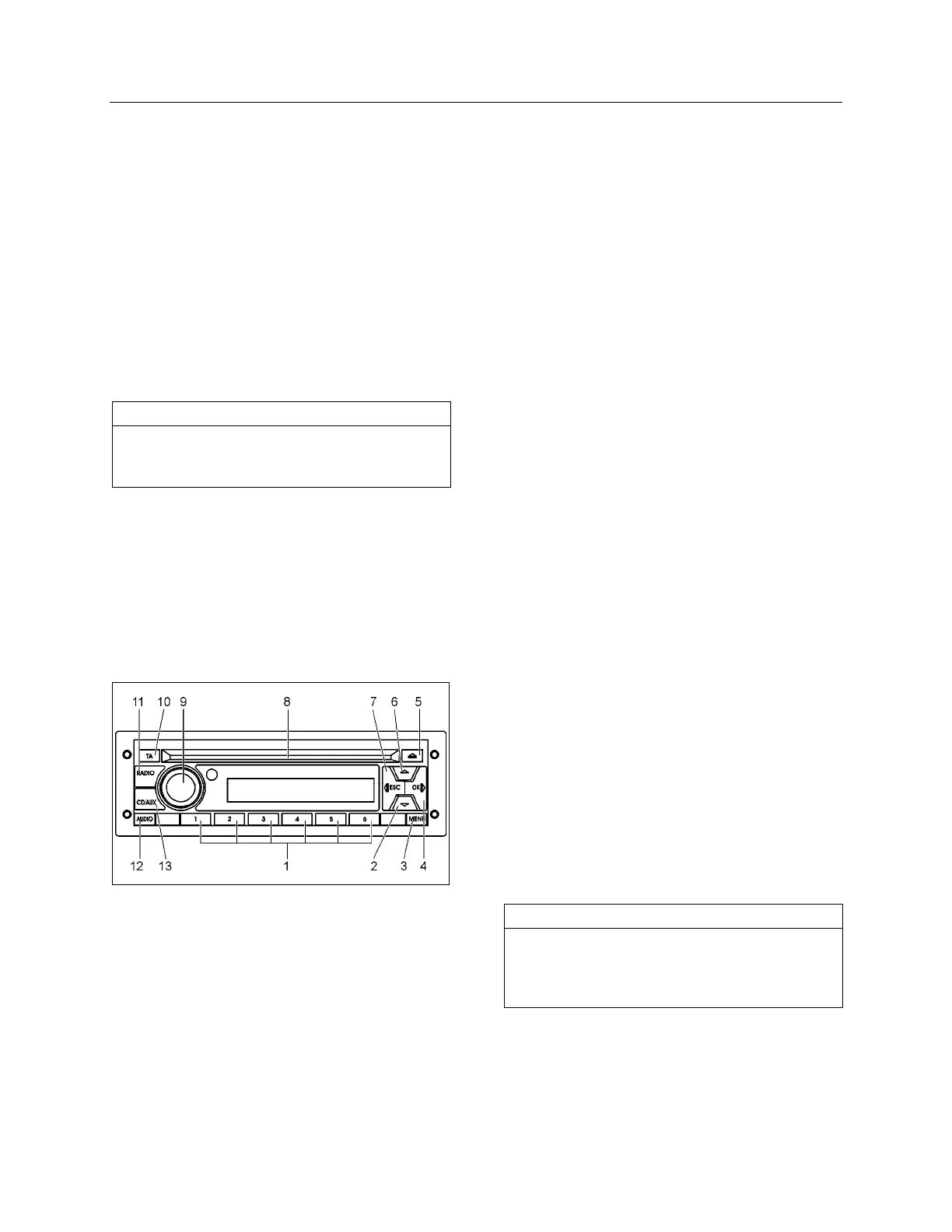
DASHBOARD RADIO/MP3/IPOD/CD PLAYER
Select from several sources of entertainment for
the driver’s area such as AM, FM, WX weather
band and Satellite radio (optional) services. Play
a CD inserted in the radio’s CD slot or listen to a
MP3 device or iPod through this unit. The
complete radio operating instructions manual is
included at the end of
SECTION 23: ACCESSORIES
of your vehicle’s Maintenance Manual.
1. Preset 1- 5 buttons
• Radio: Push and release to recall preset
station
• Radio: Push and hold to store preset sta-
tion
2. Down arrow button
• Radio: Manual tuning down
3. Menu button
• Radio: Push and release to access menu
4. (Fast) forward button >>
• Radio: Seek
• CD/USB: Push and release to select next
track
• CD/USB: Push and hold for fast forward
• Bluetooth Phone: Accept incoming call
(option)
5. Eject CD button
• CD: Eject CD
6. Up arrow button
• Radio: Manual tuning up
7. (Fast) reverse button <<
• Radio: Seek
• CD/USB: Push and release to select
previous track
• CD/USB: Push and hold for fast reverse
• Bluetooth Phone: Reject incoming call or
hang up (en option)
• iPod: Push and hold to enter the iPod
menu (option)
8. CD slot
• Insert / Remove CD
9. Rotary knob / Power button
• Push: Power On and Off
• Turn: Volume adjust and audio value
update
10. Information (Traffic / News)
• Radio: Switch traffic on or off
• Radio: Cancel ongoing traffic or news
message
11. Radio select mode
• Radio: Choose from FM1, FM2, FM3 (op-
tion), AM, Weather band and Satellite ra-
dio (option)
12. Audio button
• General: Audio settings
13. CD/Aux mode select
• CD/USB: Switch between sources other
than radio
NOTE
The driver speakers are controlled from the
dashboard radio volume knob while the
passenger’s area speakers are controlled from
the VSS-05 Sound Selector volume knob.
Dashboard Radio External Audio Input
There are three possible external audio input
modes:
• USB
• AUX







 To Next Page