Controls and Instruments
47
example, the spare tire is removed from a
vehicle.
The user will have the possibility to check the
pressure of the spare tire by accessing the
TPMS display menu. For vehicles that have no
spare tires, the title “spare tire“ will still appear
on the screens but the pressure will remain with
two dash lines at all time.
Post Trip Operation
When parking the vehicle (park brake applied),
the TPMS display keep the drive mode display
active. The driver can press any keys to get the
bottom lines showing the status information
replaced with the menus.
The pressure readings are still displayed and
updated as new readings are received and the
readings are blinking if not within the optimum
pressure range.
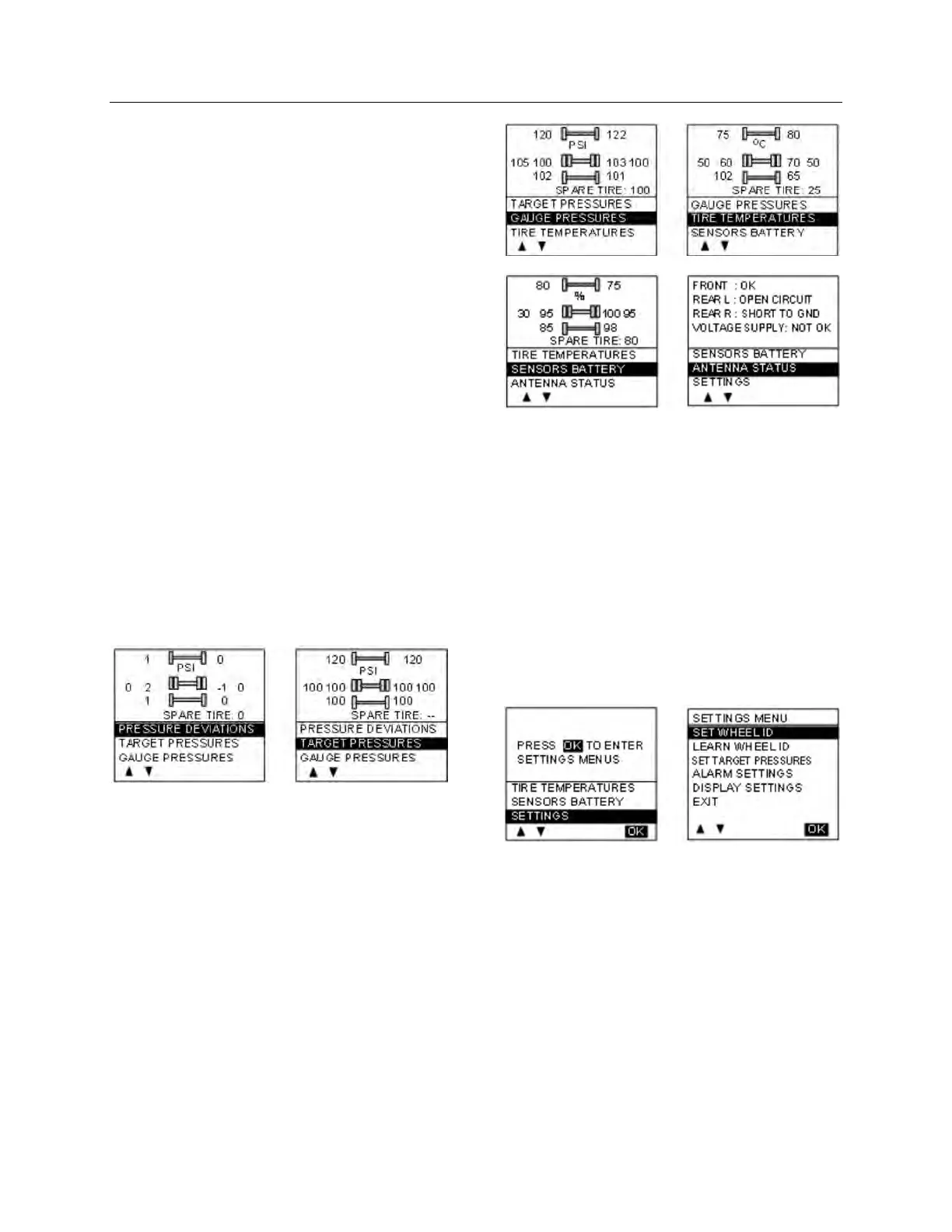
From this point the user can scroll through the
menus to get more detailed information and
inflate / deflate the tires to bring them back to
their optimum target pressures. Scrolling
through these menus is also available prior to
departure.
The display remains in this mode with the
menus appearing at the bottom until the pre-trip
check sequence starts again.
Scrolling down below the Battery life menu will
show the Settings menu. Highlighting the
Settings and pressing OK allows entering the
settings menu. Refer to chapter “SAFETY
FEATURES AND EQUIPMENT” for more
information on “SETTINGS MENU”.
Refer to chapter “Appendix G” for TPMS
Troubleshooting Guide.
Highlighting the Exit menu and pressing OK
exits the settings and come back to the pressure
display mode.







 To Next Page