1.7
Operation Manual
© 2013 Prism Media Products Ltd
Revision 1.00Prism Sound Lyra
To deal with low-latency requirements in live sound and over-dubbing, Lyra has its own fully-featured
mixer for each output channel pair (including the stereo digital, ADAT and headphones). When
selected, each mixer allows a low-latency mix of any input channels (as well as the output's
associated workstation feeds) to be sent to the required outputs. Additionally, each output can be
switched to follow the output of any other output's mixer.
A front-panel volume control can be assigned to any desired analogue or digital outputs, primarily for
use as a monitor level control.
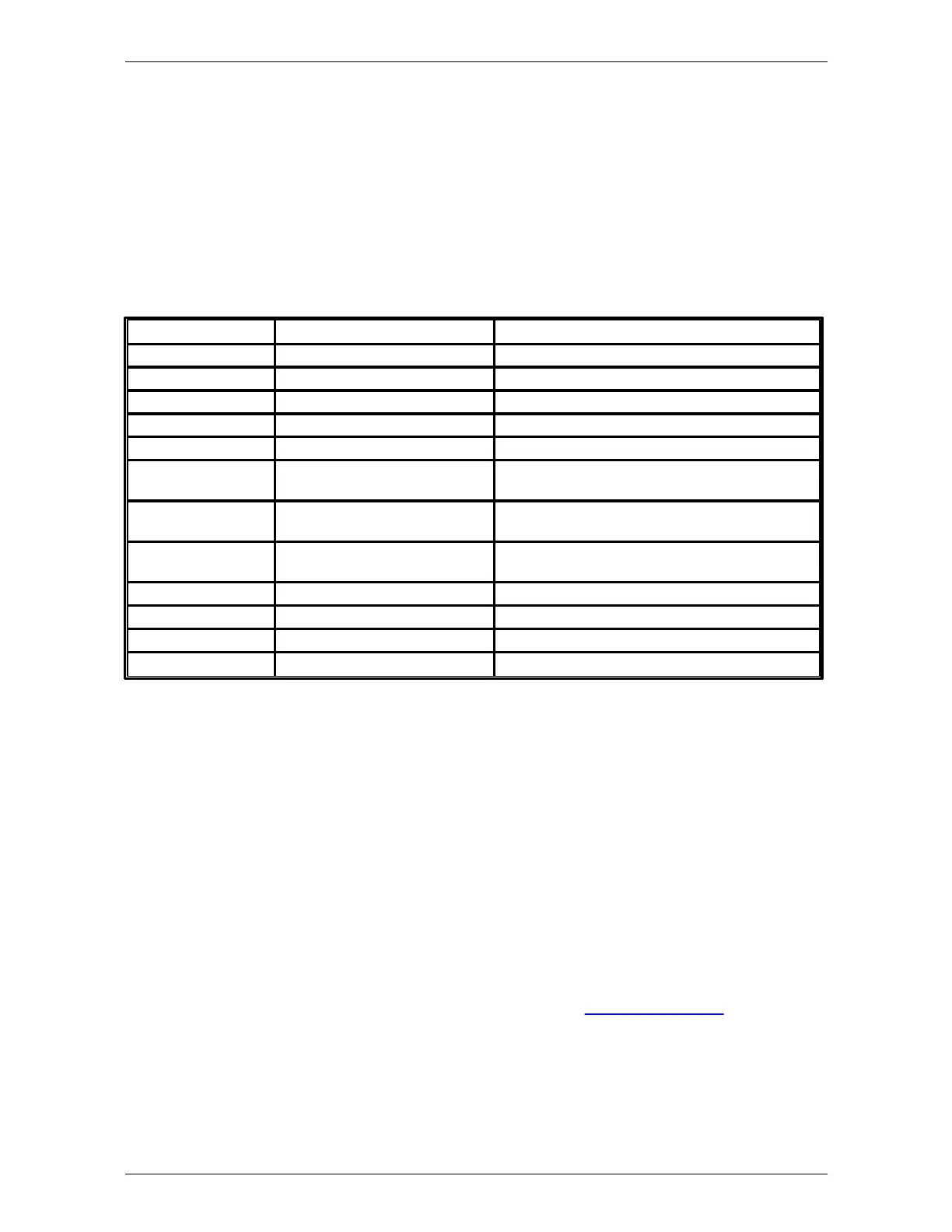
Lyra 1 offers a subset of the Lyra 2 functionality - it has only two analogue line outputs, and only a
single instrument and a single mic preamplifier, as well as more limited digital I/O capability. The
following table details the differences between Lyra 1 and Lyra 2:
Mic/instrument/line capable
Mic/instrument/line capable
Available in analogue inputs 1/2
Available in analogue inputs 1/2
Stereo S/PDIF, or AES3 with adaptor
(included)
Stereo S/PDIF, or AES3 with adaptor
(included)
Stereo S/PDIF, 8ch ADAT or 4ch
ADAT/SMUX
Wordclock, Baseclock or 256x clock
Available in stereo digital input
Available in stereo digital input or output
2.2 System requirements
Lyra will work with any modern host PC or Mac with a suitable operating system and USB 2.0 or 3.0
port. Macs must be Intel platform and must be running OS X 10.5 Leopard or later; PCs must be
running Windows Vista, 7 , 8 or later (32-bit or 64-bit).
This is not to say that the computing power of the host is unimportant, but it is more a requirement of
the audio applications than of Lyra. If you need to record or playback large numbers of channels,
perhaps at high sample rates or with a lot of processing or plug-ins, you will need a host computer
with a fast processor and bus, plenty of RAM, and probably a fast hard disk too. On the other hand,
playback of moderate channel counts at lower sample rates can be accomplished with even a
modest computer.
A good way to gauge this is to be guided by the system requirements of the audio software which
you are intending to use. For more information about this, see the Stability and latency section.


 To Next Page