1.37
Operation Manual
© 2013 Prism Media Products Ltd
Revision 1.00Prism Sound Lyra
6.1.2 Inputs tab
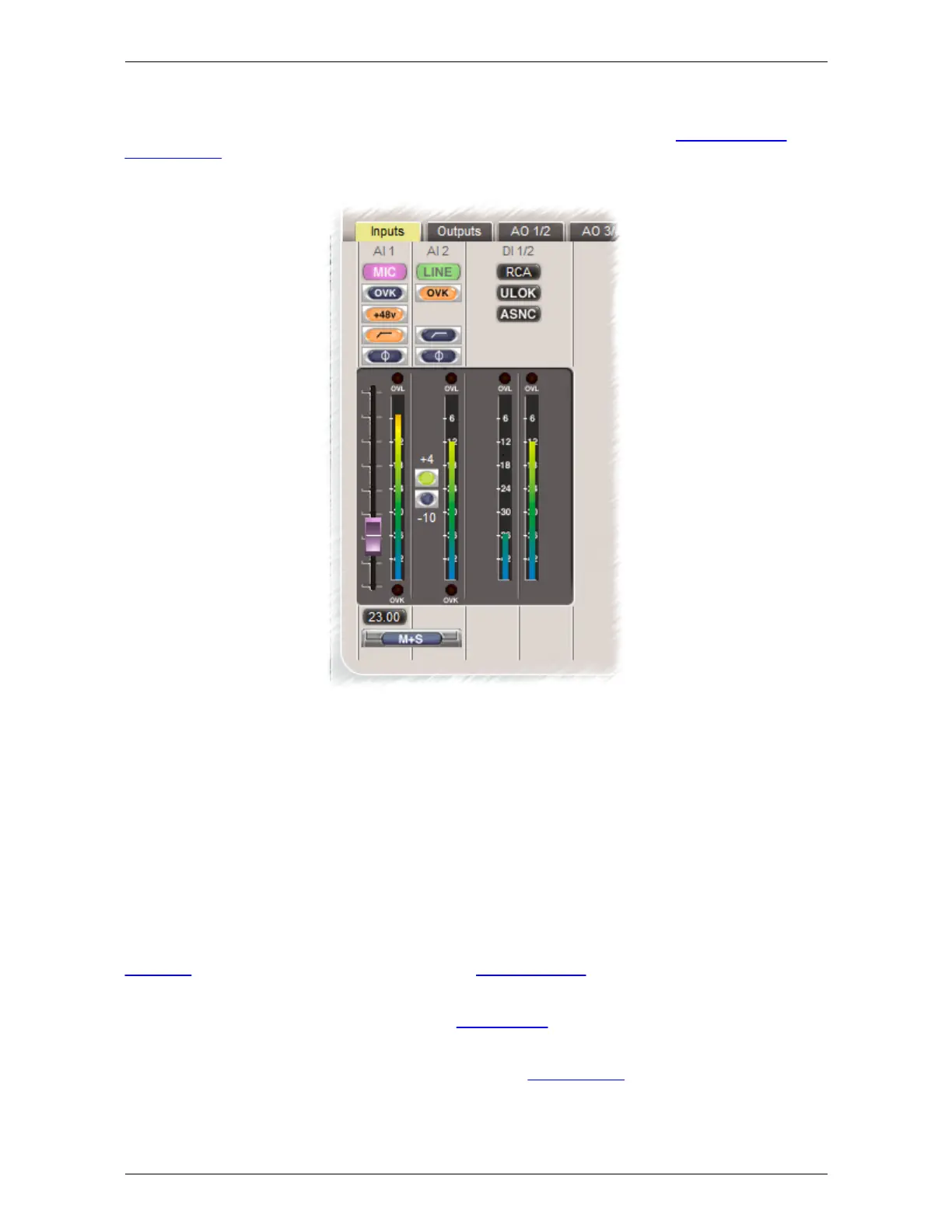
The Inputs tab contains the controls and status indicators for all functions of the analogue inputs and
S/PDIF inputs as described in the hardware section. In ADAT modes, the status of the ADAT/SMUX
inputs is also displayed here.
The mode of each analogue input is controlled by the coloured button at the top of the strip. Clicking
on the button drops a list of available input modes for that channel. These modes can be selected
explicitly, or if the 'Detect' setting is chosen the mode is selected automatically according to which
input connectors are sensed. Instrument mode is indicated by the blue 'INST' legend at the top of
the strip, microphone mode by the pink 'MIC' legend and line mode by the green 'LINE' legend. In
'Detect', microphone mode is over-ridden by line mode whenever a jack is plugged into the line input,
and both are over-ridden by instrument mode whenever a jack is plugged into the instrument input.
Note that a -20dB padded microphone mode may also be manually selected using the 'PAD'
selection.
Line input sensitivity is switched between +4dBu and -10dBV nominal by the '+4/-10' radio buttons,
whereas microphone and instrument input gains are adjusted in 1dB steps by the slider controls, and
indicated by the number beneath, which can also be directly entered if required.
Overkiller progressive limiters, phase-reversal and high-pass filters are are selectable for each
analogue input. Mic inputs have +48V phantom power switchable per-channel. On Lyra 2, each
analogue input also has an RIAA de-emphasis filter selectable as an alternative to the high-pass
filter, allowing them to be used with vinyl decks. MS matrixing is also available on Lyra 2, allowing
use of mid-side microphone configurations.
The DI strip can be switched between RCA and TOSLINK S/PDIF inputs, and ULOK and ASNC
indicators are provided. ULOK (unlock) is lit when no S/PDIF carrier is detected at the selected
input; ASNC (asynchronous) is lit when the incoming carrier is not locked to Lyra's selected sync
source. In ADAT modes, ULOK and ASNC indicators are also provided for the ADAT/SMUX inputs.


 To Next Page