1.27
Operation Manual
© 2013 Prism Media Products Ltd
Revision 1.00Prism Sound Lyra
mute button and high-resolution level meters.
In addition, it is possible to force individual physical outputs to be fed from the mixers associated with
other outputs. This is useful, for example, in driving multiple physical stereo outputs from the same
stereo bus. Note that the routing matrix precedes the Assignable level control, so that ganged
outputs may still be individually controlled.
The output mixers are primarily intended to provide low-latency foldback or monitor mixes
incorporating Lyra's audio inputs in conjunction with feeds from the DAW software - since the mix is
performed locally, the delay involved in passing live audio up to the host computer and back is
removed. However, it is also possible to configure the output mixers for general purpose use, where
inputs can be mixed to outputs without involving the Host's audio at all. Having set up such mixes
using the Lyra Control Panel app, it is possible to use stand-alone mode to retain the mix features
with no computer connected.
For more information, see the Mixer tabs section of the Lyra Control Panel app, and the Stability and
latency section.
5.1.6 Assignable level control
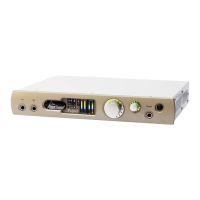
Lyra's front panel has a large assignable level control. This control can be assigned individually to
any of Lyra's analogue or digital (including ADAT) outputs (but excluding the headphone output
which has its own dedicated level control). Operation of the front panel control fades all assigned
outputs. The setting of the control is indicated by a halo of LEDs around the knob. The assignable
level control is primarily intended as a stereo monitor control.
Pressing the knob engages a mute mode wherein the LED halo flashes and the assigned outputs are
muted.
Assignment is via the Outputs tab of the Lyra Control Panel app. In this tab, there is also an
indication of the position of the control, which can also be operated on the screen using the mouse.
5.1.7 Headphone outputs
The headphone output signal path differs from Lyra's other output signal paths in a couple of
respects.
Firstly, in the Outputs tab of the Lyra Control Panel app, just above the 'DAW'/'MIX' selectors is a row
of radio buttons for quickly ganging the headphone outputs onto the mixer of any other stereo output
which it is desired to monitor on the headphones, without having to use the drop list in the
headphone selector. Note that the headphone monitoring point of the outputs is before the
application of the output routing matrix and the assignable gain control (if assigned).
Second, the headphone output cannot be assigned to the assignable gain control. This is because it
already has its own dedicated volume control on the front panel.
5.1.8 Metering system
Lyra's front panel meters can meter the level of either inputs or outputs as selected in the Unit
Settings tab of the Lyra Control Panel app. The left-most pair of meters show the levels of the
analogue inputs (or outputs); the right-most pair show the level of the S/PDIF inputs (or outputs).
Note that in the case of Lyra 2, the analogue output meters can be switched between analogue
outputs 1/2 and 3/4. The bar-graphs change colour progressively from blue, through green to orange
as signal level increases. A red 'overload' LED is lit if the signal reaches -0.05dBFS. Each of the
analogue meters has an indicator beneath which shows when the Overkiller (progressive limiter) is


 To Next Page