1.38
Operation Manual
© 2013 Prism Media Products Ltd
Revision 1.00Prism Sound Lyra
All inputs have high-resolution peak metering, with overload indication 0.05dB below clipping; the
analogue input meters also have Overkiller-active indicators which light dynamically when the
Overkillers are limiting.
6.1.3 Outputs tab
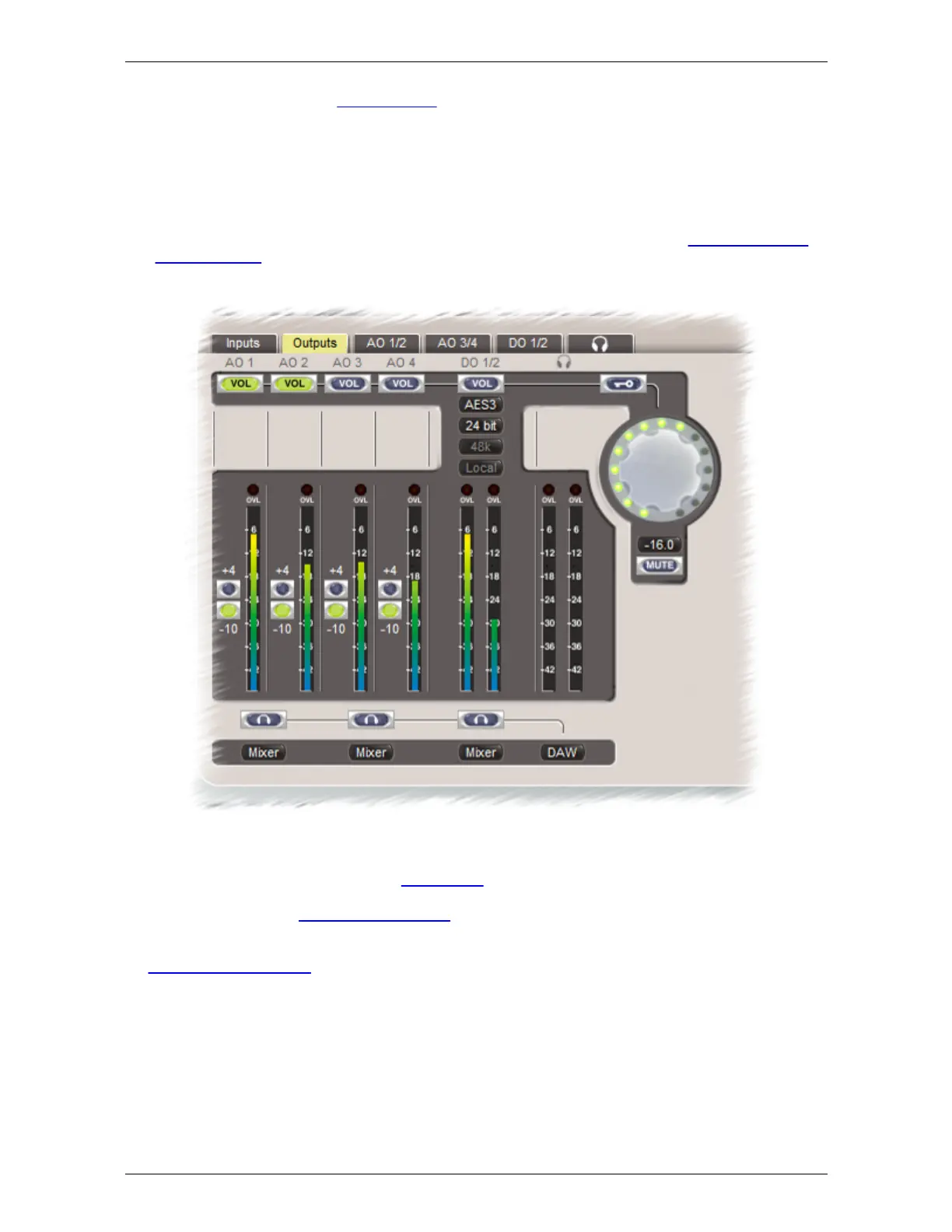
The Outputs tab contains the controls and status indicators for all functions of the analogue outputs
and S/PDIF outputs as described in the hardware section. In ADAT modes, the status of the
ADAT/SMUX outputs is also displayed here.
Line output level is switched between +4dBu and -10dBV nominal by the '+4/-10' radio buttons.
The stereo digital output has a versatile word-length control using TPDF dither or Prism Sound SNS
(Super Noise Shaping), and the RCA connector can be switched to operate as either S/PDIF or
AES3 as required. If the sample rate converter (SRC) is configured in the digital output, a separate
sync source and sample rate can be selected.
An assignable level control is available, for use as a monitor volume control, which can be assigned
to any desired outputs using the row of 'VOL' buttons. The volume control can be adjusted using the
mouse, as well as with the front-panel knob. There is also a mute button (whose function is also
available by pressing the volume knob on the Lyra front panel) and a numerical readout/setting box.
Note that changes to the assignment of the level control can be prevented by engaging the lock
button (marked with a key symbol) just above the level control. When engaged (red) the lock button
prevents changes to the level control assignment in order to avoid accidental full-level output.
Below each stereo output strip is a drop-list control allowing each output pair to be fed either directly
from the workstation ('DAW') or from a dedicated low-latency foldback mixer ('Mixer'), or from the


 To Next Page