PS5000 Series (Slim Panel Type Atom Model) User Manual
143
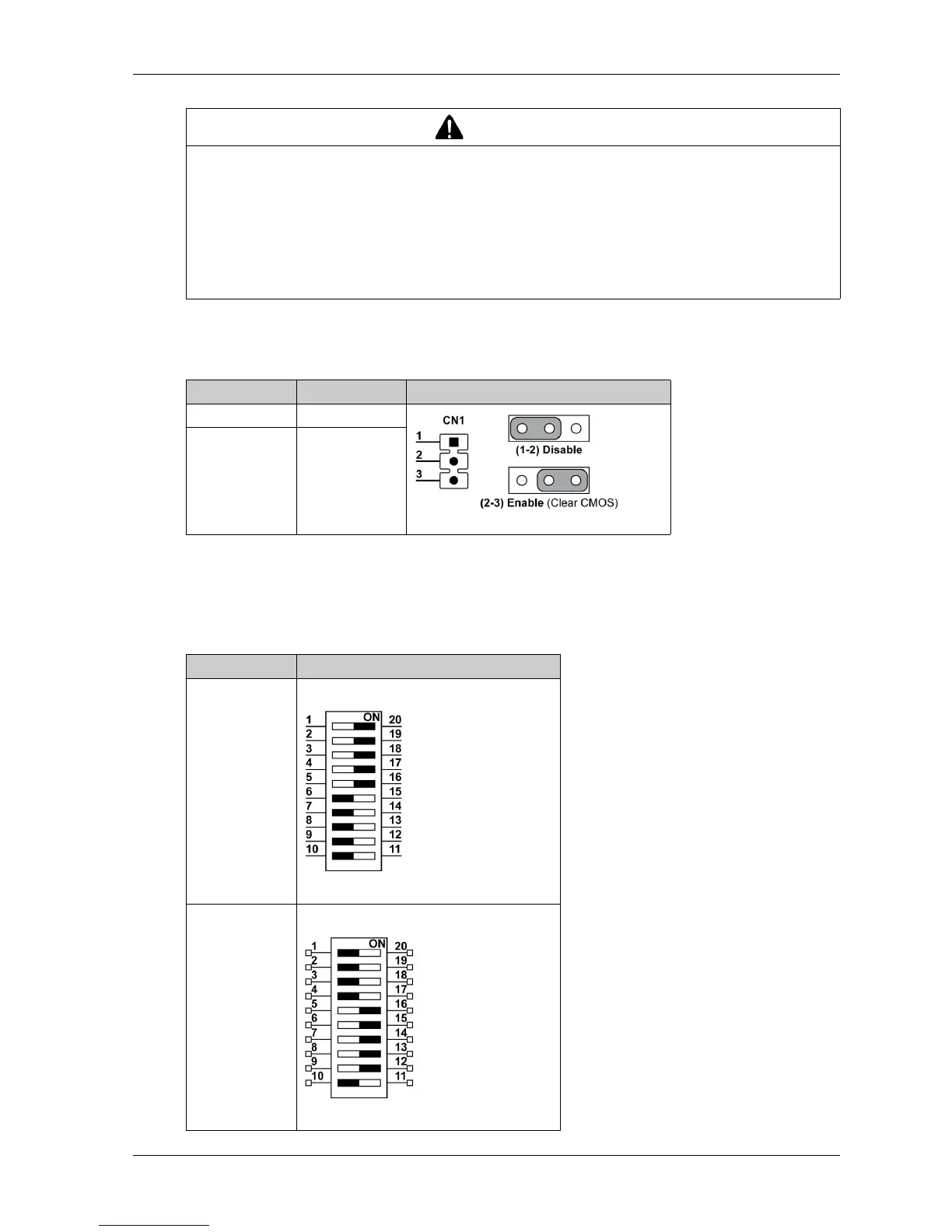
Clear CMOS Setting
The table describes the setting for the clear CMOS:
The default setting is disabled.
RS-232/422/485 Mode Setting
The table describes the RS-232/422/485 mode settings for the COM2:
CAUTION
OVERTORQUE AND LOOSE HARDWARE
Do not exert more than 0.5 Nm (4.5 lb-in) of torque when tightening the installation fastener,
enclosure, accessory, or terminal block screws. Tightening the screws with excessive force
can damage the installation fastener.
When fastening or removing screws, ensure they do not fall inside the Industrial Personal
Computer chassis.
Failure to follow these instructions can result in injury or equipment damage.
Position Description CN1
1-2 Disable
2-3 Enable
Mode SW2
RS-232 mode
RS-422 master
mode



 To Next Page