Dimensions / Installation
32
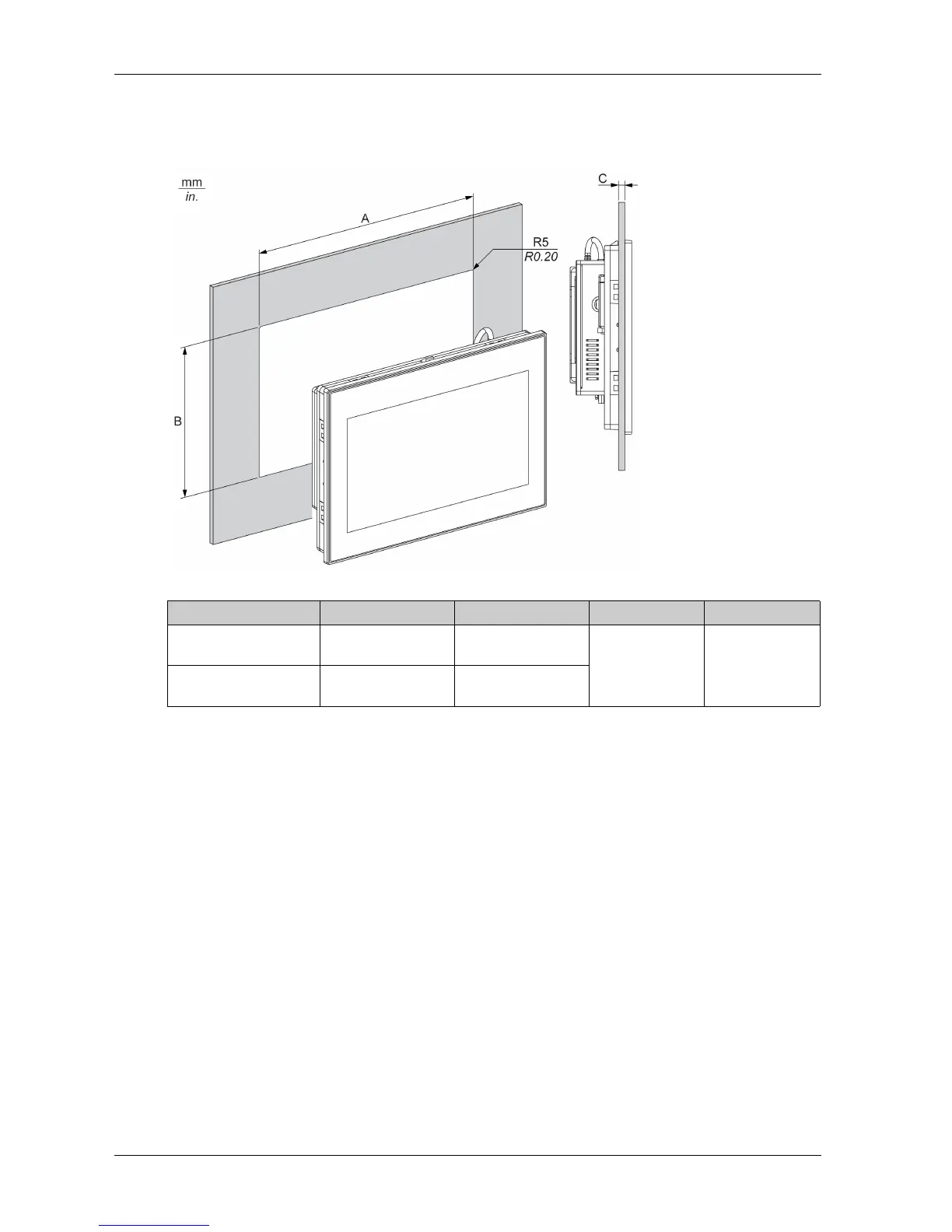
Panel Cut Dimensions
For cabinet installation, you need to cut the correct sized opening in the installation panel.
The dimensions of the opening for installing the Slim Panel are shown below:
NOTE:
Ensure that the thickness of the installation panel is from 2 to 6 mm (0.08 to 0.23 in).
All installation panel surfaces used should be strengthened. Due consideration should be given
to the weight of the Slim Panel, especially if high levels of vibration are expected and the
installation panel can move. Attach metal reinforcing strips to the inside of the panel near the
panel cut-out to increase the strength of the installation panel.
Ensure that all installation tolerances are maintained.
The Slim Panel is designed for use on a flat surface of a Type 4X enclosure (indoor use only).
Slim Panel Cut-out A B C R
W10” Multi-touch 274.6 ±0.7 mm
(10.81 ±0.03 in)
193.8 ±0.4 mm
(7.63 ±0.02 in)
2...6 mm
(0.08...0.23 in)
5mm
(0.20 in)
W15” Multi-touch 412.4 ±0.7 mm
(16.24 ±0.03 in)
261.7 ±0.4 mm
(10.30 ±0.02 in)



 To Next Page