9
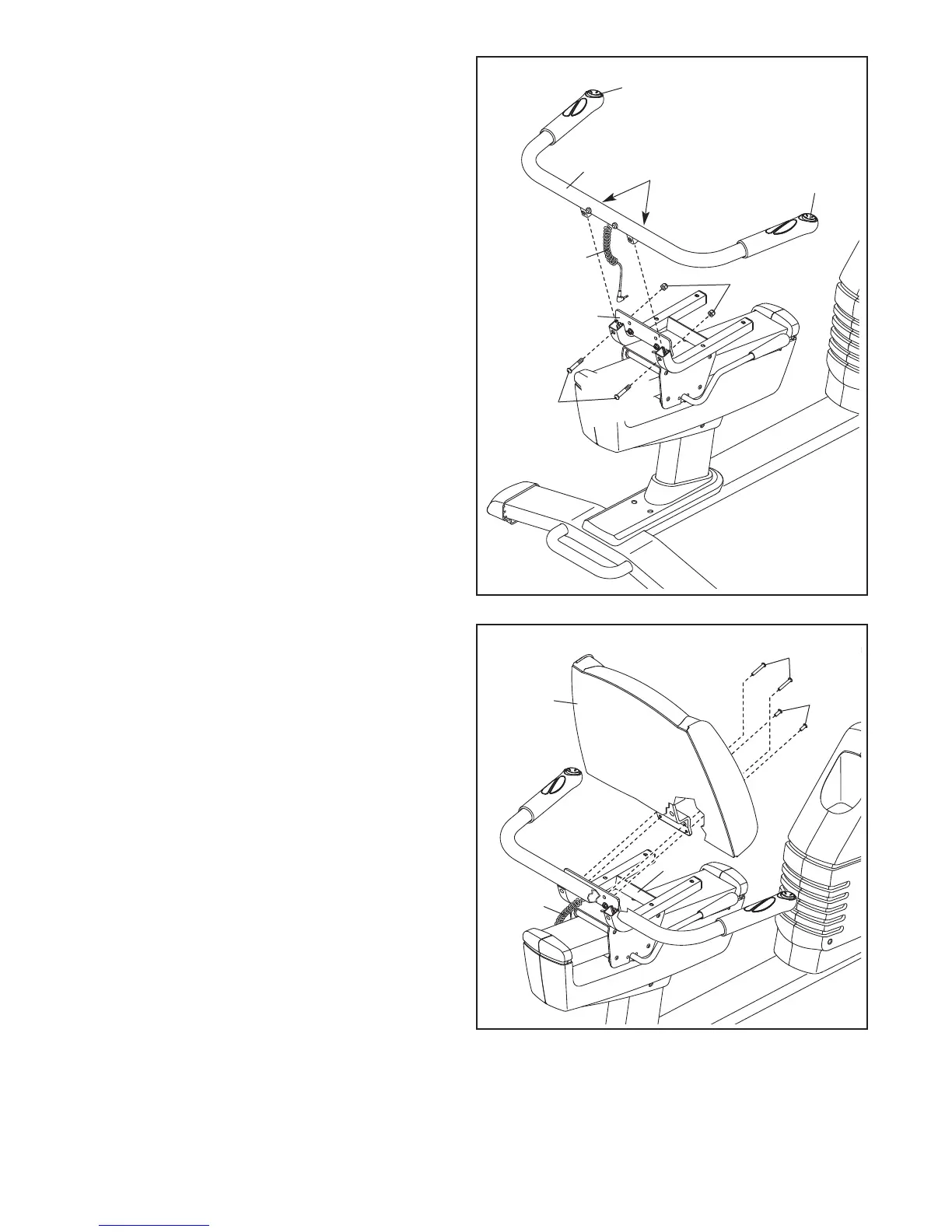
7. Identify and orient the Seat Handlebar (11) so
that the controllers face upward. Make sure
that the hexagonal holes are in the indicated
l
ocations.
T
ip: Do not pinch the Game/Pulse Wire (58).
Attach the Seat Handlebar (11) to the Seat
Carriage (3) with two M10 x 32mm Button Bolts
(78) and two M10 Locknuts (87). Do not fully
tighten the Locknuts yet.
7
11
Controller
Hexagonal
H
oles
Controller
78
58
87
3
Avoid pinching
the Game/Pulse
W
ire (58)
8. Tip: Do not pinch the Game/Pulse Wire (58).
Attach the Backrest (8) to the Seat Carriage (3)
with two M6 x 18mm Patch Screws (77) and
two M6 x 42mm Patch Screws (51).
Tip: First tighten the M6 x 18mm Patch
Screws (77), and then tighten the M6 x
42mm Patch Screws (51).
See step 7. Tighten the M10 Locknuts (87).
8
8
77
51
3
58




 To Next Page