11
10
90
59
5
E
E
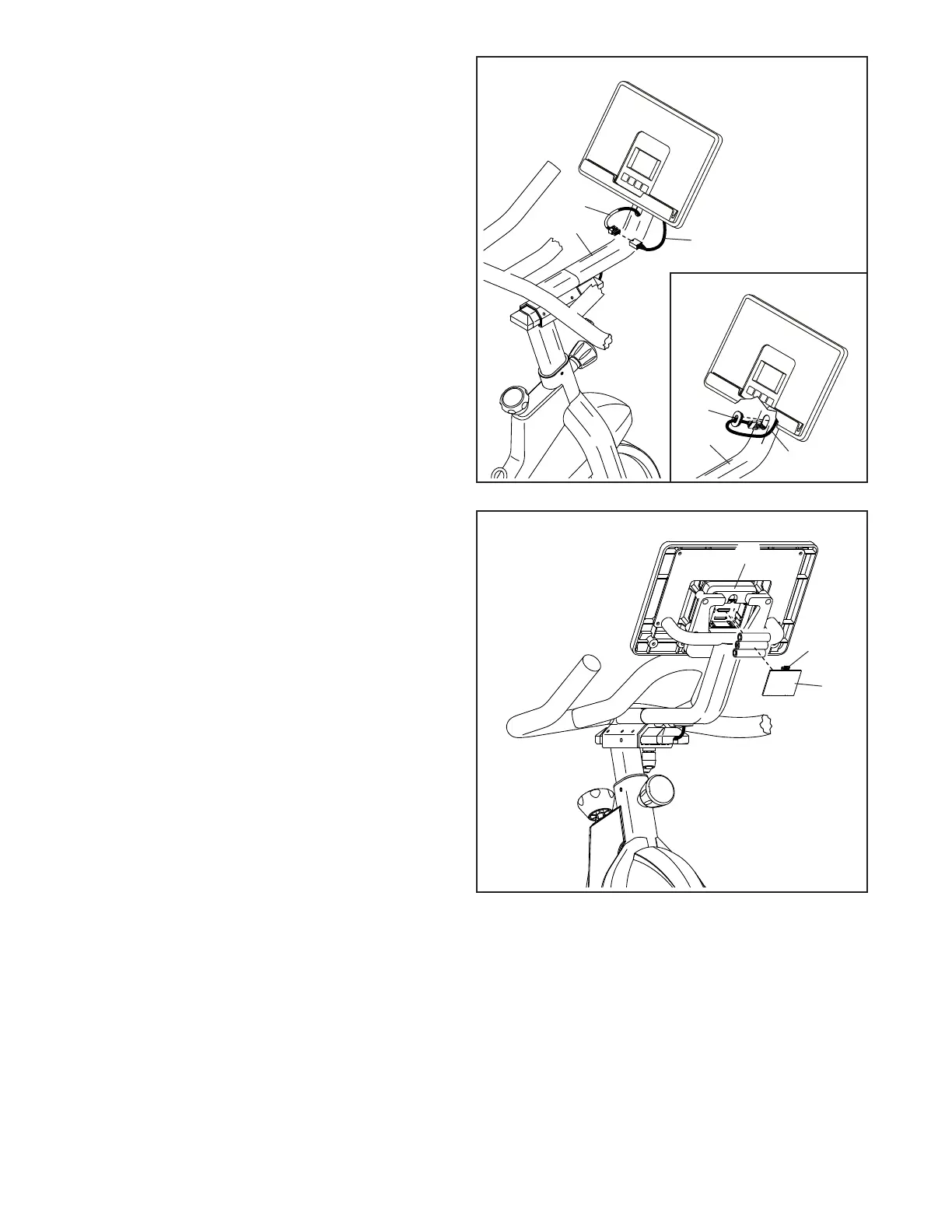
10. Connect the Upper Wire (90) to the console
wire (E).
The wire connectors should slide together
easily and snap into place with an audible
click. If they do not, turn one connector and
try again. You must connect the connectors
properly for the console to function properly.
Then, insert the connectors into the Console
Mount (5).
See the inset drawing. Slide a Grommet
(59) onto the console wire (E), and press the
Grommet into the Console Mount (5).
5
11
H
G
11. The Console (6) requires three AA batteries (not
included); alkaline batteries are recommended.
Do not use old and new batteries together or
alkaline, standard, and rechargeable batter-
ies together. IMPORTANT: If the Console has
been exposed to cold temperatures, allow
it to warm to room temperature before you
insert batteries. Otherwise, you may dam-
age the console displays or other electronic
components.
Press the tab (G) on the battery cover (H), and
remove the battery cover. Next, insert three bat-
teries into the battery compartment; make sure
to orient the batteries as shown by the dia-
gram inside the battery compartment. Then,
reattach the battery cover.
6












 To Next Page