Blood Glucose Monitoring System - User’s Manual
Diagnostic Devices, Inc www.prodigymeter.com 1.800.243.2636
17
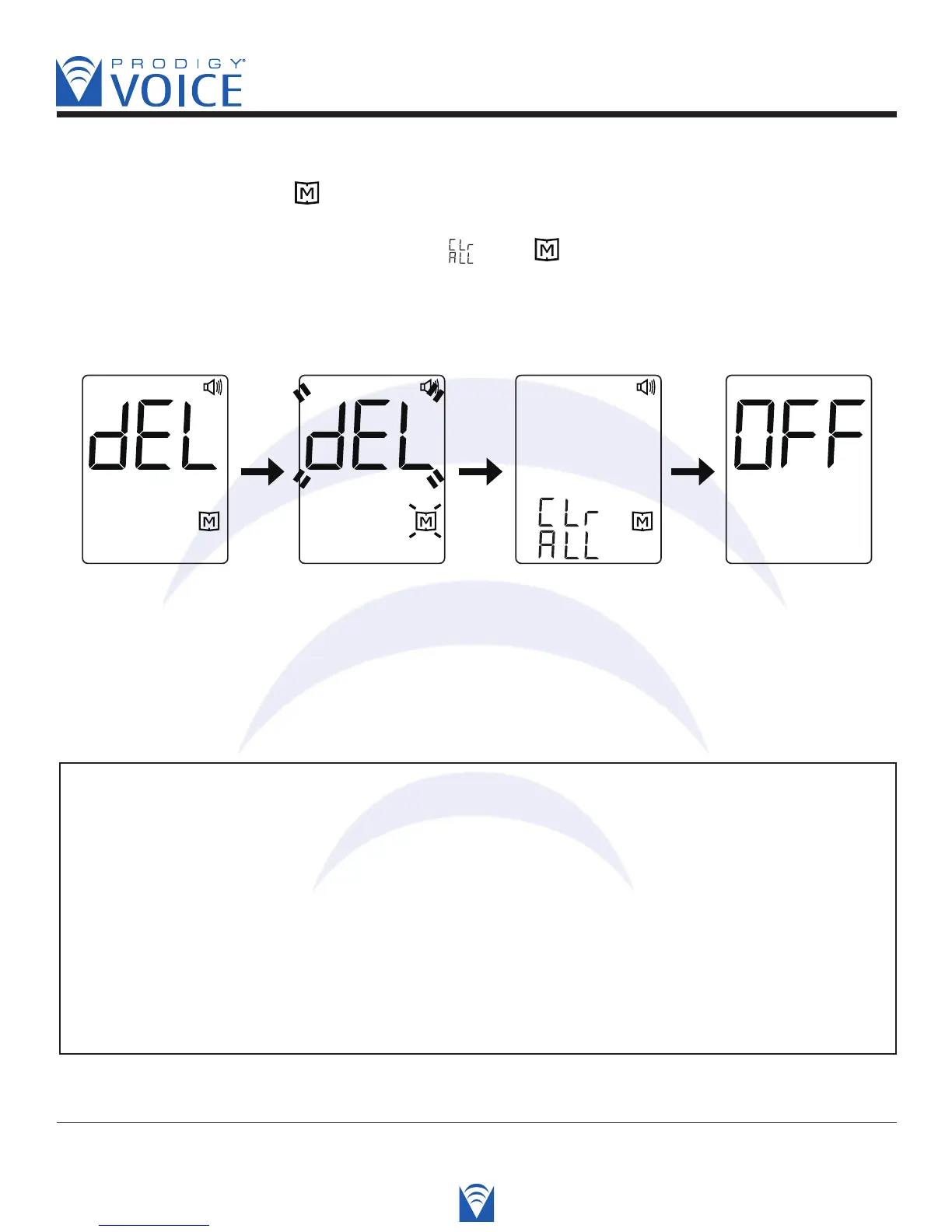
STEP 9 Delete the Memory
When “dEL” and blinking “ ” symbol is displayed, if you do not want to delete memory,
press the S button again to skip this step and turn off the meter. If you would like to delete
ALL memory, press the “Up” button twice. “ ”and “ ” are displayed on the meter, which
means that all data stored are deleted. The memory of this meter is empty now. The meter
will automatically turn off.
Voice SPEAKS: “Delete memory record function. Press “up” button to clear all records.
Are you sure you want to delete ALL records? Press “up” button again to
clear all records.”
PLEASE NOTE
• The time, date, unit of measurement and unit of temperature can ONLY be changed in
the setting mode. Therefore, when you perform a glucose testing, it is not possible to
change those parameters.
• Your meter displays 7, 14, 21, 28, 60 and 90 day averages which you can access
from the meter memory. These averages are calculated from results obtained during
the 7, 14, 21, 28, 60 and 90 days preceding the current date and time settings. When
the date and time are changed, the 7, 14, 21, 28, 60 and 90 day averages may change.
• While the meter is in the setting mode, if no button is pressed for 3 minutes, the meter
will turn off automatically.



 To Next Page