Blood Glucose Monitoring System - User’s Manual
Diagnostic Devices, Inc www.prodigymeter.com 1.800.243.2636
21
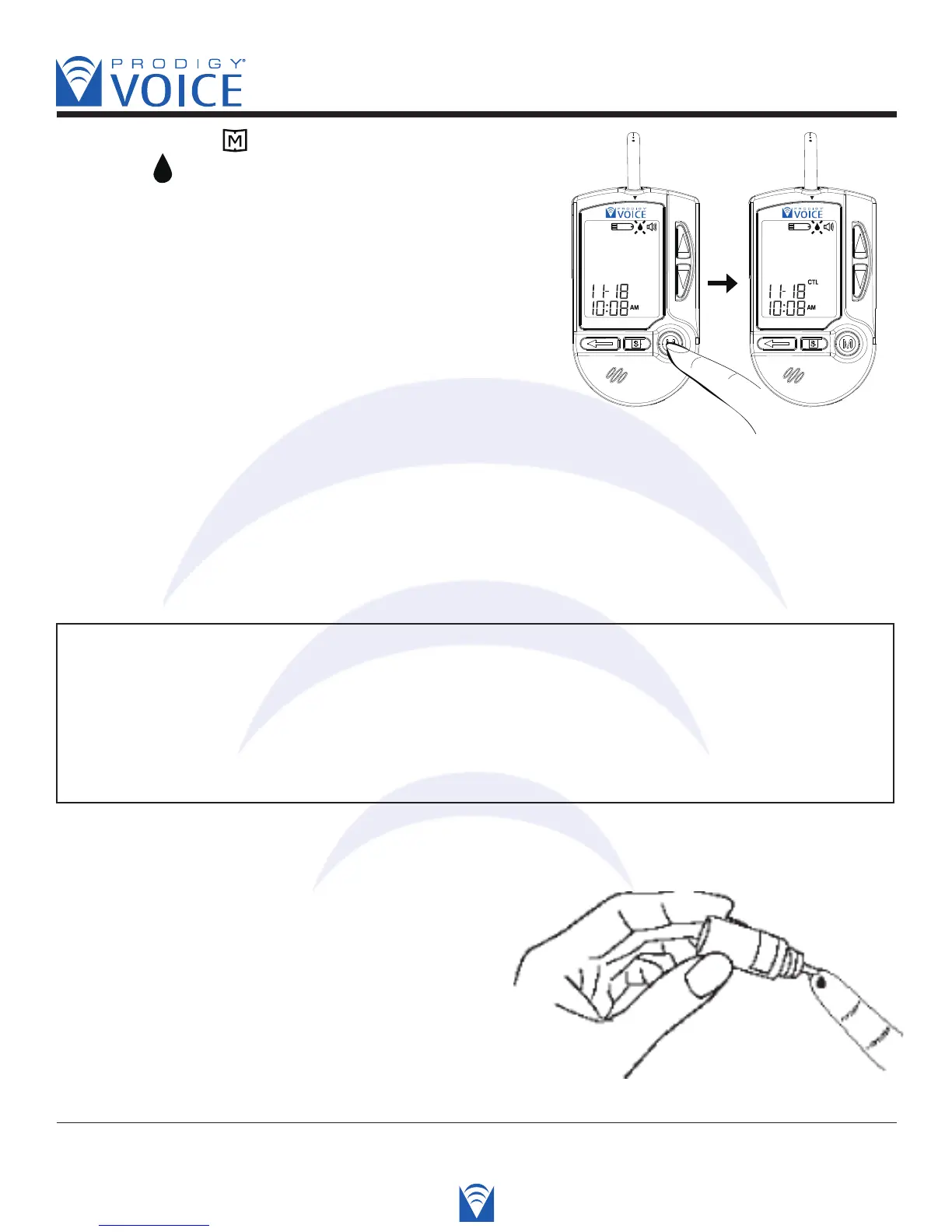
STEP 2 Press the button
While the “ ” symbol appears on the display, press
the “M” button and then “CTL” will appear on the
display. With the “CTL” symbol on the display, the
meter will not store your test result in memory.
Voice SPEAKS: “You are now in
control solution mode.”
If you decide not to perform a control solution test, press
the “M” button again, and the “CTL” symbol will disappear, you are now in the testing mode.
Voice SPEAKS: “You are now in testing mode.”
At this point you may test your blood glucose or turn the meter off by removing the test strip.
WARNING
• Contact bars must be inserted all the way into the meter or you may get an inaccurate
test result.
• Every time you perform a control solution test, you must enter into the “CTL” test mode
so that the test result will not be stored in the meter memory. Failure to do so will confuse
the blood glucose test result with the control solution test result in memory.
STEP 3 Apply Control Solution
Shake the control solution bottle well. Remove the
cap. Squeeze the bottle, discard the first drop and
wipe off the dispenser tip with a clean tissue paper
or cotton swab. Squeeze a drop on a clean non-
absorbent surface or on your finger tip first. Then,
apply the drop to the test strip absorbent channel,



 To Next Page